 By Andrew Armstrong
You find the video you need, turn everything up to full, and it is still too quiet. On top of that, in July 2025 several popular volume boosters for Chrome and Edge, including Volume Max, were caught quietly tracking every site their users visited.
So we built VolumeGeek. It boosts the sound of any tab up to 600%, with a limiter so it does not crackle and a simple equaliser for bass and voices. It’s free, open source and has no tracking at all.
Quick Facts
- Free. No Pro tier, no ads and no limit.
- Open source under the GPL-3.0, with the full source on GitHub.
- Works in Chrome, Edge, Brave, Opera, Vivaldi and Firefox.
- No account and nothing sent anywhere.
What it does
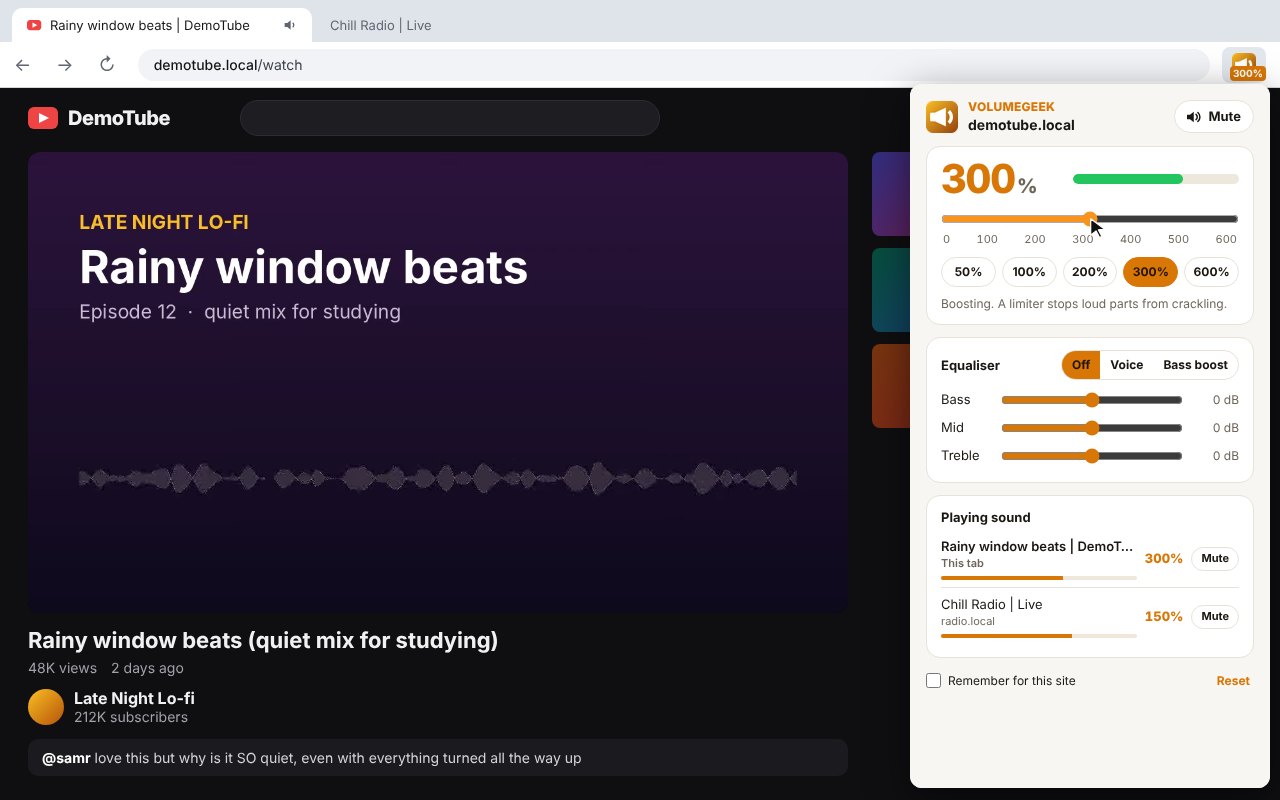
- Boost up to 600%: drag the slider or tap 50, 100, 200, 300 or 600%.
- Limiter: holds back loud parts so boosted sound does not crackle.
- Equaliser: bass, mid and treble, with Voice and Bass boost presets.
- Mute: the tab you are on, or any tab from the Playing sound list.
- Level on the icon: the badge shows 300%, 50% or 0% when muted.
- Remember for this site: your level and equaliser come back next time.
How it works
On Chrome and Edge, VolumeGeek takes the tab’s sound once you click its button, runs it through a volume control, equaliser and limiter, and plays it back, all inside your own browser. On Firefox it does the same for the page’s audio and video players. The sound never leaves your computer.
How to install it
Store listings for Edge and Firefox are on the way. Until then, adding it yourself takes about a minute:
- Download the ZIP and unzip it somewhere you’ll keep it.
- Go to
chrome://extensions(oredge://extensions) and switch on Developer mode. - Click Load unpacked and pick the
volumegeekfolder.
On Firefox, grab the Firefox version instead and load it from about:debugging. The VolumeGeek page walks through every step with screenshots.
Download it
Found a bug or want a feature? Open an issue on GitHub. VolumeGeek joins TextGeek, ColorGeek, TabGeek, Markdown Saver, RefreshGeek, FocusGeek, Bluesky Saver, ErrorGeek, Image Format Saver, Reddit Saver, Page Saver, Board Saver for Pinterest, Grid Saver for Instagram and Clip Saver for TikTok in our browser extensions.
Discover more from TechyGeeksHome
Subscribe to get the latest posts sent to your email.
