£17 one-time purchase, instant download
GPO Health & Cleanup Report: find every Group Policy problem before it breaks something silently
A PowerShell tool that scans your domain’s Group Policy Objects and turns orphaned GPOs, broken WMI filters, permission gaps and inheritance conflicts into one interactive report, scored 0 to 100.
Runs against any domain controller through the GroupPolicy module. Read-only, nothing is linked, changed or deleted.
Video Demo
A 15-second walkthrough of the real report: the score card, filtering to Critical, searching by check code, and expanding the MS16-072 finding.
Sixteen checks, built around the one MS16-072 misses
Lifecycle, consistency, targeting and hygiene, weighted into one number, so a handful of stale GPOs never reads the same as a domain with active security gaps.
The MS16-072 permission trap
Checks for the specific permission gap that makes user policy silently stop applying after MS16-072, a change GPMC doesn’t warn about and most free scripts don’t check.
Orphaned and empty GPOs
Finds GPOs linked nowhere and GPOs with no configured settings, both quietly consuming SYSVOL and slowing every gpupdate that enumerates them.
Disabled but still linked
Catches a GPO that reads as active on its OU but has every setting disabled, or is linked and disabled at the same time.
Missing SYSVOL folders
Tests for the policy folder directly rather than misreading a missing folder as a replication version mismatch and sending you to check DFSR for a problem that isn’t there.
Broken WMI filter references
Reads the actual filter reference off each GPO and checks it against the WMI filters that still exist, catching a filter that was deleted out from under a live policy.
Version drift and stale GPOs
Flags a SYSVOL and AD version mismatch, and any GPO linked and active but untouched well beyond your chosen threshold.
Enforced and blocked inheritance
Covers domain, OU and site links uniformly, including an enforced link at the domain root, the single most common place one lives and the easiest for a tool to miss.
Duplicate names and heavily linked OUs
Flags GPOs sharing a display name and an OU with so many direct links that precedence becomes hard to reason about.
Self-contained, white label report
One HTML file, your own branding, no install, no internet connection needed to open it. Email it, print it, hand it over.
See it in action
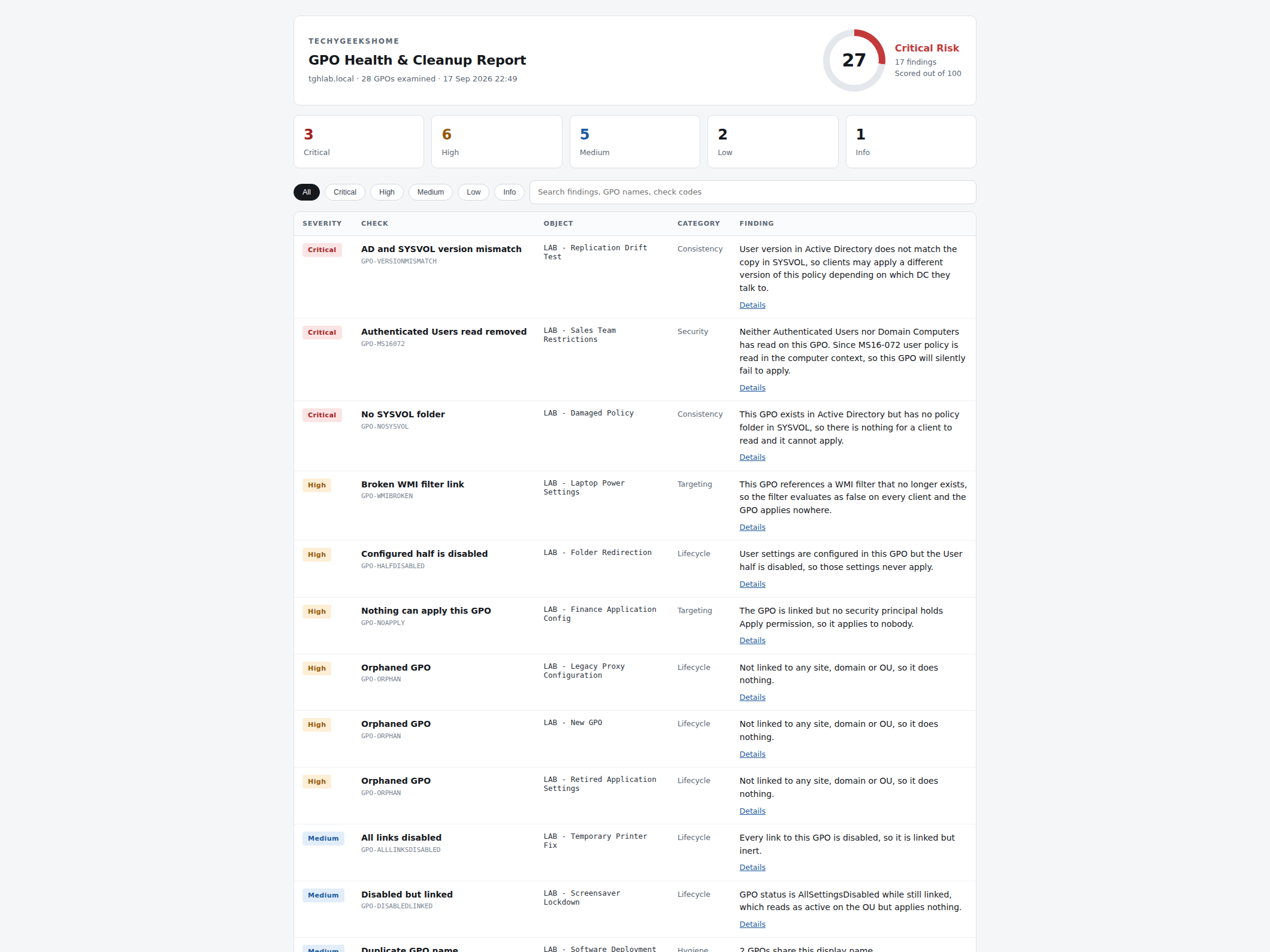
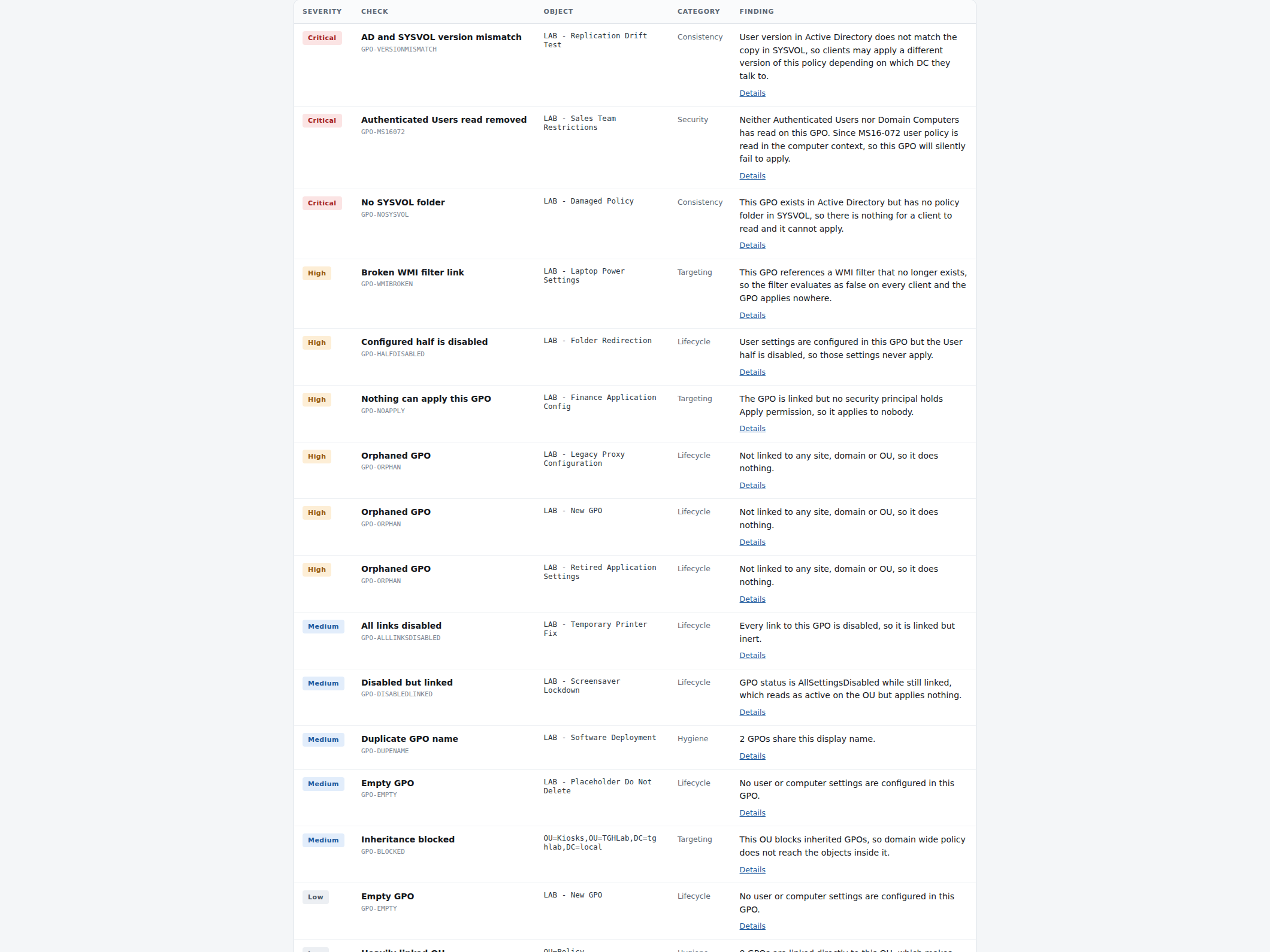
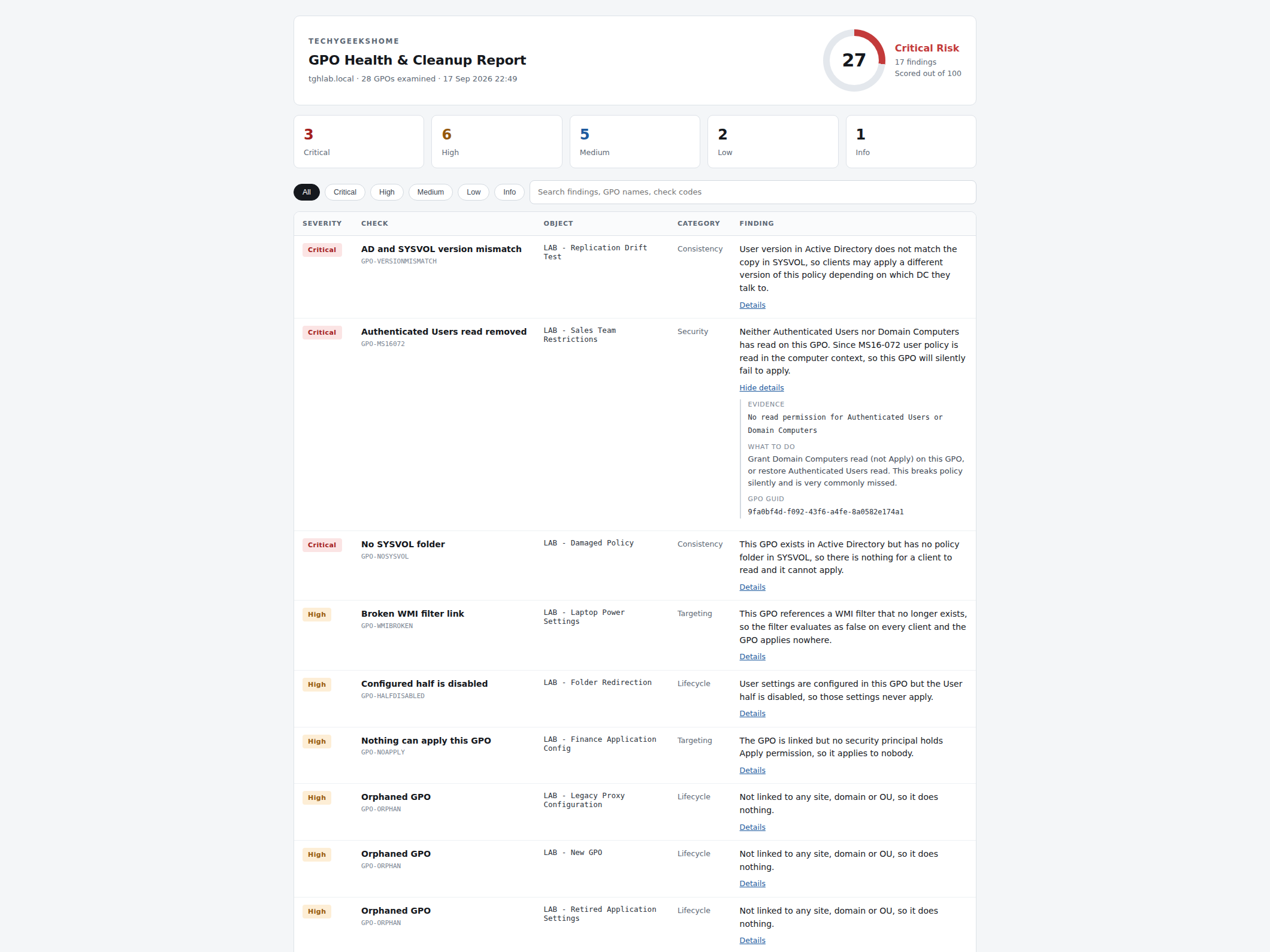
Real report output from a lab domain, showing the score card, the findings table and a finding expanded to its evidence.
Who it’s for
One report, three different people who need it.
MSPs and consultants
Run it against every client domain and hand over a report they can actually read, no GPMC walkthrough required.
Internal IT and sysadmins
A health check on your own Group Policy before an audit, a migration, or just because nobody has looked in years.
Anyone who inherited someone else’s domain
GPOs accumulate for a decade and nobody wants to touch them. This tells you which ones are actually safe to clean up.
Requirements
Operating system
A Windows machine with the GroupPolicy and ActiveDirectory PowerShell modules (RSAT). Doesn’t need to run on a domain controller.
Rights
Domain read access is enough for most checks. The scan never writes anything to AD or SYSVOL.
Download
Delivered instantly after checkout, from your account on this site.
Prerequisites
PowerShell 5.1 or later. RSAT’s Group Policy Management tools installed on the machine running the scan.
Version
1.0, released September 2026.
Licence
For the purchasing individual or organisation, including running it for your own clients. Not for resale or redistribution. Full terms in the included LICENSE.txt.
Frequently Asked Questions
What is the MS16-072 check, and why does it matter?
After Microsoft’s MS16-072 update, user Group Policy is retrieved using the computer’s security context rather than the user’s. If Authenticated Users read is removed from a GPO without granting Domain Computers read in its place, that policy silently stops applying to users. GPMC doesn’t warn about it, and most free scripts don’t check for it. This tool does.
Will it change anything in my Group Policy setup?
No. It is entirely read-only. It never links, unlinks, creates, changes or deletes a GPO, a link, a permission or a setting. It reads and writes a report, and nothing else.
Does it need to run on a domain controller?
No. Run it from any domain-joined machine with the GroupPolicy and ActiveDirectory RSAT modules installed.
Can I use it for more than one client, as an MSP?
Yes. The licence covers running it for your own organisation and for your own clients, as part of the work you do for them. It is not for resale or redistribution as a standalone download.
Do I need to install anything to view the report?
No. The report is a single self-contained HTML file. Open it in any browser, no internet connection or server needed.
Can I set my own branding and thresholds on the report?
Yes. Branding, the stale-GPO threshold and the heavily-linked-OU warning level are all set with command-line parameters, covered in the instructions included with the download.
Is there a subscription?
No. It is a one-time purchase of £17. You keep the tool and can run it as often as you like.
Version History
- 1.0: September 2026. Initial release.
Find out what’s actually happening in your Group Policy
Delivered as an instant download after checkout. Full instructions included.
Our other pro tools
One-time purchase, read-only, real lab tested. The same standard across the whole range.
Questions before you buy?
Ask first
Not sure it covers what you need? Get in touch before you buy and we’ll tell you straight.
Instructions included
Full setup and command-line reference is included in the download, no separate documentation to hunt for.