100% Free · Version 1.1.2
DriverGeek: every driver you have, and the updates Windows hides
Lists every device on the machine and the driver behind it, then shows you what Windows Update actually holds for it, including the optional driver updates Windows files three clicks deep and never offers you. It can install the ones you tick, one device at a time, behind a System Restore point and a copy of the driver you are running now.
Windows 10 or 11, 64-bit · self-contained installer · nothing else to install
Video Demo
Twenty-five seconds: the driver inventory, the optional updates Windows keeps out of sight, and the Settings screen that says in plain words what the install path will not do.
What DriverGeek actually tells you
A driver inventory that does not invent problems, and the one list Windows will not show you.
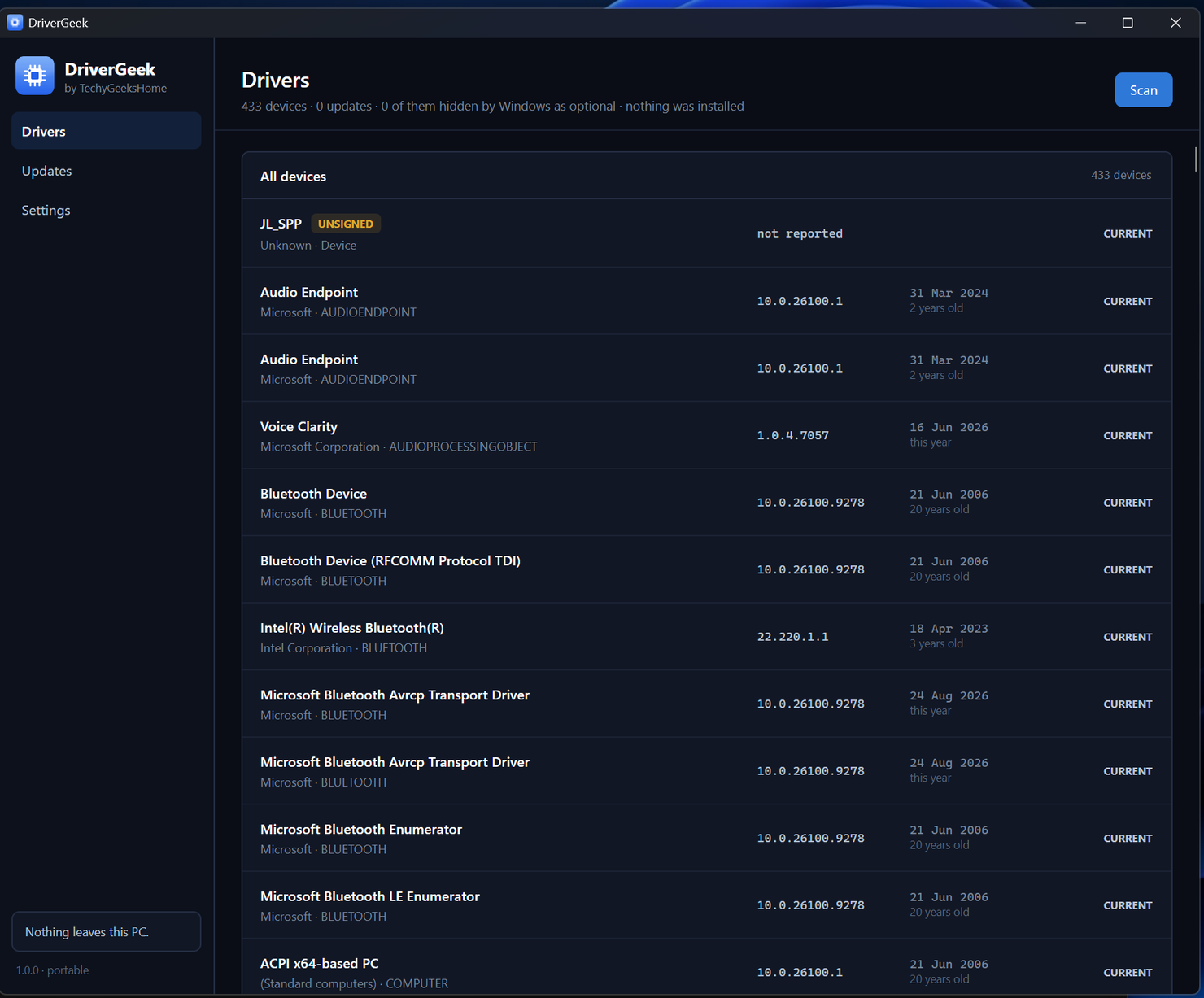
Every device, every driver
Version, date, provider, and whether it is signed, for everything Windows knows about, in one sortable list.
The optional updates, surfaced
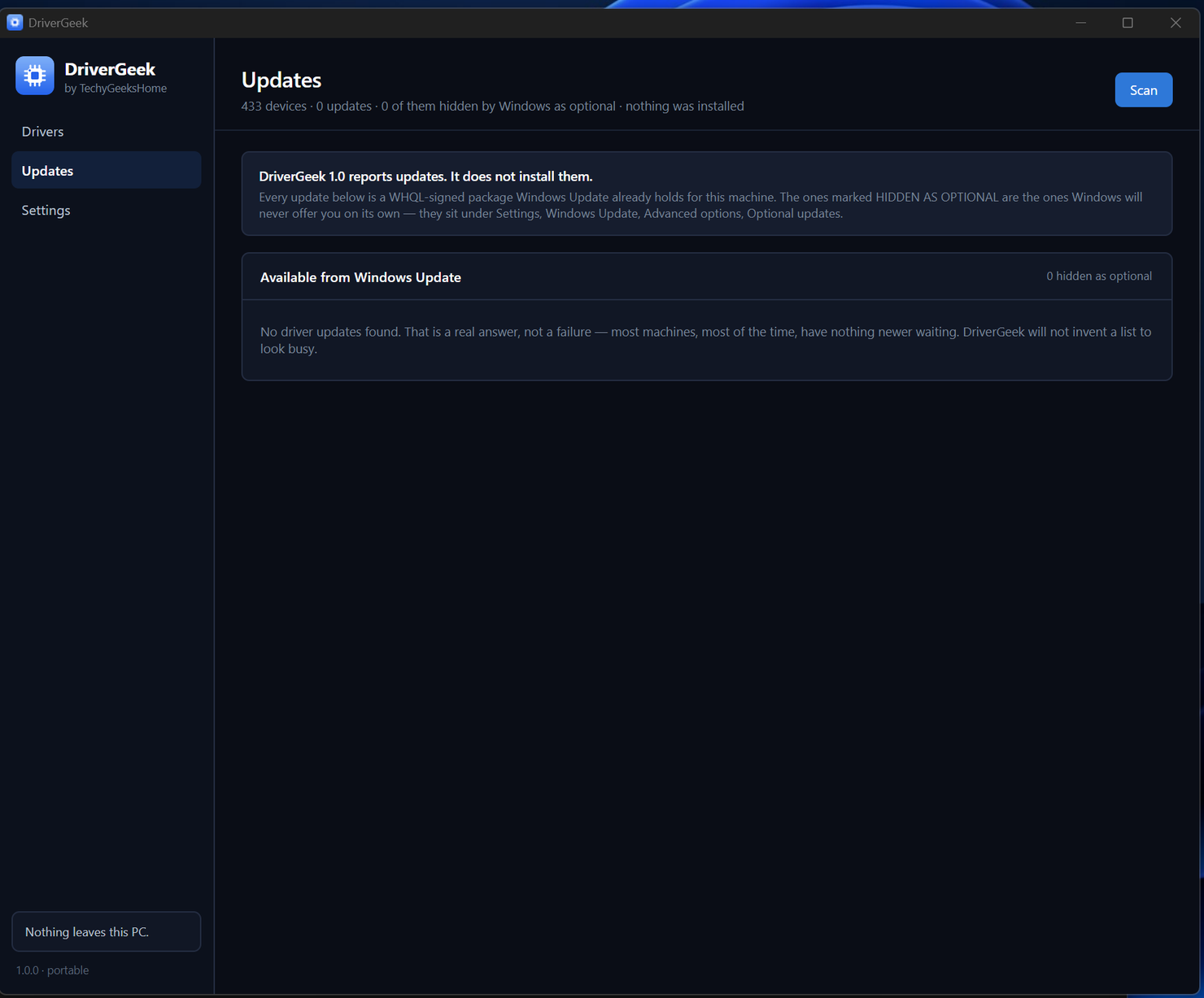
Windows Update files most of the genuinely useful driver updates under Advanced options → Optional updates, where almost nobody looks. DriverGeek puts them on one screen and marks them.
Straight from Windows Update
Every update shown is a WHQL-signed package Microsoft already holds for your machine. No driver packs, no scraped vendor downloads, nothing to vouch for that we did not build.
An honest empty result
Most machines, most of the time, have nothing newer waiting. DriverGeek says so plainly rather than padding a list to look busy.
Old is not the same as out of date
A 2019 driver for 2019 hardware that works is not a problem. DriverGeek separates “there is a newer one from Windows Update” from “this one is old”, because only the first is actionable.
Boot-critical devices flagged
Storage controllers, disk and volume drivers are identified and marked. They are the ones worth leaving alone, and they have no tick box at all – DriverGeek will not replace them.
Signed and unsigned, at a glance
Unsigned drivers are counted and shown rather than buried three columns deep.
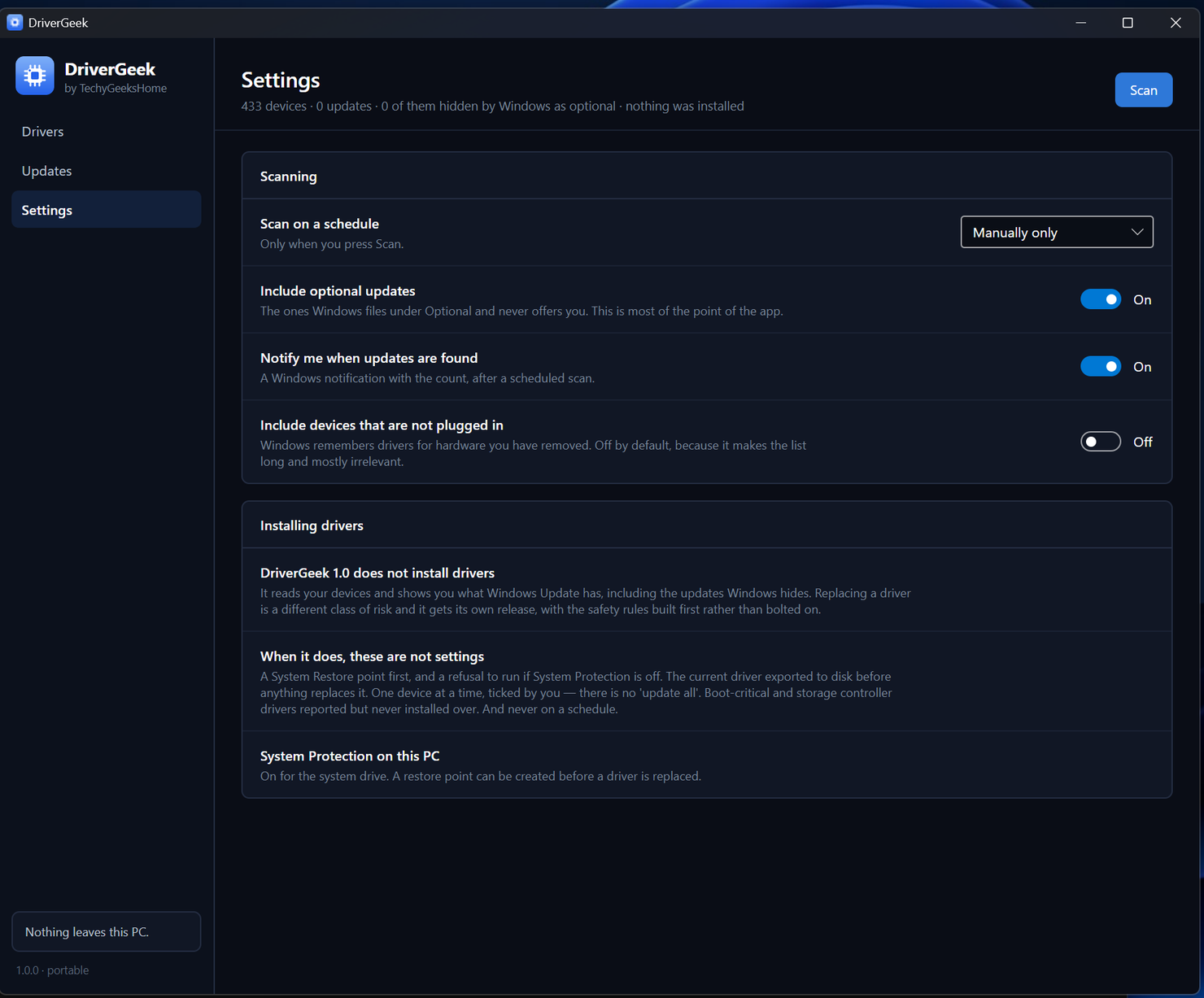
Scan on a schedule
A scheduled scan measures and writes a line to the log. It has no way to install anything, and there is no command line that can.
See it in action
Three screens, no mock-ups. These are DriverGeek running on a real machine.
Who it’s for
Built by an IT pro who needed it, not a commercial suite trying to upsell you.
Anyone whose hardware feels off
Sound that crackles, Wi-Fi that drops, a webcam that stopped behaving. Often Windows already has the fix, filed under Optional where nobody goes looking.
People with new hardware
A fresh build or a new graphics card. See exactly what Windows has for it before you start hunting round vendor support pages.
IT pros and technicians
Free at work, with no per-seat licence. A quick, honest driver inventory on a machine you have never seen before.
Requirements
Operating system
Windows 10 or later, or Windows 11. 64-bit.
Rights
Standard user to scan – DriverGeek does not ask for administrator rights on startup. Installing a driver does need them, and it says so at the point you tick one.
Download
A single self-contained installer. The exact size is listed on the releases page.
Prerequisites
None. The .NET 8 runtime is bundled inside the installer.
Version
1.1.2.
Licence
GPL-3.0. Free for everyone, including commercial use.
Frequently Asked Questions
Is it really free? No Pro version, no catch?
Yes. DriverGeek is GPL-3.0 open source with no paid tier, no ads, no bundled offers and no account. Free for everyone, including commercial use.
Does DriverGeek install drivers?
Since 1.1.0, yes, but only the ones you tick, one device at a time, and never on its own. Replacing a driver is a different class of risk to reading one, so the guards were built first rather than bolted on. Before anything is replaced DriverGeek requires a System Restore point to exist, writes a copy of the driver you are currently running to disk, and refuses boot-critical and storage controller devices outright. Those have no tick box at all. If any of that fails, the install is refused and DriverGeek tells you which condition was not met, before anything on the machine has been touched. There is no automatic mode, no scheduled install and no command line that can trigger one.
Where do the drivers come from?
Windows Update, and nowhere else. No driver packs and no scraped vendor downloads. If Windows Update does not hold a newer driver for a device, DriverGeek says so and stops there.
Does DriverGeek collect data or phone home?
No. It talks to Windows Update, which is already on your machine, and to nothing else. No telemetry, no analytics, no account, and no update check that phones home without being asked.
Why does Windows show a warning when I install it?
The builds are not code-signed, and Windows shows a SmartScreen warning for any unsigned installer it has not seen before. The full source is on GitHub, and every release publishes a SHA-256 hash you can check the download against.
Version History
- 1.1.2. The installer now asks which language to use (English or Italian, the Italian by bovirus) and shows the GPL-3.0 licence, and reports the version as 1.1.2 rather than 1.1.2.0. The About window’s family list now covers all twelve TechyGeeksHome apps.
- 1.1.1. The About window moved onto the same colours as the rest of the app.
- v1.1.0. Installing arrives. Tick a device on the Updates screen and DriverGeek takes a System Restore point, writes a copy of the driver you are running now to disk, then lets Windows Update do the install – refusing outright if any of that fails, or if the device is boot-critical. The Scan button now shows a progress bar and a running status line instead of appearing to hang.
- v1.0.2. Fixes 1.0.1 not opening at all. The window wired the new buttons before the XAML had assigned them, so it threw before anything appeared.
- v1.0.1. About window and a Check for updates button, both in the sidebar. The update check runs only when you press it.
- v1.0.0. Initial public release. Driver inventory, and the Windows Update optional-driver surfacer.
Download DriverGeek today
Free, open source, and it cannot change a thing on your machine.
Windows 10 or 11, 64-bit · self-contained installer · nothing else to install
Windows may show a “Windows protected your PC” warning the first time you install it. That means SmartScreen has not seen the file before, not that anything is wrong with it. Here is why our builds are unsigned, and how to verify your download against its SHA-256 hash: we will never ask you to switch SmartScreen off.
Support
DriverGeek is free and always will be, at home and at work.