100% Free and Open Source · Version 1.0.0
ColorGeek: pick any colour on your screen
Click the icon, pick a colour, and it is copied as HEX, RGB or HSL, ready to paste. It checks contrast too, keeps your last 24 colours and exports a palette. A free colour picker that sends nothing anywhere.
Chrome, Edge, Brave, Opera, Vivaldi and Firefox · no account · nothing to pay · how to install it
0 downloads so far
Video Demo
From a paint shop page to a copied colour code, a contrast check and an exported palette.
Pick it, copy it, done
ColorGeek does one job well: it gets the colour you want onto your clipboard.
Pick from anywhere
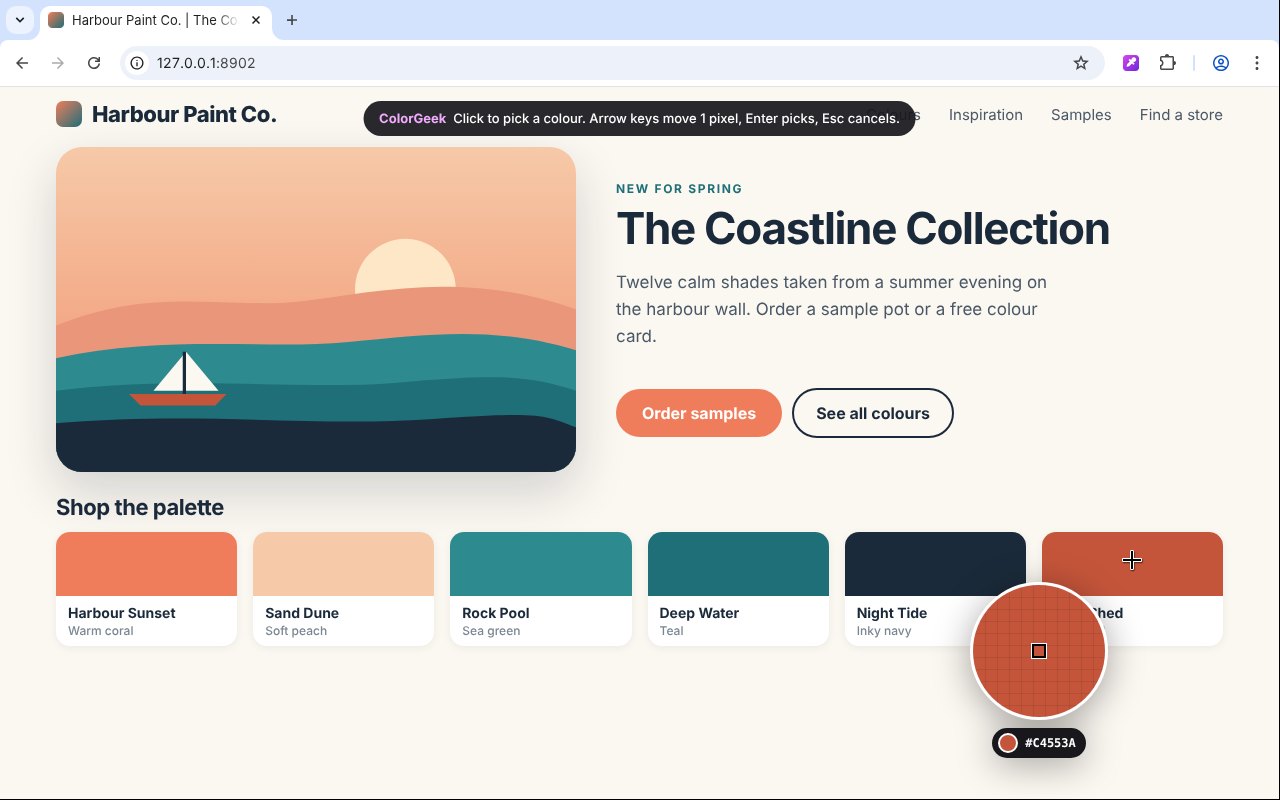
In Chrome, Edge, Brave, Opera and Vivaldi the eyedropper picks from anywhere on your screen, not just the page.
Copied straight away
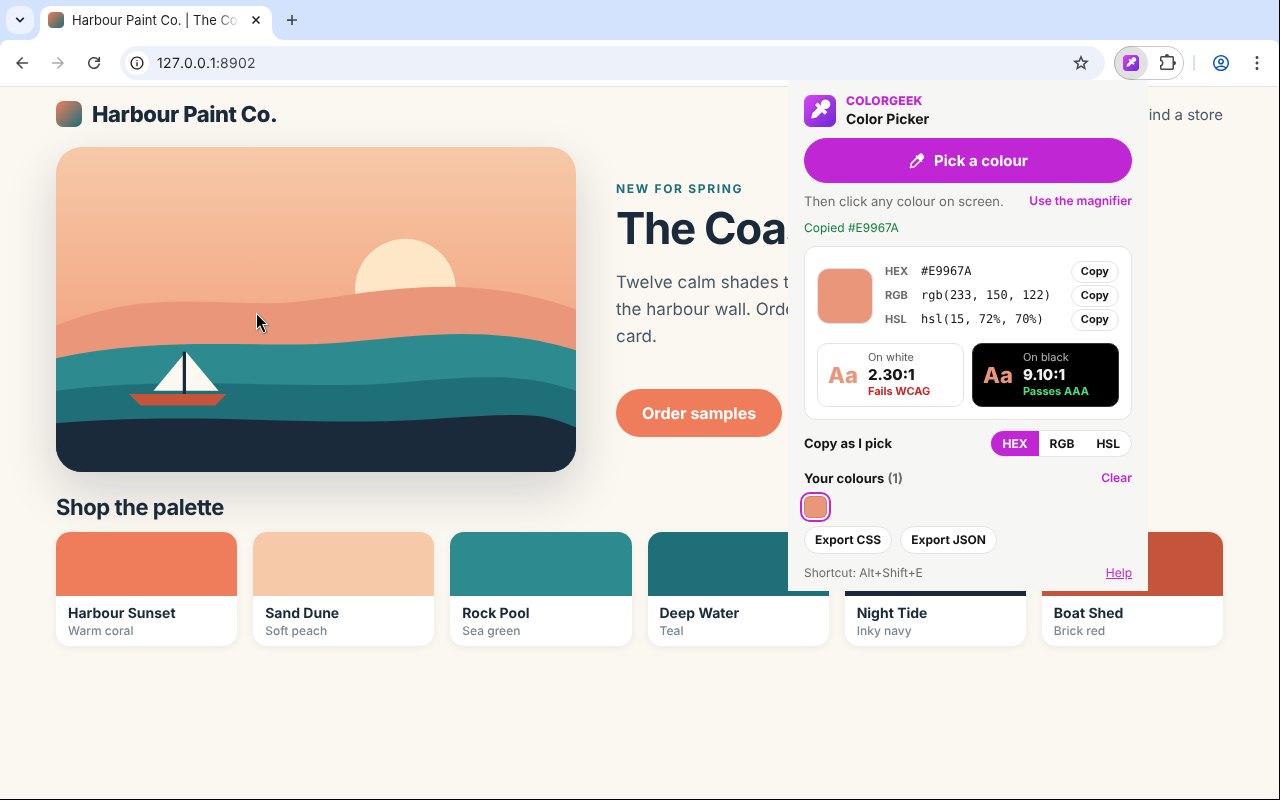
The colour goes onto your clipboard as HEX, RGB or HSL, whichever you choose as your default.
All three formats
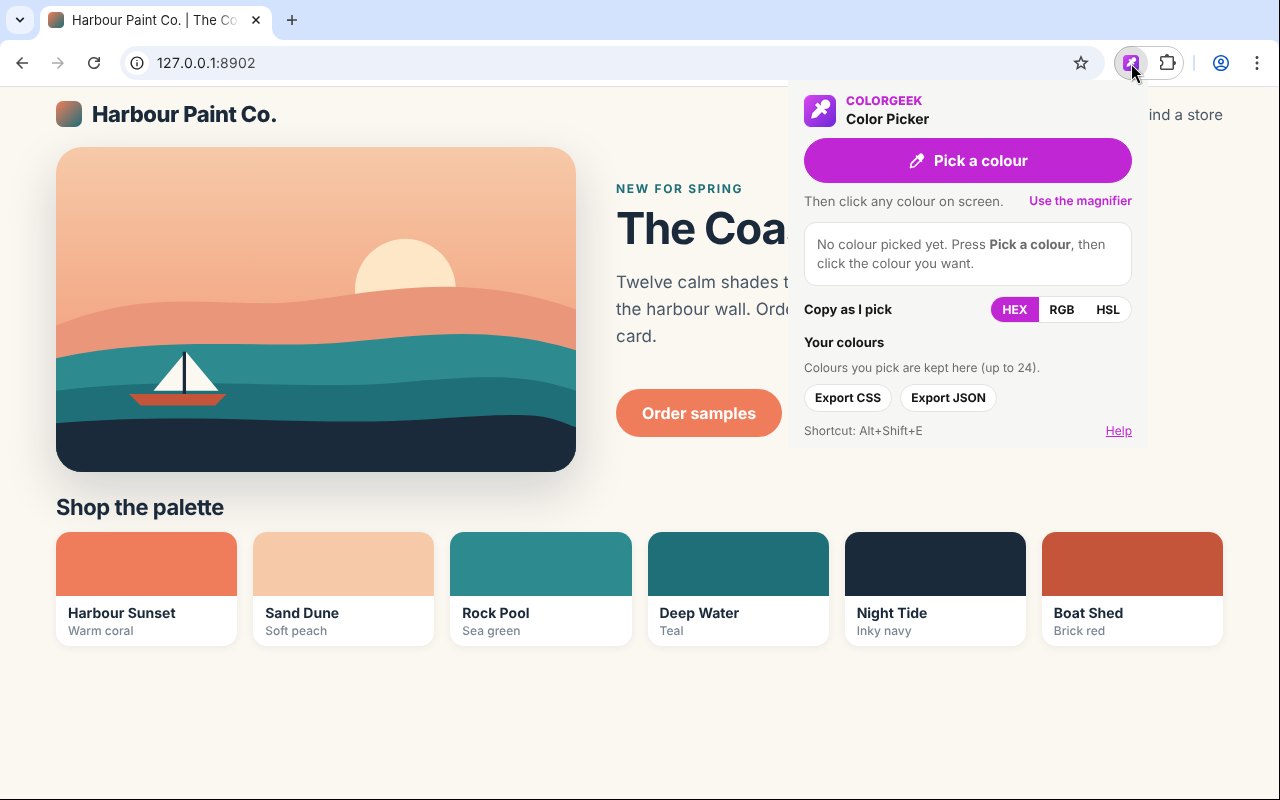
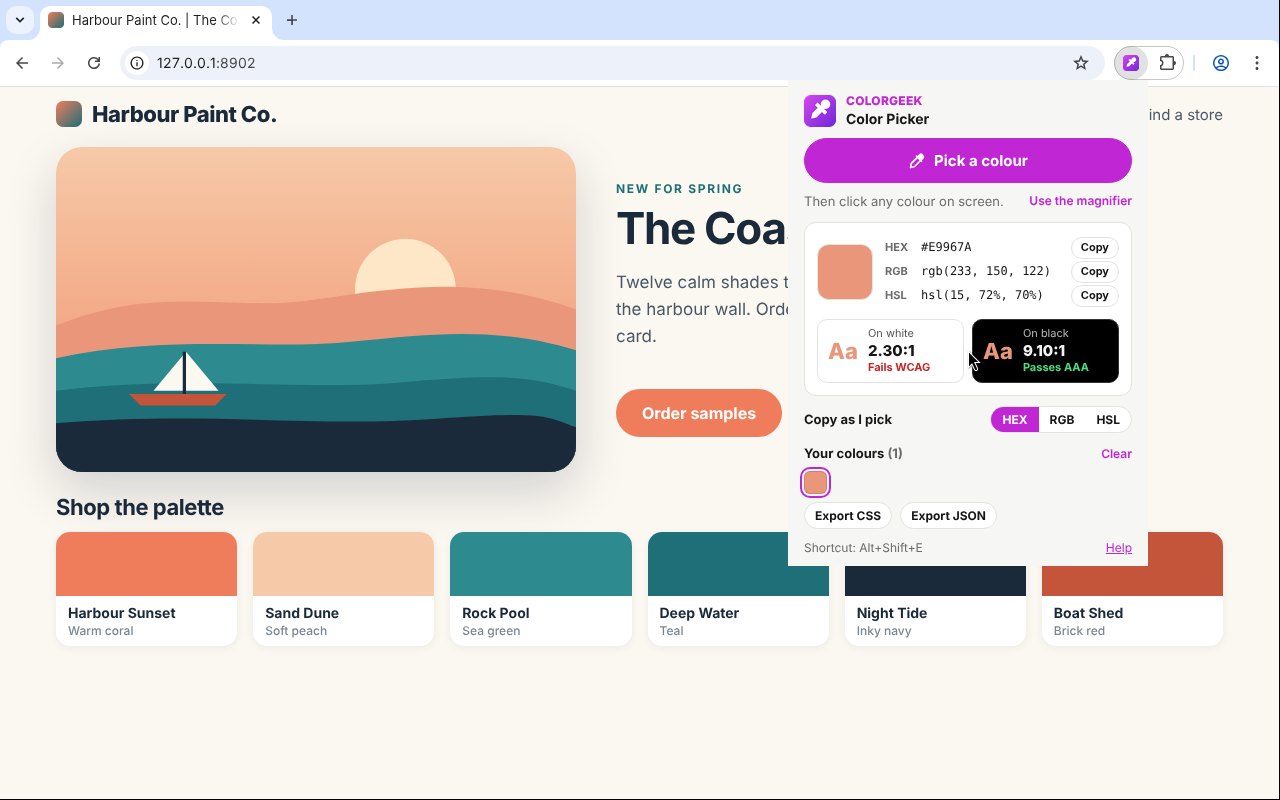
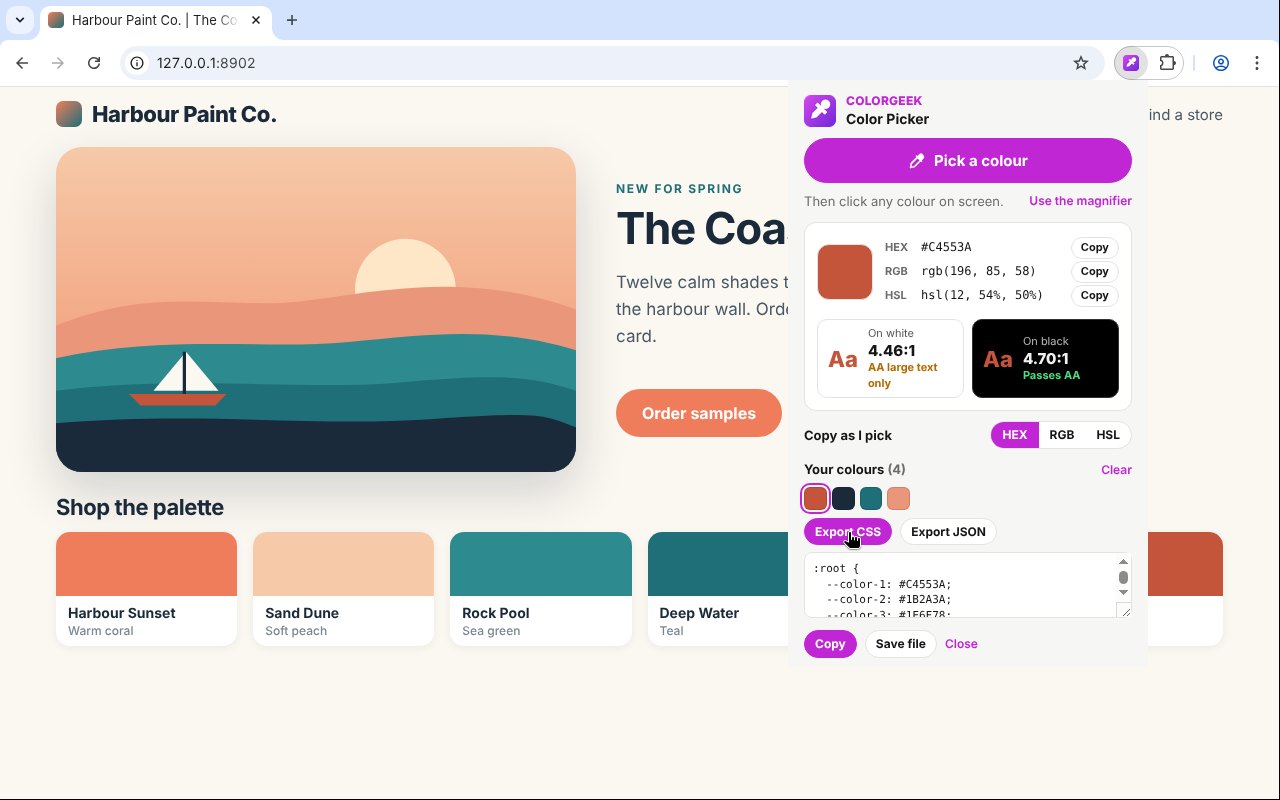
The popup shows HEX, RGB and HSL together, each with a one-click Copy button.
Magnifier
Alt+Shift+E, or right-click and Pick a colour, opens a zoomed lens over the page. Arrow keys move one pixel.
Contrast check
See the contrast ratio against white and black, with AAA, AA or Fails, so you know if text in that colour reads well.
Your last 24 colours
Every pick is saved, newest first, with no duplicates. Click one to copy it again.
Export a palette
Export your colours as CSS variables or JSON, then copy it or save it as a file.
No network access
No host permissions and no libraries. ColorGeek cannot send your browsing anywhere.
Works in Firefox
Firefox uses the magnifier on the page, with the same formats, contrast check and history.
How to install it
About a minute, and you only do it once. Store listings for Edge and Firefox are on the way.
Download and unzip
Download the ZIP and unzip it somewhere you will keep it, such as Documents. The browser runs the extension from that folder, so leave it there.
Open your extensions page
Type chrome://extensions in the address bar. In Edge use edge://extensions, in Brave brave://extensions.
Switch on Developer mode
The switch is top right in Chrome and Brave, and bottom left in Edge. It just lets you add an extension from a folder.
Load unpacked
Click Load unpacked and pick the colorgeek folder. Then pin the ColorGeek icon from the puzzle piece menu.
On Firefox, download the Firefox version, open about:debugging, choose This Firefox, then Load Temporary Add-on and pick the ZIP. Firefox removes temporary add-ons when it closes, so the Firefox Add-ons listing will be the easier option once it is approved.
See it in action
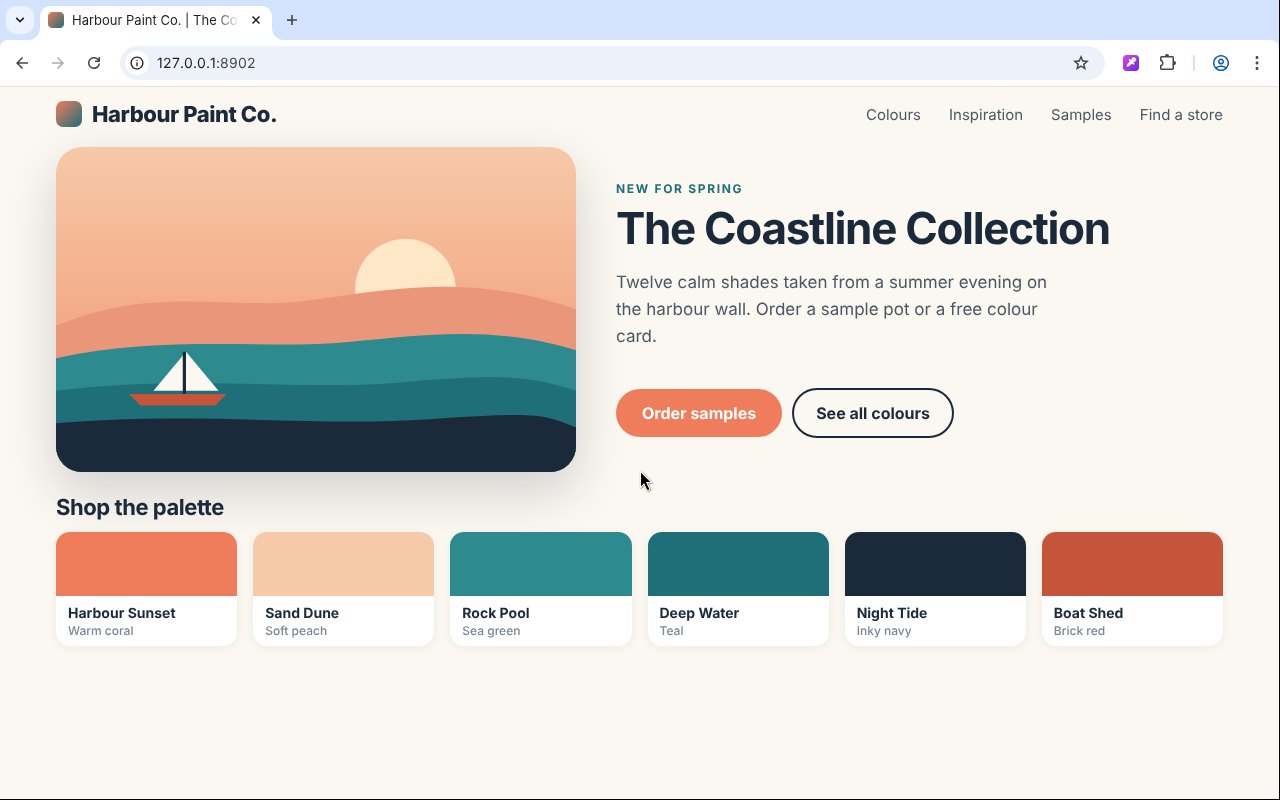
Every step, exactly as it looks in your browser.
Who it is for
Anyone who needs the exact colour from a web page, a photo or an app on screen.
Designers
Grab brand colours from a site, check contrast and keep a palette as you go.
Web developers
Copy the exact HEX into your CSS, or export the lot as CSS variables.
Everyone else
Match a colour for a slide, a document or a paint chart without guessing.
Requirements
Browser
Chrome, Microsoft Edge, Brave, Opera or Vivaldi on Windows, macOS or Linux, or Firefox 142 or newer.
Account
None.
Permissions
It reads the tab only when you click its icon, press its shortcut or use its right-click item. No access to any site in the background.
Download
About 40 KB. No installer.
Version
1.0.0, released 20 October 2026.
Licence
GPL-3.0. Free for everyone, including commercial use.
Frequently Asked Questions
Is ColorGeek really free?
Yes. There is no Pro version, no ads and no limit on how many colours you pick. It is open source under the GPL-3.0, so you can read every line of it on GitHub.
Does ColorGeek collect any of my data?
No. It has no host permissions and no network access, so it cannot send anything anywhere. Your recent colours stay on your own computer.
Can it pick colours outside the browser?
In Chrome, Edge, Brave, Opera and Vivaldi, yes: Pick a colour opens the browser’s eyedropper, which works anywhere on screen. In Firefox it picks from the current page with the magnifier.
Which colour formats does it copy?
HEX, RGB or HSL. Choose your default and it copies that straight away. The other two are one click away in the popup.
What does the contrast check mean?
It shows the contrast ratio of the colour against white and against black, with the WCAG grade: AAA, AA, AA for large text only, or Fails.
How do I pick the exact pixel?
Press Alt+Shift+E, or right-click and choose Pick a colour, to open the magnifier. Arrow keys move one pixel at a time, Shift moves ten, and Enter picks.
Does it work on Firefox?
Yes. Download the Firefox version from this page. A Firefox Add-ons listing is in review and will make installing it permanent.
Why does it not work on some pages?
Browser pages such as settings, the new tab page and the extension stores cannot be read by any extension. ColorGeek shows a clear message on those.
Version History
- v1.0.0: 20 October 2026. Initial public release.
Download ColorGeek today
Completely free. Version 1.0.0, no strings attached, and open source under the GPL-3.0 licence.
0 downloads so far