100% Free · Version 1.1.2
TranscribeGeek: turn recordings into text on your own machine
Drop in audio or video and get a transcript out, plus a subtitle file if you want one. OpenAI’s Whisper models run locally on your own processor. No account, no server, no upload, and no cap on how much you transcribe.
Windows 10 or 11, 64-bit · self-contained installer · nothing else to install
Video Demo
Twenty seconds: the queue, the models and the Settings screen that states what TranscribeGeek will not do. No sound – it is a walkthrough, not a sales pitch.
Everything you need to get words out of a recording
TranscribeGeek is a proper Windows application built around whisper.cpp. The queue, the models and the output are all handled for you, and nothing ever leaves the machine.
Audio and video, either way
WAV, MP3, M4A, FLAC, OGG, Opus, WMA, AAC, MP4, MKV, MOV, AVI and WebM. Video files have the audio pulled out for you automatically.
Transcript and subtitles
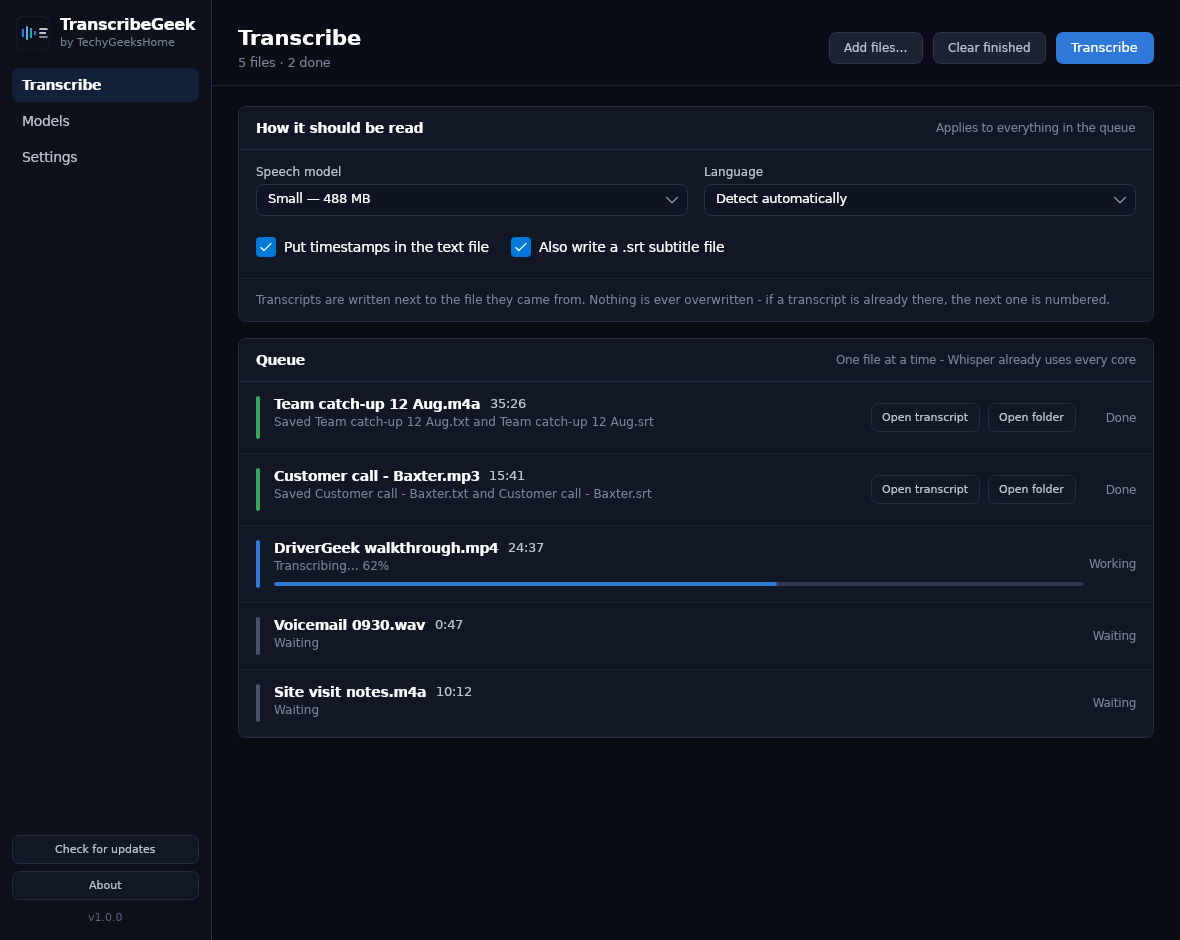
A plain text transcript beside the source file, with or without timestamps, and a SubRip .srt subtitle file alongside it if you tick the box.
A real queue
Drop in twenty files and walk away. They are worked through one at a time on purpose. Whisper already uses every core, so two at once makes both slower.
22 languages, or automatic
Pick the language if you know it, or let Whisper detect it. Telling it is always more accurate than letting it guess.
Four model sizes
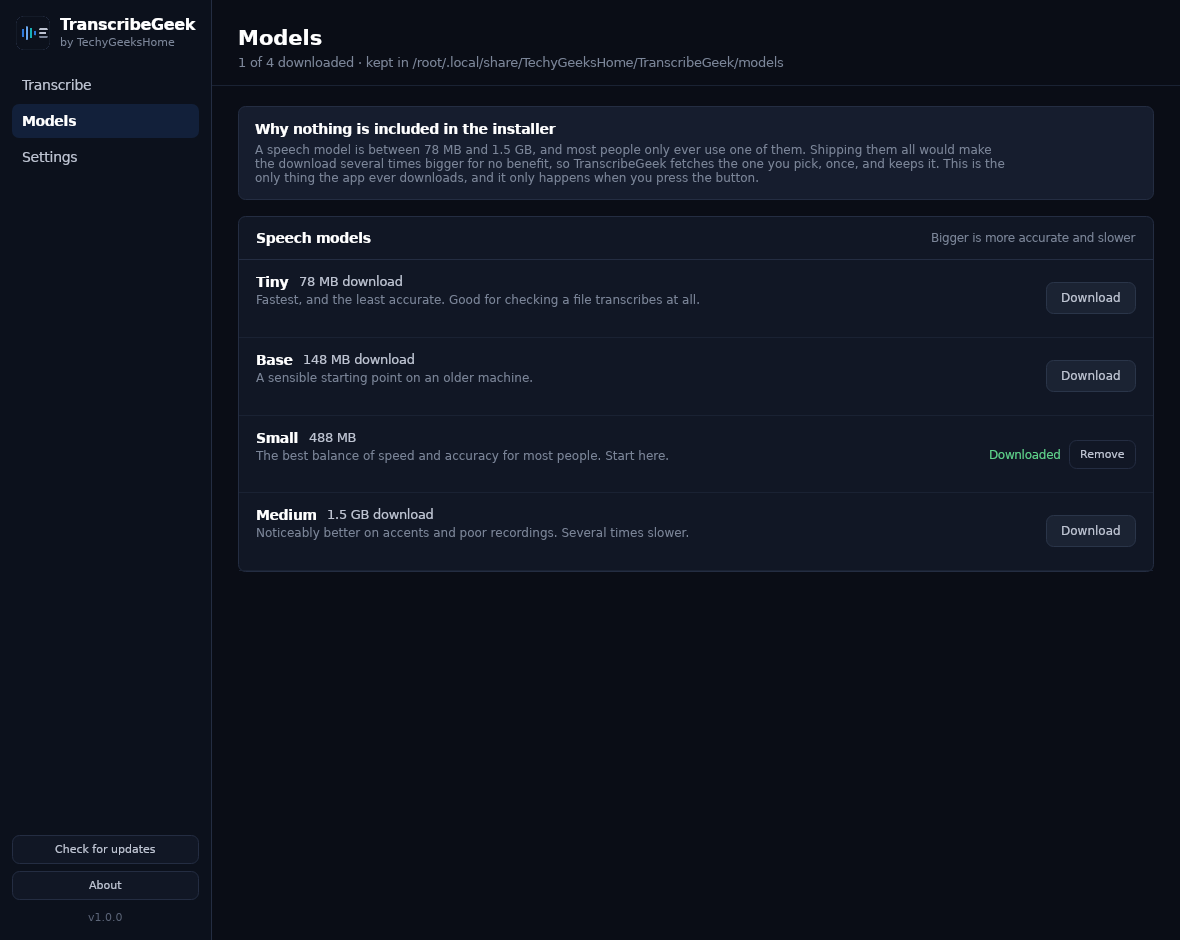
Tiny for a quick check, Small for everyday work, Medium when the recording is difficult. Downloaded on request and kept. Nothing is bundled into the installer.
It never overwrites
If a transcript of that name is already there, the next one is numbered. Your earlier work is never silently replaced.
ffmpeg, if you have it
MP3 and MP4 need ffmpeg to decode. TranscribeGeek runs it as a separate program if it finds one and says so plainly if it does not. It never quietly downloads a 90 MB binary you did not ask for.
Update checker
Checks only when you click Check for updates, and never installs anything silently.
See it in action
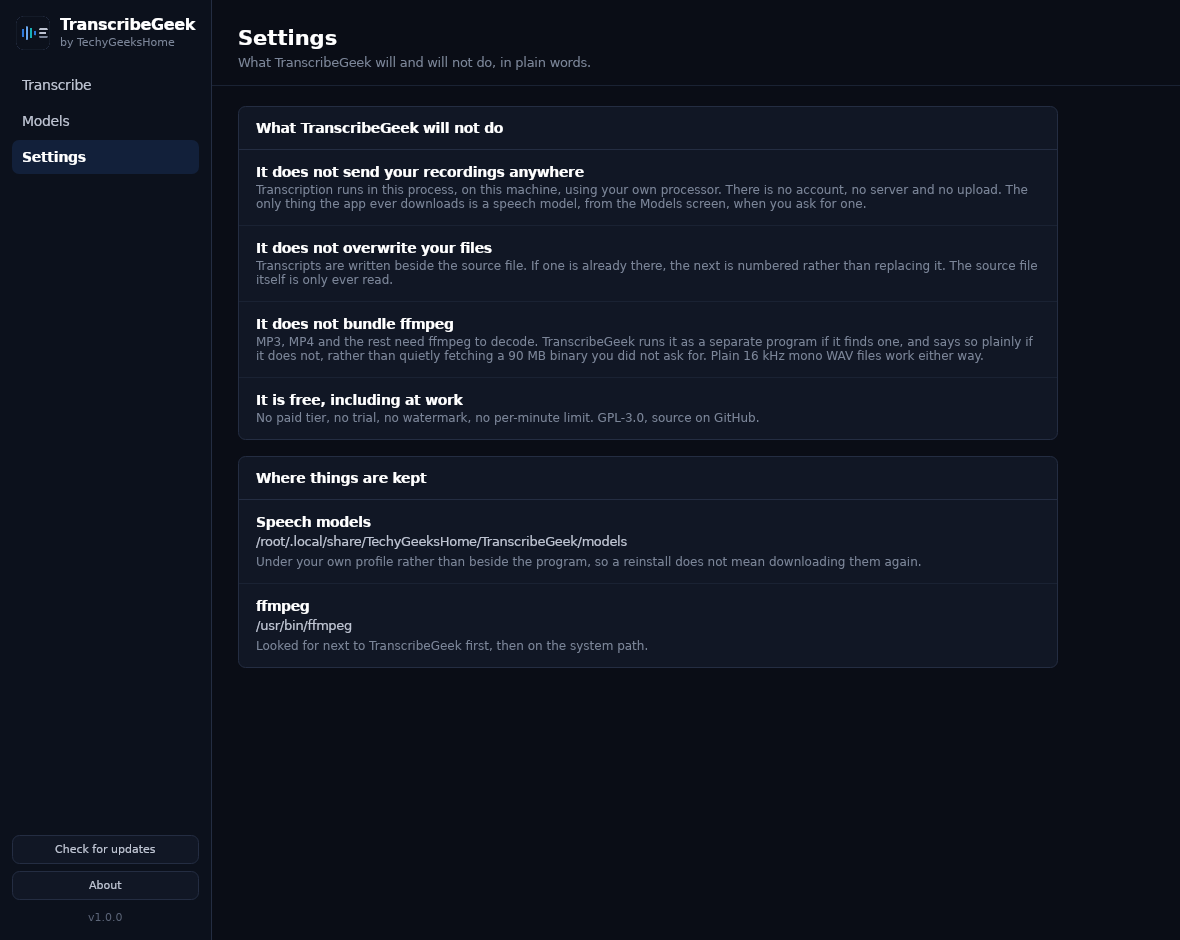
Three screens: the queue, the models, and a Settings page that states plainly what TranscribeGeek will not do.
Who it’s for
Built by an IT pro who needed it, not a commercial suite trying to upsell you.
Anyone with a pile of recordings
Interviews, lectures, meetings, voice notes. Drop them in, walk away, come back to a folder of text files.
Video makers
A .srt file per video, ready to upload. No per-minute charge, no watermark, no monthly allowance to run out.
Anyone who cannot upload
Legal, medical, HR, anything under NDA. The recording never leaves the machine, so there is nothing to clear with anybody first.
Requirements
Operating system
Windows 10 version 1809 or later, 64-bit. Windows 11 fully supported.
Rights
Runs as a normal user. No administrator rights are needed or requested.
Download
About 37 MB for the installer. Speech models are downloaded separately, from inside the app, only when you ask for one.
Prerequisites
None. .NET 8 is inside the build. ffmpeg is optional and only needed for formats other than plain 16 kHz mono WAV.
Version
1.1.2. Released 1 September 2026.
Licence
GPL-3.0. Free to use, including at work. No paid tier, ever.
Frequently Asked Questions
Is it really free? No Pro version, no catch?
Yes. TranscribeGeek is free to download and use, with no Pro tier, no ads, no per-minute cap and no bundled offers in the installer.
Does my recording get uploaded anywhere?
No. Transcription runs in the application, on your own processor. There is no account and no server. The only thing the app ever downloads is a speech model, from the Models screen, when you ask for one.
Why is there no speech model in the installer?
Because a model is between 78 MB and 1.5 GB and most people only ever use one of them. Bundling them all would make the download several times bigger for no benefit, so you pick one on the Models screen and it is fetched once and kept.
Do I need ffmpeg?
Only for formats other than plain 16 kHz mono WAV, so in practice, yes, for MP3 and MP4. Put ffmpeg.exe next to TranscribeGeek or anywhere on your PATH. It is deliberately not bundled: the common builds are GPL, and the app should not quietly download a 90 MB binary you did not ask for.
How long does a recording take to transcribe?
On a normal desktop processor, roughly real time with the Small model. An hour of audio takes about an hour. Tiny is several times faster and less accurate; Medium is several times slower and better on accents and poor recordings.
Will it overwrite my existing transcripts?
Never. Output is written beside the source file, and if a file of that name already exists the next one is numbered. The recording itself is only ever read.
Version History
- 1.1.2: 1 September 2026. Transcription now works in the installed and portable builds. The speech library is carried inside the application and written out where it is needed, rather than relying on where Windows unpacked it. This affected 1.0.0, 1.0.1, 1.1.0 and 1.1.1, all of which could install and then fail on the first file.
- 1.1.1: 1 September 2026. A first attempt at the same fault, which did not hold on Windows.
- 1.1.0: 1 September 2026. Works out who is speaking and labels each line Speaker 1, Speaker 2 and so on. The labels are a good guess rather than a fact, and the transcript is still written if the speaker pass fails.
- 1.0.1: 30 August 2026. Application icon redrawn to match the TechyGeeksHome house style. No functional changes.
- 1.0.0: 30 August 2026. First release. Whisper transcription with a queue, four model sizes, 22 languages, timestamped text output and SubRip subtitles, on the same shell as the rest of the range.
Download TranscribeGeek today
Free, offline, and there is no limit on how much you transcribe.
Not code-signed, so Windows may warn on first run. Click More info, then Run anyway. SHA256 checksums
Windows may show a “Windows protected your PC” warning the first time you install it. That means SmartScreen has not seen the file before, not that anything is wrong with it. Here is why our builds are unsigned, and how to verify your download against its SHA-256 hash. We will never ask you to switch SmartScreen off.
Support
Found a bug, or want something added? Open an issue on GitHub and it will be read. Speaker labels. Who said what. Are the next thing planned.
Featured on