 By Andrew Armstrong
In 2025, security researchers found a group of Chrome and Edge extensions that started out clean and were later turned into trackers through updates. One of the best known was Geco, a colour picker with a verified badge and good reviews, which began sending every page its users visited to a remote server.
So we built ColorGeek. It does the same job, picking any colour on your screen and copying it as HEX, RGB or HSL, with no network access at all and open source code anyone can check. It’s free and has no tracking of any kind.
Quick Facts
- Free. No Pro tier, no ads and no limit.
- Open source under the GPL-3.0, with the full source on GitHub.
- Works in Chrome, Edge, Brave, Opera, Vivaldi and Firefox.
- No account and nothing sent anywhere.
What it does
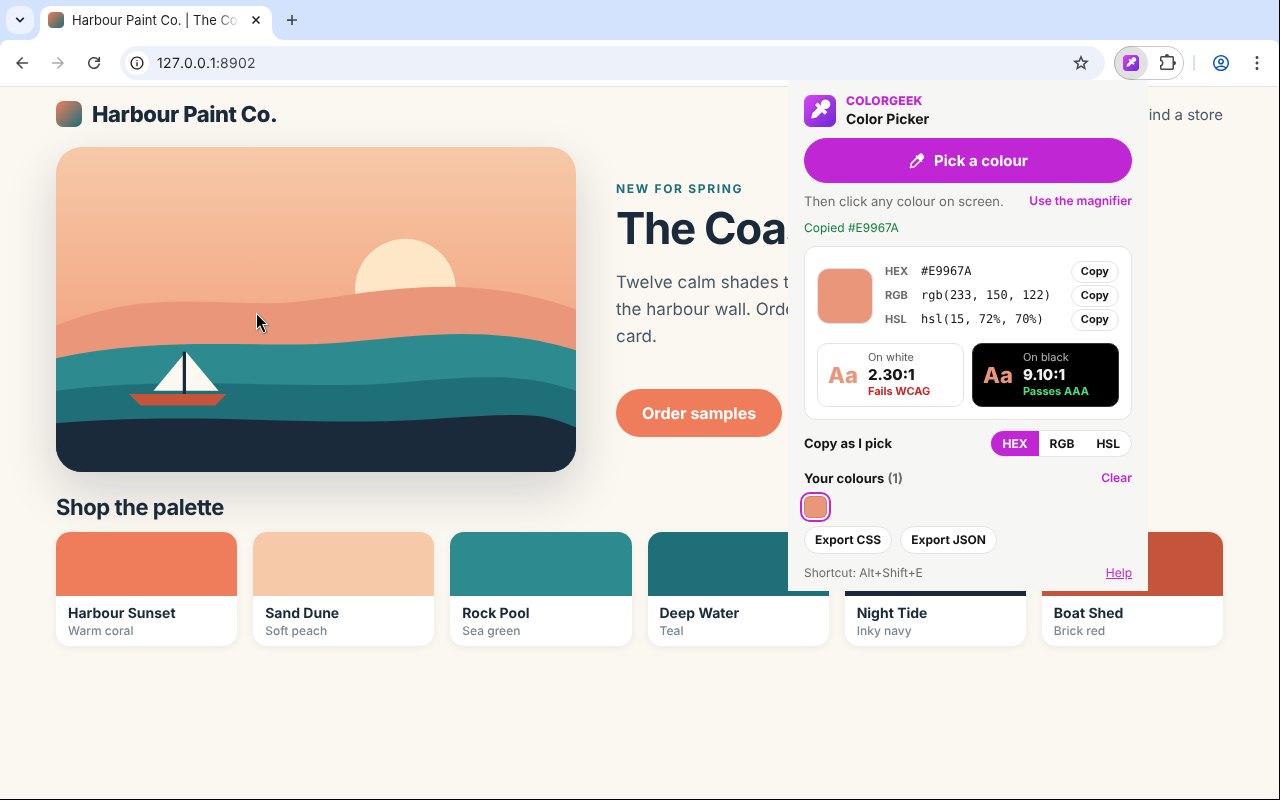
- Pick from anywhere: the browser’s eyedropper picks a colour from anywhere on screen in Chrome, Edge, Brave, Opera and Vivaldi.
- Copied straight away: as HEX, RGB or HSL, with the other two formats one click away.
- Contrast check: the ratio against white and black, with the WCAG grade.
- Magnifier: Alt+Shift+E opens a zoomed lens on the page for the exact pixel.
- Your last 24 colours: saved on your computer, ready to copy again.
- Export a palette: as CSS variables or JSON.
How it works
ColorGeek uses the browser’s own eyedropper where there is one, and a magnifier over the page where there is not, such as in Firefox. It has no host permissions, no libraries and no network access, so it only ever sees the tab you are on, and only when you ask.
How to install it
Store listings for Edge and Firefox are on the way. Until then, adding it yourself takes about a minute:
- Download the ZIP and unzip it somewhere you’ll keep it.
- Go to
chrome://extensions(oredge://extensions) and switch on Developer mode. - Click Load unpacked and pick the
colorgeekfolder.
On Firefox, grab the Firefox version instead and load it from about:debugging. The ColorGeek page walks through every step with screenshots.
Download it
Found a bug or want a feature? Open an issue on GitHub. ColorGeek joins TabGeek, Markdown Saver, RefreshGeek, FocusGeek, Bluesky Saver, ErrorGeek, Image Format Saver, Reddit Saver, Page Saver, Board Saver for Pinterest, Grid Saver for Instagram and Clip Saver for TikTok in our browser extensions.
Discover more from TechyGeeksHome
Subscribe to get the latest posts sent to your email.
