 By Andrew Armstrong
Import-Module ServerManager
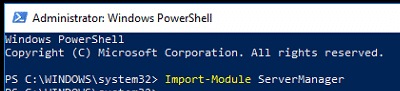 Once that has completed, then run the following command to install the required Remote Server Administration Tools (RSAT) feature:
Add-WindowsFeature RSAT-AD-PowerShell
 For it to work you need at least one Domain Controller in the domain as Windows Server 2008 R2 or above and have Active Directory Web Services (ADWS) installed on it.
You should now be able to use Active Directory commands within Powershell.
For it to work you need at least one Domain Controller in the domain as Windows Server 2008 R2 or above and have Active Directory Web Services (ADWS) installed on it.
You should now be able to use Active Directory commands within Powershell.
Feedback
If you have any questions or feedback on this post, please feel free to leave us a message below in our comments section.🛠️
Gear We Recommend
Testing configs is easier with a dedicated admin machine set up right. Here’s the kit we use.
Browse our Windows Admin Toolkit picks on AmazonAs an Amazon Associate, TechyGeeksHome earns from qualifying purchases.
Discover more from TechyGeeksHome
Subscribe to get the latest posts sent to your email.
