 By Andrew Armstrong
Got a long lesson, a slow podcast or a training video to get through? Most players stop at two times speed, and some sites keep putting it back to normal every time you change it.
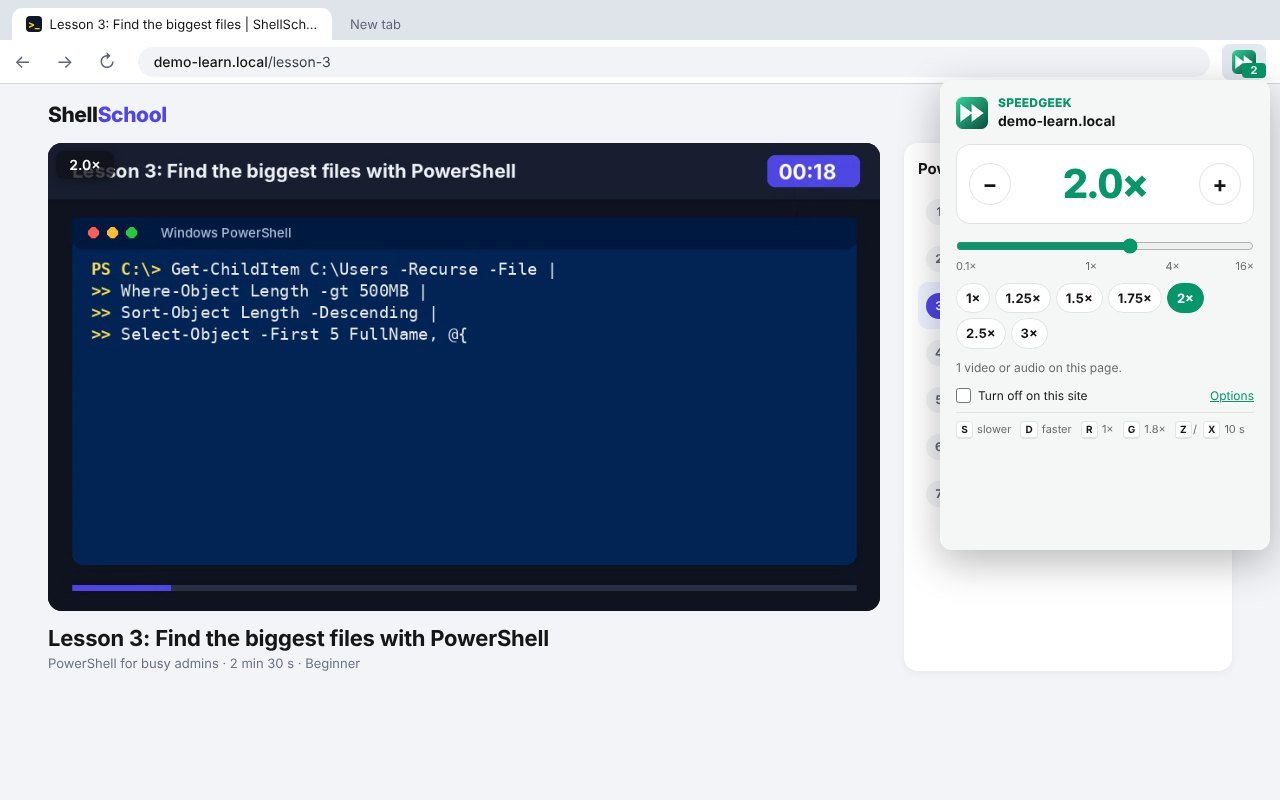
So we built SpeedGeek. Press D to speed up and S to slow down, anywhere from 0.1x to 16x, and it remembers your speed for each site. It’s free, open source and has no tracking at all.
Quick Facts
- Free. No Pro tier, no ads and no limit.
- Open source under the GPL-3.0, with the full source on GitHub.
- Works in Chrome, Edge, Brave, Opera, Vivaldi and Firefox.
- No account and nothing sent anywhere.
What it does
- Speed keys: D faster, S slower, R back to normal, G for your favourite speed.
- Skip: Z jumps back 10 seconds, X jumps forward.
- 0.1x to 16x: far past the 2x most players stop at.
- Speed box: shows your speed on the video, fades away, and can be dragged anywhere.
- Remembered per site: your speed is already set next time, even if the site tries to reset it.
- Your choice: change every key, and run it on every site or only when you click it.
How it works
SpeedGeek changes the playback speed of the video and audio on the page, inside your own browser. When you install it, a welcome page asks whether it should work on every site or only when you click its icon, and it only asks for site access if you pick every site. Nothing is sent anywhere.
How to install it
Store listings for Edge and Firefox are on the way. Until then, adding it yourself takes about a minute:
- Download the ZIP and unzip it somewhere you’ll keep it.
- Go to
chrome://extensions(oredge://extensions) and switch on Developer mode. - Click Load unpacked and pick the
speedgeekfolder.
On Firefox, grab the Firefox version instead and load it from about:debugging. The SpeedGeek page walks through every step with screenshots.
Download it
Found a bug or want a feature? Open an issue on GitHub. SpeedGeek joins PiPGeek, VolumeGeek, TextGeek, ColorGeek, TabGeek, Markdown Saver, RefreshGeek, FocusGeek, Bluesky Saver, ErrorGeek, Image Format Saver, Reddit Saver, Page Saver, Board Saver for Pinterest, Grid Saver for Instagram and Clip Saver for TikTok in our browser extensions.
Discover more from TechyGeeksHome
Subscribe to get the latest posts sent to your email.
