 By Andrew Armstrong
Part of our SCCM and ConfigMgr guides: every related guide in one place.
When using Configuration Manager, you may find that some things may not work fully if you are also behind a web security proxy service. We came across this problem recently where the Asset Intelligence Point was being blocked from contacting the internet due to web security. This caused this error in our Configuration Manager Console: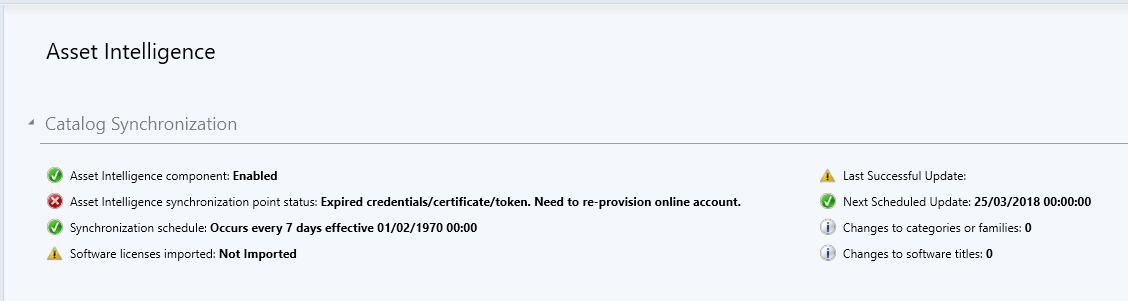 So we started to investigate this and found that we had to whitelist sc.microsoft.com.nsatc.net in our web security. After that, it started working again, but this led us to think about what else should be whitelisted.
Below is what we have found, so please feel free to copy this list if you require to whitelist your Configuration Manager environment.
So we started to investigate this and found that we had to whitelist sc.microsoft.com.nsatc.net in our web security. After that, it started working again, but this led us to think about what else should be whitelisted.
Below is what we have found, so please feel free to copy this list if you require to whitelist your Configuration Manager environment.
Whitelist URL’s
| Module | URL to whitelist | Service |
| Asset Intelligence Synchronisation Point | sc.microsoft.com.nsatc.net | Asset Intelligence |
| Client | Microsoft Active Protection Service | |
| Client | Microsoft Active Protection Service | |
| Client | has.spserv.microsoft.com | Cloud Device Attestation Service |
| Console | login.windows.net/ | Any component requiring logon to online services |
| Primary Site | *.core.windows.net | Cloud Distribution Point |
| Primary Site | *.cloudapp.net | Cloud Distribution Point |
| Primary Site | Windows Store for Business | |
| Primary Site | https://login.microsoftonline.com/ | Windows Store for Business |
| Service Connection Point | *akamaiedge.net | Updates and Servicing |
| Service Connection Point | *.manage.microsoft.com | Updates and Servicing |
| Service Connection Point | go.microsoft.com | Updates and Servicing |
| Service Connection Point | blob.core.windows.net | Updates and Servicing |
| Service Connection Point | download.microsoft.com | Updates and Servicing |
| Service Connection Point | sccmconnected-a01.cloudapp.net | Updates and Servicing |
| Service Connection Point | https://silverlight.dlservice.microsoft.com | Updates and Servicing |
| Service Connection Point | *.manage.microsoft.com | Microsoft Intune |
| Service Connection Point | Microsoft Intune | |
| Service Connection Point | https://login.microsoftonline.com// | Microsoft Intune |
| Service Connection Point | download.microsoft.com | Windows 10 Servicing |
| Service Connection Point | https://go.microsoft.com/fwlink/?LinkID=619849 | Windows 10 Servicing |
| Site Server | has.spserv.microsoft.com | Cloud Device Attestation Service |
| SUP | windowsupdate.microsoft.com | Software Updates |
| SUP | *.windowsupdate.microsoft.com | Software Updates |
| SUP | *.update.microsoft.com | Software Updates |
| SUP | *.windowsupdate.com | Software Updates |
| SUP | download.windowsupdate.com | Software Updates |
| SUP | download.microsoft.com | Software Updates |
| SUP | *.download.windowsupdate.com | Software Updates |
| SUP | wustat.windows.com | Software Updates |
| SUP | ntservicepack.microsoft.com | Software Updates |
| SUP | go.microsoft.com | Software Updates |
| SUP | officecdn.microsoft.com | Office 365 Software Updates |
| SUP | officecdn.microsoft.com.edgesuite.net | Office 365 Software Updates |
2026 Update: Current Proxy Requirements
Since this list was first put together, a few of the older Configuration Manager services have been retired. If you are running a current ConfigMgr branch, you can remove these from your allowlist:- Windows Store for Business (retired)
- Silverlight (silverlight.dlservice.microsoft.com, retired)
- Asset Intelligence synchronisation point (deprecated)
| Module | URL to whitelist | Service |
| Management Point | login.microsoftonline.com | Microsoft Entra token validation |
| Management Point | sts.windows.net | Microsoft Entra token validation |
| Service Connection Point | configmgrbits.cdn.manage.microsoft.com | Updates and Servicing |
| Service Connection Point | graph.microsoft.com | Microsoft Entra user discovery |
| Cloud Management Gateway | *.blob.core.windows.net, *.cloudapp.azure.com, *.vault.azure.net | CMG connection point and storage |
| Delivery Optimization | *.do.dsp.mp.microsoft.com | Content delivery optimisation |
Comments
If you have any feedback or questions on this guide, please feel free to leave us a message below in our comments section.🛠️
Gear We Recommend
Testing configs is easier with a dedicated admin machine set up right. Here’s the kit we use.
Browse our Windows Admin Toolkit picks on AmazonAs an Amazon Associate, TechyGeeksHome earns from qualifying purchases.
Discover more from TechyGeeksHome
Subscribe to get the latest posts sent to your email.
