 By Andrew Armstrong
 Discord’s free plan stops uploads at 10 MB. Gmail stops attachments at 25 MB, and WhatsApp at 16 MB. A minute of phone video is usually well over all three, so the clip you wanted to send just sits there.
The usual fixes are a website that wants you to upload the video first, or HandBrake and a lot of guessing at bitrates until something happens to fit. HandBrake’s own developers have turned down a “fit to size” option twice. So we built one.
VideoSizeGeek is a free Windows app that shrinks a video to the exact size you ask for, on your own PC.
How it works
Drop a video in and pick where it’s going. There are presets for Discord (free and Nitro), Gmail, WhatsApp and X, or you can type any size you like in megabytes.
VideoSizeGeek reads the length of the clip and works out the bitrate that will land at that size. Then it encodes in two passes: the first studies the video, the second encodes it to that exact bitrate. If the result still comes out a touch too big, it corrects once and tries again, so you get a file that actually sends.
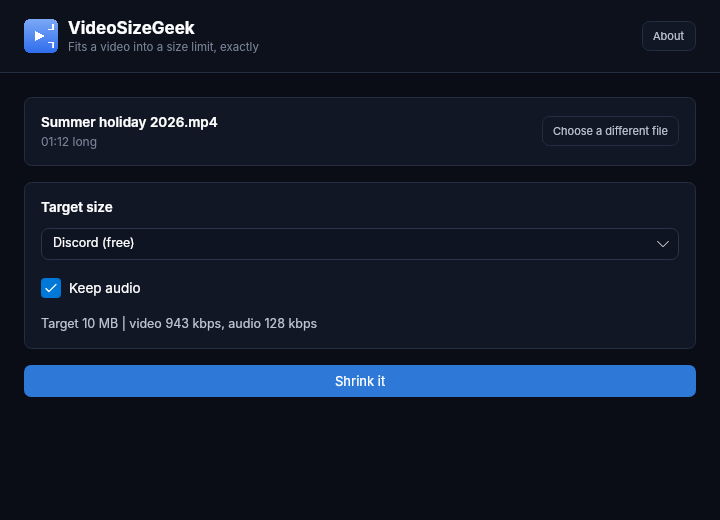
In the demo, a 72 second, 95 MB holiday clip came out at 9.5 MB, under Discord’s 10 MB limit.
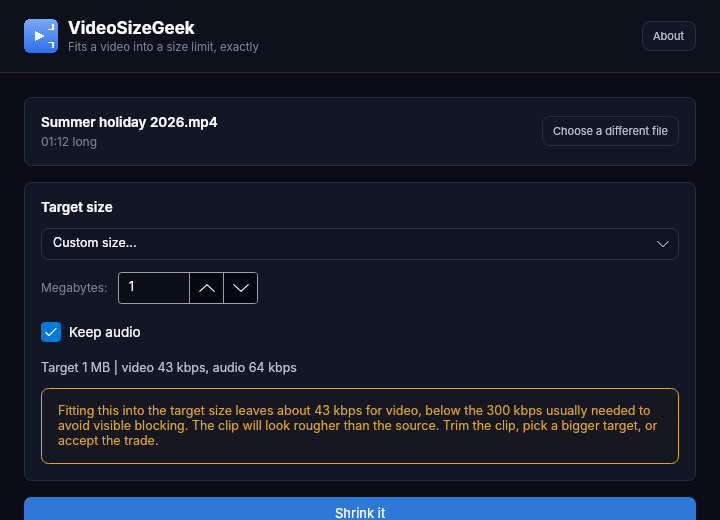
It tells you when the target is too small
Squeeze a long clip into a tiny file and the picture turns into blocks. Most tools just hand you the mess. VideoSizeGeek warns you before it starts, with the numbers, so you can trim the clip, pick a bigger target, or go ahead knowing what you’ll get.
What it won’t do
- It won’t upload your video. Everything happens on your PC.
- It won’t touch the original. The smaller copy is a new file next to it, named with its size, like
Summer holiday 2026-10MB.mp4. - It won’t add a watermark, ask for an account or limit how many videos you shrink.
ffmpeg in one click
VideoSizeGeek uses ffmpeg to do the encoding. It isn’t bundled, because it would add over 100 MB to every download, but the first time the app can’t find it, it offers a one-click download of a pinned, checksum-verified build. If you already have ffmpeg on your PATH, it just uses that.
Requirements
- Windows 10 or 11, 64-bit
- No administrator rights needed
- Free and open source (GPL-3.0), including at work
Version 1.0.3 is out now. Grab the installer or the portable version from the VideoSizeGeek page, or see the source on GitHub.
Discover more from TechyGeeksHome
Subscribe to get the latest posts sent to your email.
