100% Free · Version 1.0.3
VideoSizeGeek: shrink a video to fit Discord, Gmail or WhatsApp
Type 10 MB and get a video that fits Discord’s free upload limit. Or 25 MB for Gmail, 16 MB for WhatsApp, or any size you like. VideoSizeGeek works out the right quality for that size and encodes in two passes, so the file lands under the limit instead of somewhere near it. Everything happens on your own PC.
Windows 10 or 11, 64-bit · no admin rights needed · 0 downloads from this site
Video Demo
Under a minute: a 95 MB holiday clip squeezed under Discord’s 10 MB limit, start to finish.
Everything you need to make a video fit
VideoSizeGeek does one job: get a video under a size limit without guessing. ffmpeg does the encoding, on your own PC.
Named presets
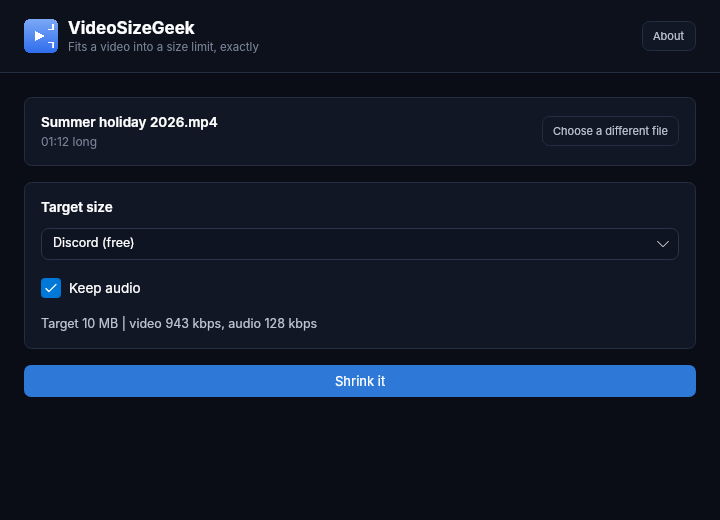
Discord’s 10 MB free limit, Discord Nitro’s 500 MB, Gmail’s 25 MB attachment limit, WhatsApp’s 16 MB and X’s 512 MB. Or type your own size in MB.
Two-pass encoding
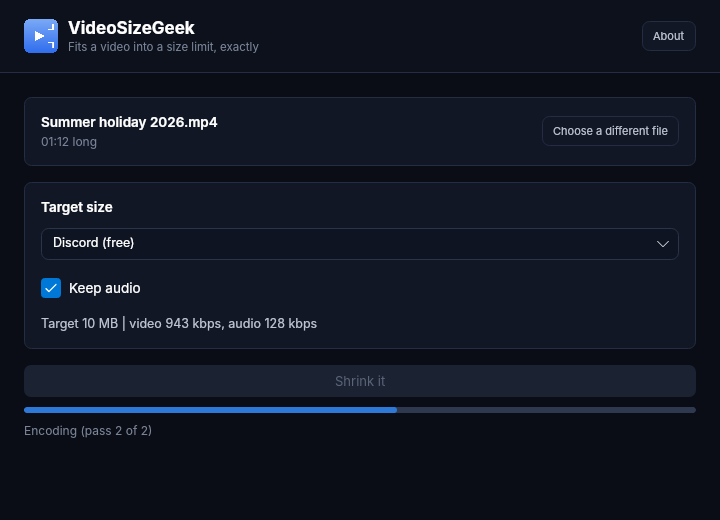
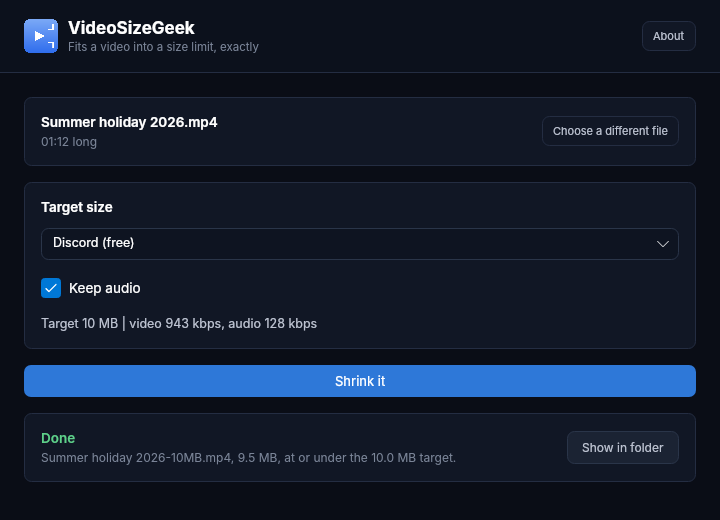
The first pass studies the video, the second encodes it to the exact bitrate. If it still comes out too big, it corrects once and tries again rather than handing you a file that won’t send.
Warns you first
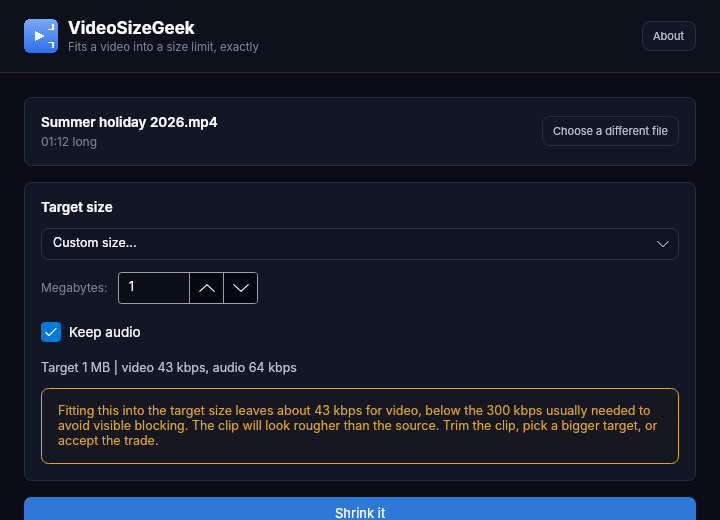
If the target is too small for the clip to look decent, it says so before it starts, with the numbers. You can trim the clip, pick a bigger target, or go ahead anyway.
Keep or drop the sound
Untick Keep audio and every bit of the budget goes to the picture. The numbers are worked out again either way.
Never touches the original
The smaller copy is a new file next to the source, named with its target size, like Summer holiday-10MB.mp4.
ffmpeg in one click
The first time it can’t find ffmpeg it offers a one-click download of a pinned, checksum-verified build. Already have ffmpeg? It’s used automatically.
See it in action
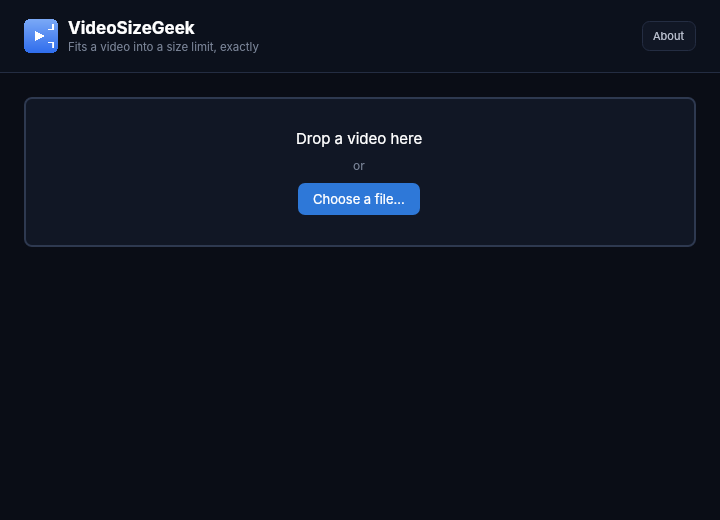
Five screens: drop a video in, pick a target, the warning when a target is too small, encoding, and the finished file.
Who it’s for
Built by an IT pro who needed it, not a commercial suite trying to upsell you.
Gamers
Clips that are too big for Discord’s free limit, made to fit without paying for Nitro.
Anyone emailing a video
Gmail stops at 25 MB. Pick the Gmail preset and the clip goes as an attachment, not a Drive link.
Anyone who can’t upload
Work recordings, family videos, anything you’d rather not hand to a random website just to shrink it.
Requirements
Operating system
Windows 10 or 11, 64-bit.
Rights
Installs for your account only. No administrator rights needed.
ffmpeg
Offered as a one-click download the first time it’s needed, or picked up from your PATH.
Version
1.0.3. Released 26 October 2026.
Licence
GPL-3.0. Free to use, including at work.
Source
On GitHub, built by GitHub Actions from the tagged source.
Frequently Asked Questions
How do I make a video small enough for Discord?
Drop the video into VideoSizeGeek, pick Discord (free) and click Shrink it. It works out the bitrate that fits 10 MB for that clip's length and encodes in two passes, so the result is at or under 10 MB.
Is VideoSizeGeek really free?
Yes. No Pro version, no ads, no watermark and no limit on how many videos you shrink.
Does my video get uploaded anywhere?
No. ffmpeg runs on your own PC. The only download the app ever makes is ffmpeg itself, once, if you ask it to.
Why does it warn that the target is too small?
A long clip squeezed into a small file gets very few bits per second, and the picture turns blocky. VideoSizeGeek tells you before it starts, so you can trim the clip or pick a bigger target instead.
Will it change my original video?
Never. The smaller copy is a new file next to the original, and the original is only ever read.
Version History
- 1.0.3: 26 October 2026. The too-small warning now shows its text (it was an empty box), and the finished screen shows the new file’s name and size instead of just Done.
- 1.0.2: 23 September 2026. Installer improvements.
- 1.0.1: 21 September 2026. ffmpeg no longer has to be installed separately: one-click, checksum-verified download inside the app.
- 1.0.0: 20 September 2026. First release.
Download VideoSizeGeek today
Free, no uploads, no watermark. Pick a size and it fits.
Not code-signed, so Windows may warn on first run. Click More info, then Run anyway. SHA256 checksums · Source code on GitHub
Windows may show a “Windows protected your PC” warning the first time you install it. That means SmartScreen has not seen the file before, not that anything is wrong with it. Here is why our builds are unsigned, and how to verify your download against its SHA-256 hash. We will never ask you to switch SmartScreen off.
Support
Found a bug, or want something added? Open an issue on GitHub and it will be read.
Featured on