 By Andrew Armstrong
Updated 22 September 2026: ShortGeek is now on version 2.0.0. The guide/RSS/URL importer and the optional AI polish pass described below have been removed — neither reliably produced a usable script. New Short is Paste Script only now, and you can attach a screenshot to any beat. See the product page for what’s current; the rest of this post is left as it was written for the 1.0.0 launch.
Short-form video is where the traffic is, and nobody who writes guides for a living has an evening spare to cut one. The tools that promise to do it for you want a subscription, stamp a watermark on the free tier, and fill the frame with AI-generated pictures of things that do not exist.
ShortGeek is the other way round. Paste in a script and it narrates it, burns in word by word captions and renders a 1080×1920 MP4 you can upload as it is. It launched as version 1.0.0, free at home and at work, and every frame is rendered on your own machine.
Nothing in it is AI generated imagery
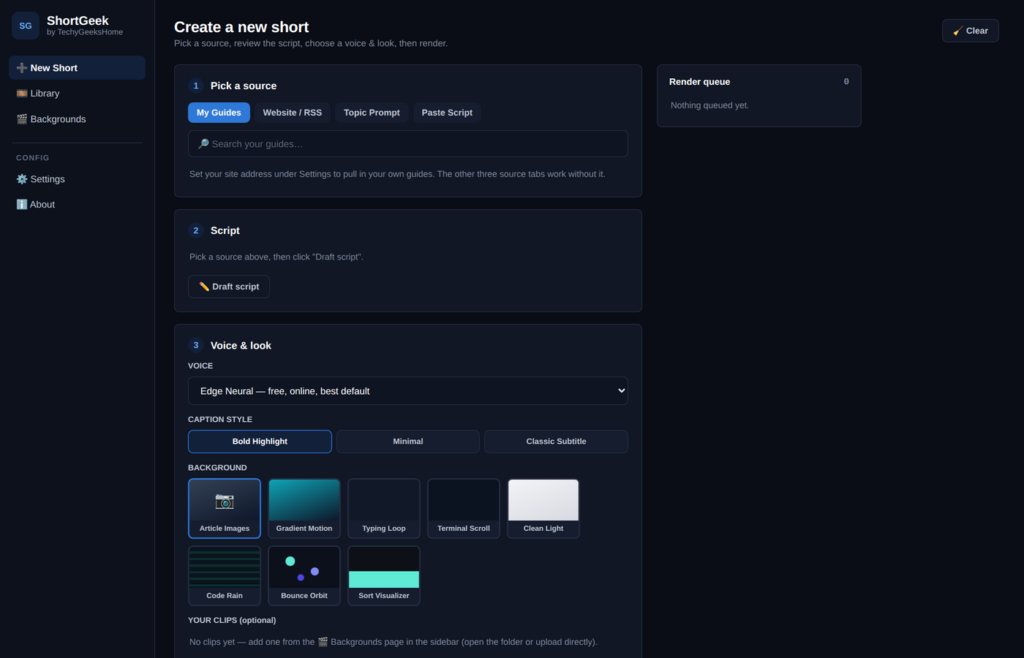
This is the part worth being blunt about. Backgrounds are drawn in code, frame by frame, or your own MP4 clips. Attach a screenshot to any one beat if you want one on screen, and it sits as a small inset on that beat’s card, never full bleed.
The looks: gradients, a terminal scroll, a typing loop, a clean light look, Code Rain, Bounce Orbit, and a Sort Visualizer running an actual bubble sort on a bar chart. Or drop your own MP4 clips in and use those. Nothing is AI art and nothing is somebody else’s footage passed off as yours.
You write the script, and you can edit it
You write the script yourself: a hook, however many beats you want, and a call to action, pasted straight in. Nothing is invented or reworded on your behalf, because ShortGeek isn’t drafting anything — it’s narrating and captioning exactly what you wrote, and it’s all editable before you render.
Want a screenshot on screen for a beat — a Windows Key+H popup, say? Attach one and it shows as a small inset in the corner of that beat’s card, sized to stay legible at phone-viewing size.
A real voice, without signing up for anything
The default is Microsoft Edge’s free neural text to speech, which needs no account. If that endpoint is ever unreachable, ShortGeek falls back to the offline eSpeak NG voice rather than failing the render, and says in the queue that it did. ElevenLabs is there too if you already have a key and a voice you like.
Caption timing comes from the voice engine itself rather than being estimated from word lengths, which is why the highlight lands on the word actually being said. Three styles: Bold Highlight, Minimal and Classic Subtitle.
What it will not do
The same rules as the rest of the range, and they are stated inside the app as well as here.
- No AI imagery. Backgrounds drawn in code, clips you supplied, or a screenshot you attach to a beat yourself. That is the whole list.
- No invented facts. You write every line yourself, and you can edit all of it before rendering.
- No uploading on your behalf. Those platform APIs are locked down, quota limited and change constantly. You get a finished file and post it yourself.
- No subscription, no credits, no watermark. Nothing it renders is marked, and nothing is metered.
- No account. The only outbound call is to the free voice service, or to ElevenLabs if you added a key for it.
Get it
One installer, about 90 MB, with Python and ffmpeg bundled. There is nothing to install first: no Python, no PATH ticking, no winget commands.
The full feature list, screenshots of every screen and the FAQ are on the ShortGeek product page.
What is next
Square and landscape output alongside the default 9:16, more backgrounds drawn in code, and a thumbnail picker for the library. Direct uploading is deliberately not on the list.
If a render fails or a script comes out wrong, open an issue on GitHub and say which source you used and what came out. A person reads them.
Discover more from TechyGeeksHome
Subscribe to get the latest posts sent to your email.
