 By Andrew Armstrong
Saving a TikTok is easy enough once. Saving every video on a profile means copying links one at a time, pasting them into a website full of adverts, and hoping you got the good copy.
So we built Clip Saver. It’s a free browser extension that saves every video and photo post on a TikTok profile in one go, in the best quality TikTok offers, and hands it all to you as a single ZIP file.
Quick Facts
- Free. No Pro tier, no ads and no limit on how many videos you save.
- Open source under the GPL-3.0, with the full source on GitHub.
- Works in Chrome, Edge, Brave, Opera, Vivaldi and Firefox.
- No account, no tracking and no website in the middle. Videos go straight from TikTok to your computer.
What it does
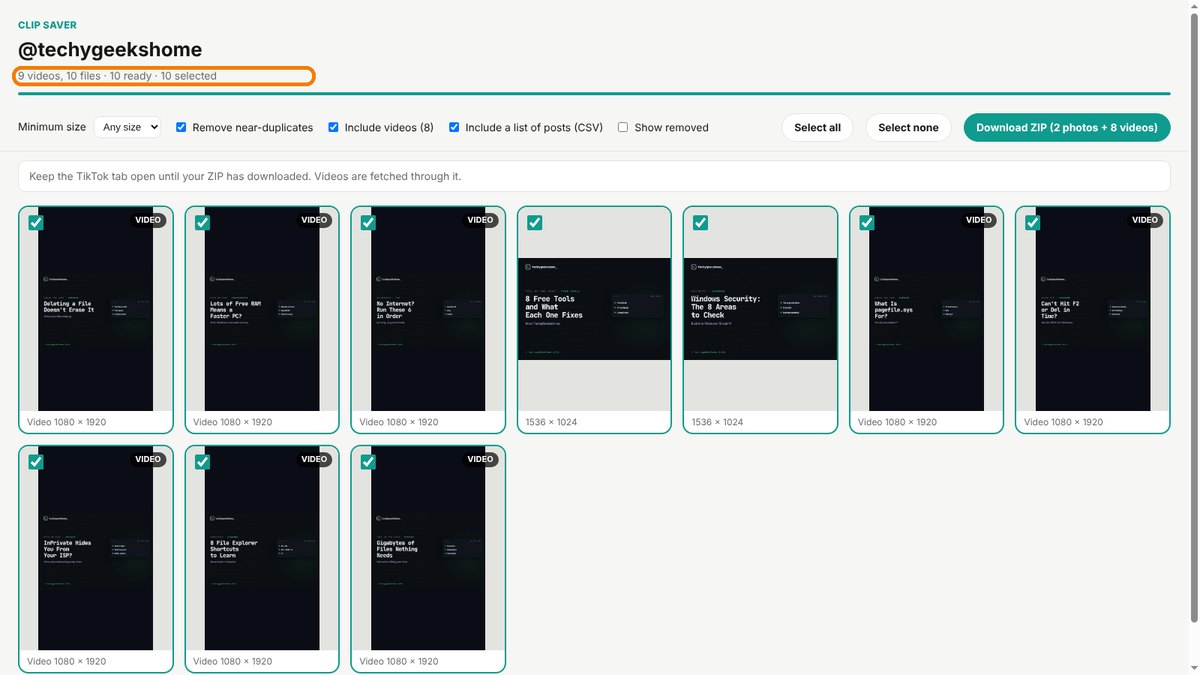
Open a profile, click the Clip Saver icon, and it scrolls down for you, counting the videos as TikTok loads them. A results tab then shows every video and photo post, ready to download.
- Best quality. It picks the highest resolution TikTok has for each video, in H.264 so it plays on any phone, PC or TV.
- Photo posts too. Photo carousels come down as full-size pictures.
- Whole profiles or one video. Open a single video instead and Clip Saver saves just that.
- One tidy ZIP. The account name and date are in every file name, with an optional spreadsheet of links and captions.
How it works
Clip Saver doesn’t send any extra requests to TikTok’s servers. It remembers the video details TikTok already sends to your browser while you scroll. TikTok only hands its videos to its own pages, so Clip Saver fetches each one through the TikTok tab you have open. Keep that tab open until your ZIP has downloaded.
How to install it
On Microsoft Edge, install Clip Saver straight from the Edge Add-ons store and it updates itself. Firefox Add-ons is still reviewing it. On Chrome, Brave, Opera and Vivaldi, adding it yourself takes about a minute:
- Download the ZIP and unzip it somewhere you’ll keep it.
- Go to
chrome://extensions(oredge://extensions) and switch on Developer mode. - Click Load unpacked and pick the
clip-saverfolder.
On Firefox, grab the Firefox version instead and load it from about:debugging. The Clip Saver page walks through every step with screenshots.
A word on whose videos they are
Saving a profile doesn’t change who owns what’s on it. Clip Saver is ideal for backing up your own videos, or keeping content you have permission to use. Reposting someone else’s TikToks still needs their permission.
Download it
Found a bug or want a feature? Open an issue on GitHub. Clip Saver joins Board Saver for Pinterest and Grid Saver for Instagram in our browser extensions.
Clip Saver is an independent tool made by TechyGeeksHome. It is not affiliated with, endorsed by or connected to TikTok or ByteDance.
Discover more from TechyGeeksHome
Subscribe to get the latest posts sent to your email.
