 By Andrew Armstrong
If you are looking to get hold of the MSI installer for Apple iTunes, then this guide is for you.
The process is actually very simple and should not take more than a few clicks of your mouse.
Download Apple iTunes
The first thing you are going to need to do is to download the latest EXE installer version of iTunes. Since Apple have now moved to the Microsoft Store for their installation of iTunes, you will need to download a slightly older version that the one available as a Windows 10 app.
7-Zip
Once you have got the EXE installer for iTunes, you then need to install (if you do not already have it) 7-Zip.
7-Zip is completely free for personal and commercial use and is also the best compression tool out there.
If you have not already got 7-Zip installed, you can download it from the link below:
Extract the MSI
Now that you have the latest EXE installer for Apple iTunes and also 7-Zip installed, all you now need to do is to right-click on the EXE file and select the Extract Here option from the menu shell:
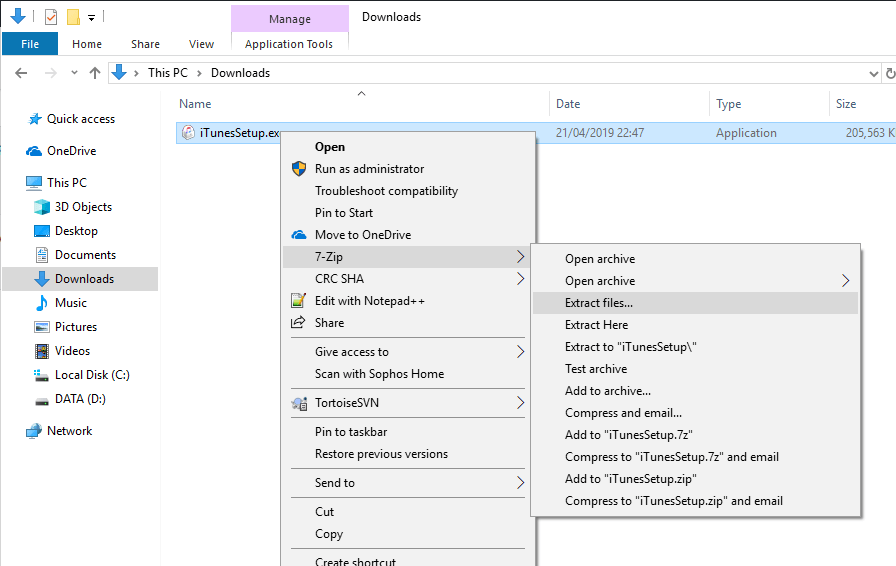
This will then extract all of the MSI installers that are built into the iTunes EXE offline installer:
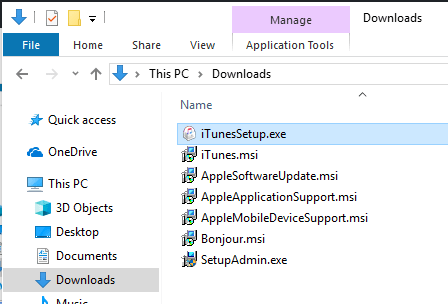
You can then use any of these installers to distribute the software using systems like Group Policy, WDS or SCCM.
Update (September 2026): Apple’s Split App Set
Apple has since split iTunes for Windows into separate apps, Apple Music, Apple TV, Apple Devices and iCloud, distributed through the Microsoft Store as MSIX packages rather than a single EXE. The 7-Zip extraction technique above still works if you can get hold of a legacy iTunes offline EXE installer, but it does not apply to the new Store apps, which are not packaged the same way.
For enterprise deployment, the component most IT admins actually need, the driver and service that lets Windows talk to an iPhone or iPad, is Apple Mobile Device Support. Apple still ships this as standalone MSI files (AppleMobileDeviceSupport.msi for 32-bit, AppleMobileDeviceSupport64.msi for 64-bit), and the simplest current way to get the latest version is winget install Apple.AppleMobileDeviceSupport, which you can then repackage for Group Policy, SCCM or Intune without needing to extract anything.
Comments
If you have any problems and want to ask us any questions, please feel free to leave us a message below in the comments box and we will get back to you as soon as we can.
More Guides You Might Have Missed
- Microsoft Teams MSI Installers
- Shoretel Communicator Download Client and MSI Installer
- How to Sysprep a Windows 7 Machine Ready for WDS Capture
- Blue screen of death (BSOD) after imaging to Windows XP
Gear We Recommend
Testing configs is easier with a dedicated admin machine set up right. Here’s the kit we use.
Browse our Windows Admin Toolkit picks on AmazonAs an Amazon Associate, TechyGeeksHome earns from qualifying purchases.
Discover more from TechyGeeksHome
Subscribe to get the latest posts sent to your email.
