 By Andrew Armstrong
X now shows where every account is based. That’s handy when a reply feels off, but there’s still no button to block or hide a whole country. Here’s how to check where an account is based, how to block accounts one at a time, and how to hide posts from a country or region automatically on your desktop.
Where X shows the country an account is based in
- Open the account’s profile on X.
- Click the Joined date under their bio.
- The About this account page shows Account based in (a country, or sometimes just a region like Africa or South Asia) and Connected via (the app store they signed up from).
If “Account based in” and “Connected via” don’t match, the account may be using a VPN to look like it’s somewhere else.
Block accounts from a country one at a time
Once you know where an account is based, block it the normal way: on the profile, click the three dots, then Block. Blocks apply to your whole X account, so they also work in the phone app. The catch is you have to open every profile by hand, which gets old fast.
Hide a whole country or region automatically
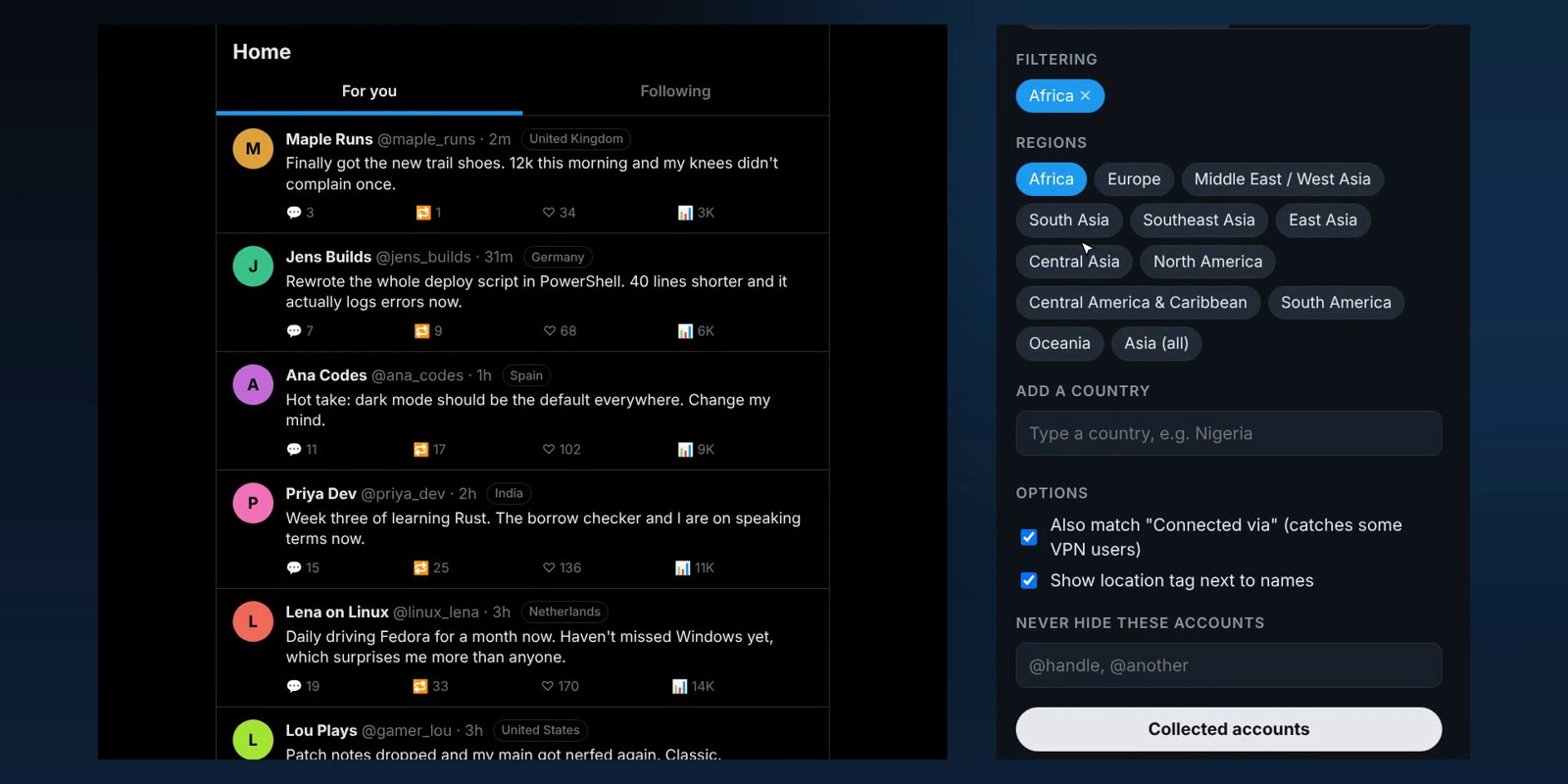
X has no setting for this, so we built a free browser extension that does it: Country Filter for X. It reads the same “Account based in” info for everyone on your feed and acts on it.
- Hide or blur posts and replies from the countries or regions you tick.
- A location tag next to every name, so you can see where accounts are based as you scroll.
- Regions as well as countries, for accounts that only show something like “Africa”.
- Connected via matching, which catches some accounts hiding behind a VPN.
- A Collected accounts list of everyone it has checked, with a one-click Block button that carries over to the X app.
It’s free and open source, works in Chrome, Edge, Brave, Opera, Vivaldi and Firefox, and nothing leaves your browser. It only talks to x.com using your own session.
A few things to know
- The country comes from X, so it’s only as accurate as X’s own info.
- X allows about 50 location lookups every 15 minutes, so on a busy feed it fills in over the first day. Every account is remembered for 30 days.
- Hiding only works in your browser. To keep an account out of the X app too, block it.
Frequently Asked Questions
Can you block a whole country on X?
Not with X itself. X shows where each account is based, but it has no setting to filter or block by country. A browser extension like Country Filter for X can hide posts from the countries or regions you pick on x.com, and lets you block the accounts it finds one click at a time.
Where does X show which country an account is in?
On the account’s profile, click the “Joined” date to open About this account. “Account based in” shows the country or region, and “Connected via” shows the app store the account signed up from.
Is the country X shows always right?
No. It can be wrong when someone uses a VPN, and some accounts only show a region such as Africa or South Asia. Treat it as a strong hint, not proof.
Does hiding posts by country work in the X app?
A browser extension only works on x.com in your browser. Accounts you actually block are blocked on your X account, so those carry over to the phone app.
Is it against X’s rules to block accounts?
No. Blocking and muting are normal X features. Just block accounts one at a time rather than with a bulk tool that hammers X, which can get your own account flagged.
Get it from the Country Filter for X page, which has the downloads, install steps and screenshots.
Discover more from TechyGeeksHome
Subscribe to get the latest posts sent to your email.
