If you are using Wo
rdPress on a sub-domain already and you want to setup WordPress Multisite using further sub-domains (if you have an existing WordPress sub-domain site for example) then following all the standard
guides out there on the web may not get you all the way to a fully working sub-sub-domain WordPress site.
As an example, we here at TechyGeeksHome are already using a sub-domain for this site which is blog.techygeekshome.info. However, we wanted to add a number of WordPress Multisites (for our microsites) and as we already have an existing WordPress installation, we would have to use sub-domains rather than sub-directories. This would mean that our new
Skype MSI Archive would be skype.blog.techygeekshome.info – which is fine but following the standard
guides on setting up WordPress Multisites did not help very much due to the sub-sub-domain.
So, lets assume that you have followed the WordPress Multisite setup process successfully but when you click to go to the website or the dashboard, you are getting a DNS failure notice. This is because you need to setup a wildcard sub-domain to point to the root of your existing WordPress installation.
For this
guide purposes we are using CPanel but the process should be very similar on any other DNS platform…
So into your sub-domain settings in the CPanel:
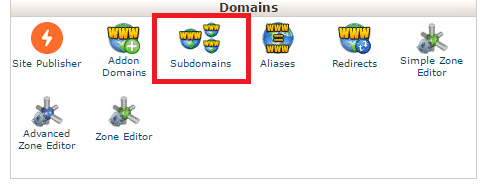
You then need to add a new sub-domain with “
“ as its name (“” = wildcard). Then ensure that the document root is the public root of your
existing WordPress installation. In this example it is
public_html/blog/
So you should have a new sub-domain settings like this:
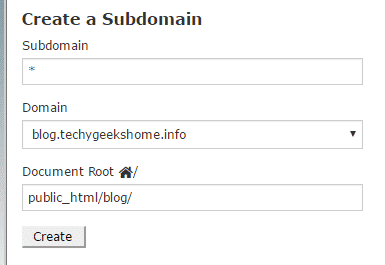
So go ahead and click the Create button to create the wildcard on your existing sub-domain and to the root.
Once this is created, you should now find that your sub-sub-domain WordPress Multisite now works. Although keep in mind that DNS changes are not immediate and can take up to 24 hours to fully propagate.
Comments
If you have any problems with this
guide or would just like to leave us some feedback on your experiences, please feel free to leave us a comment below.
Firewall rules are only half the story. Here’s the networking hardware we recommend for a properly segmented setup.
Browse our Networking Equipment picks on Amazon
As an Amazon Associate, TechyGeeksHome earns from qualifying purchases.
Discover more from TechyGeeksHome
Subscribe to get the latest posts sent to your email.
 By Andrew Armstrong

How can I setup my domain server to get time automatically from an bro server?