 By Andrew Armstrong
You may wish to add the WSUS console to the Software Center in SCCM. This stops people logging onto WSUS servers and also provides quick and easy access to multiple WSUS servers. However, the installer requires a few setup parameters to make it work correctly.
Download WSUS Console
Windows Server Update Services Console 3.0 SP2 (WSUS)
Instructions
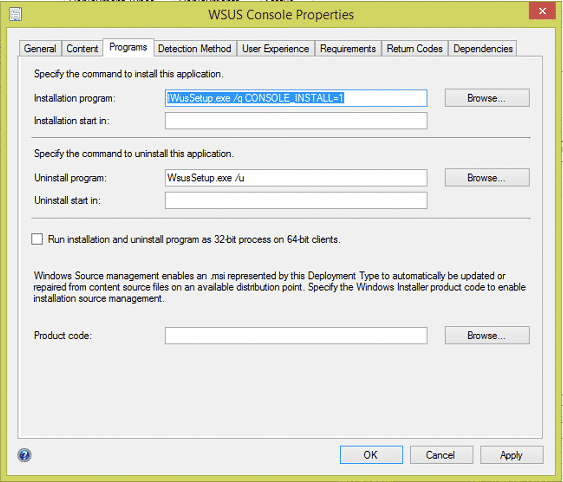
The first thing that you will need to do is to download the WSUS installation files from the link above. You should then copy the installation files to your SCCM source location and create a new application in SCCM. Point your installation to the WSUS installation files and you will need to setup the following installation program parameters:
Installation program:
WusSetup.exe /q CONSOLE_INSTALL=1Uninstall program:
WsusSetup.exe /uYour installation program parameters should then look like this:
Detection Method
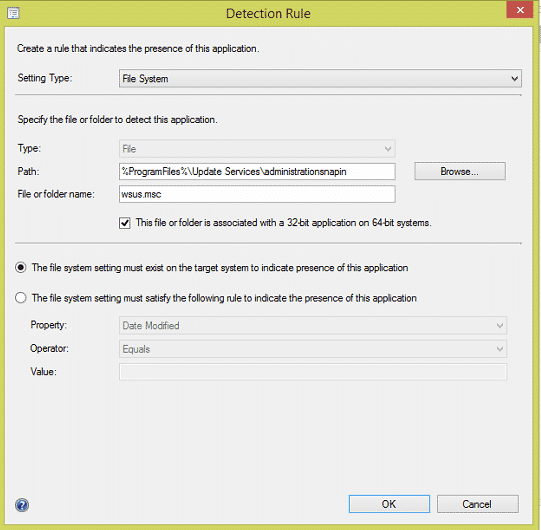
As this is a custom installation without using the simplicity of an MSI file, you will need to also setup the detection method for this application. To do this, you should setup your detection exactly like the image below:
You can then distribute and deploy this application where it is required.
Feedback
If you have any questions about this guide, please post them below in the comments section.
Discover more from TechyGeeksHome
Subscribe to get the latest posts sent to your email.
