£29 one-time purchase, instant download
MSP Backup Health Report: know your backups actually work before you need them
A PowerShell tool that audits Windows Server Backup or Veeam Backup & Replication and turns missing schedules, failed or stale jobs, low repository space and 3-2-1 gaps into one interactive report, scored 0 to 100.
Runs on the machine doing the backing up (Windows Server Backup) or the Veeam server itself. Read-only, nothing leaves your network.
Video Demo
See the scan, the score and the findings table, start to finish.
Everything a real backup audit needs, scored in one place
Coverage, failures, capacity, offsite copies and retention, weighted into one number, so a single missed backup never reads the same as a domain with none.
Coverage detection
Finds whether Windows Server Backup or Veeam is even present, and flags a missing schedule or a target that can’t be read.
Failed and stale job detection
Flags a job that failed, completed with warnings, or hasn’t run successfully within your own staleness window.
Disabled job detection
Catches a schedule that exists on paper but never actually triggers, in Veeam or behind a Windows Server Backup policy.
Repository & target capacity
Flags a backup target or Veeam repository running low on free space, before it fails a job outright.
3-2-1 offsite copy check
Flags a single local-only copy with no offsite or network target anywhere in the setup.
Retention shortfalls
Flags less backup history available than your configured minimum, so you know before you need a restore that isn’t there.
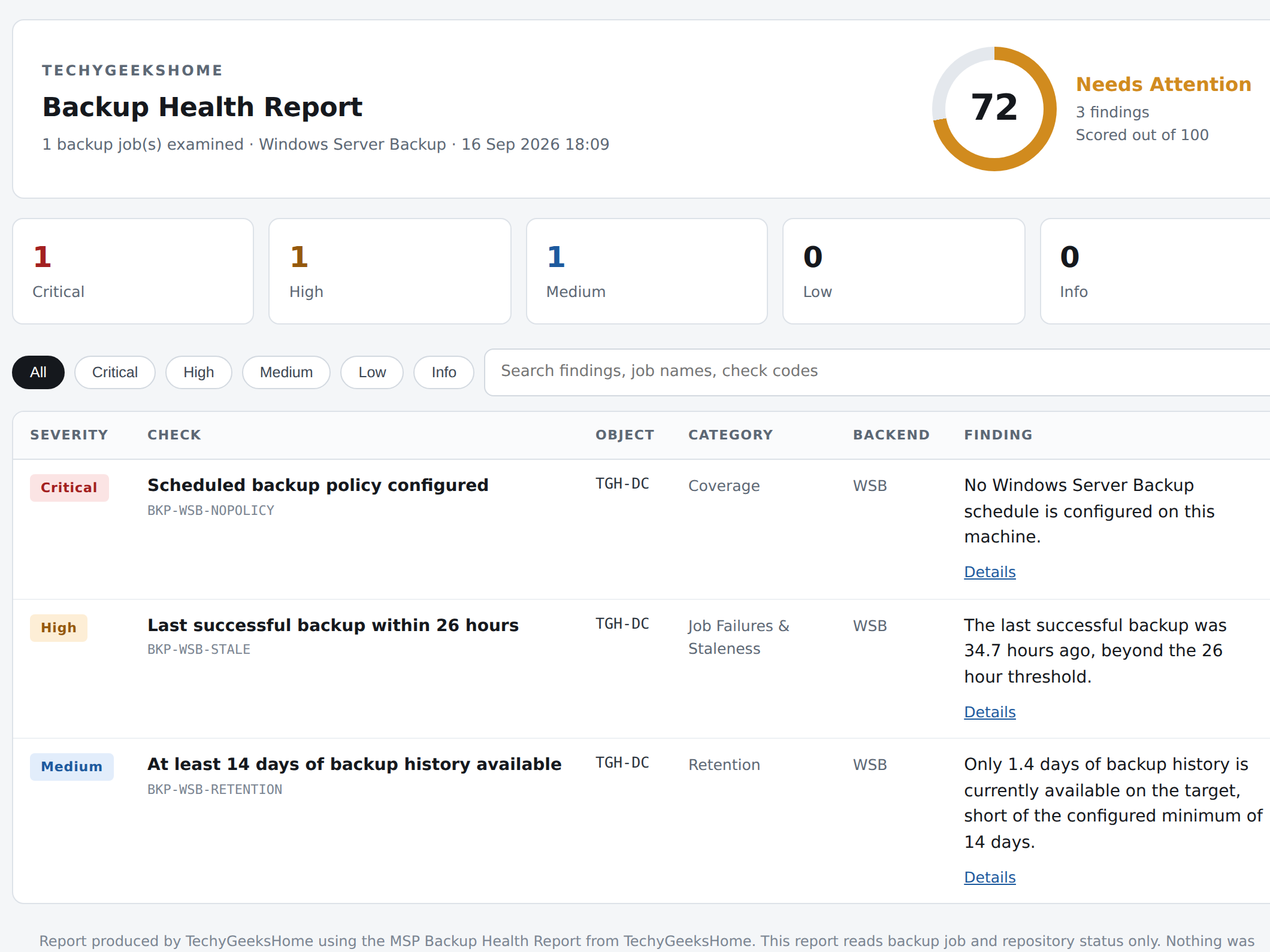
0 to 100 health score
One number for the whole backup setup, weighted so it reflects severity, not just finding count.
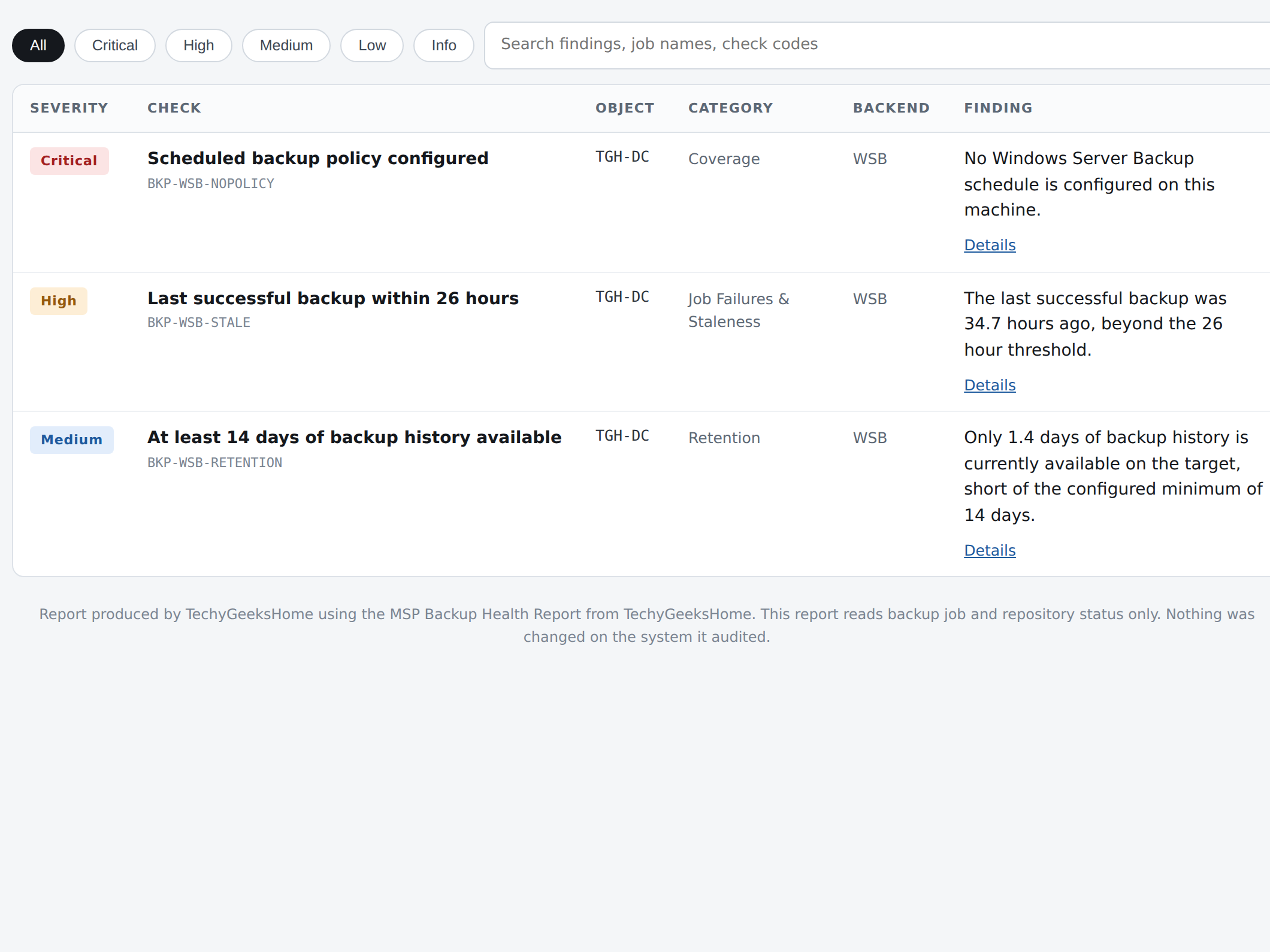
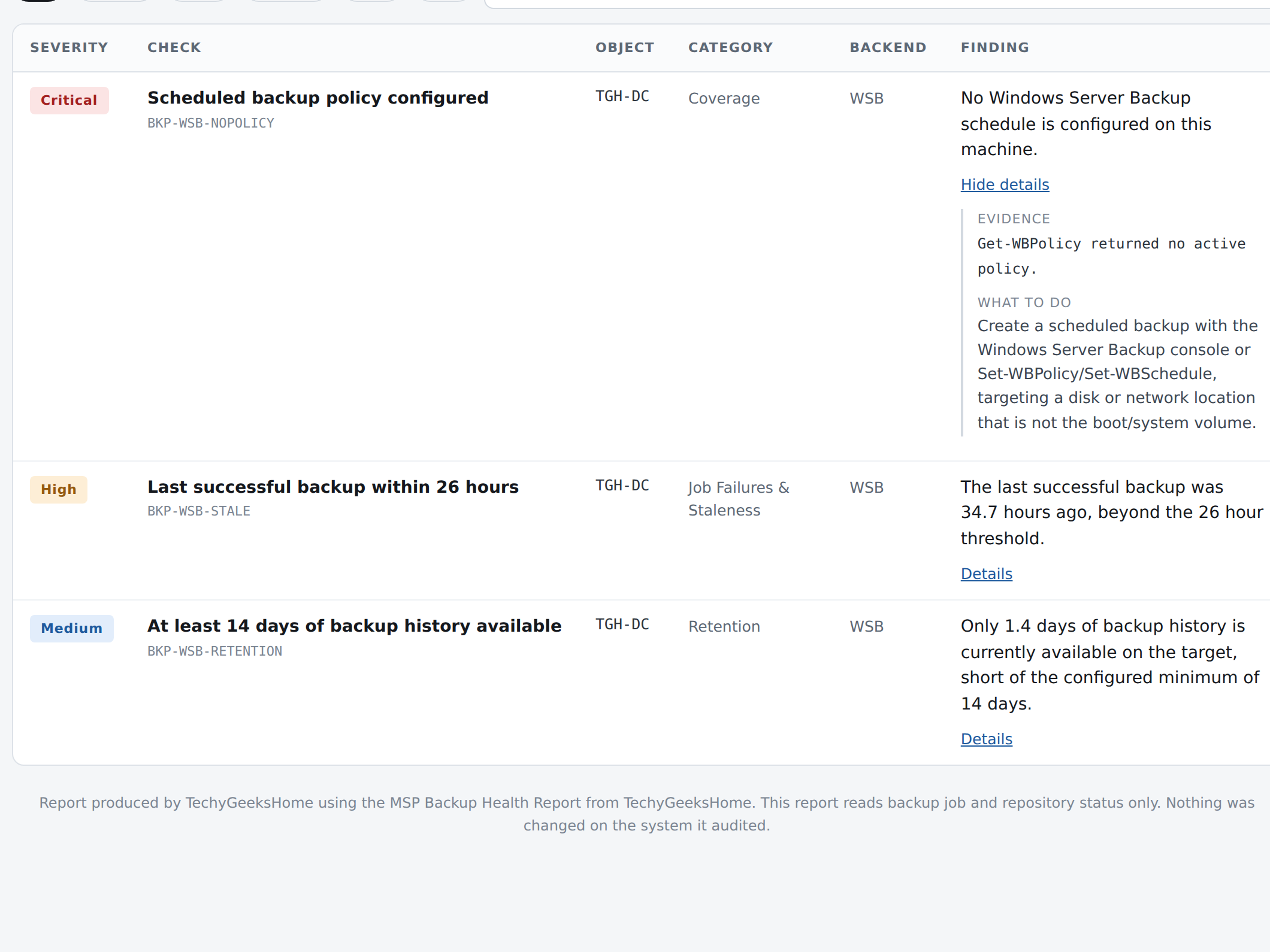
Filterable findings table
Sort and filter every finding by category or severity, search by name.
Self-contained, white label report
One HTML file, your own branding, no install, no internet connection needed to open it. Email it, print it, hand it over.
See it in action
Real screenshots from a real Windows Server Backup machine, not a mockup.
Who it’s for
One report, three different people who need it.
MSPs and consultants
Run it against every client server and hand over a report they can actually read, no translating required.
Internal IT and sysadmins
A health check on your own backup setup before an audit, a migration, or just because nobody has looked in a while.
Anyone who has never actually tested a restore
A backup you haven’t checked is a hope, not a plan. This is the five-minute version of finding out before you need to.
Requirements
Operating system
Windows Server running Windows Server Backup, or the Veeam Backup & Replication server itself.
Rights
An elevated (Administrator) session for Windows Server Backup, or the Veeam Backup Administrator role for Veeam. The scan never writes anything.
Download
Delivered instantly after checkout, from your account on this site.
Prerequisites
PowerShell 5.1 or later. The WindowsServerBackup feature for WSB, or the Veeam PowerShell console component for Veeam.
Version
1.0, released 16 September 2026.
Licence
For the purchasing individual or organisation, including running it for your own clients. Not for resale or redistribution. Full terms in the included LICENSE.txt.
Frequently Asked Questions
Does it support both Windows Server Backup and Veeam?
Yes. It auto-detects whichever is present and checks that one, or you can force a specific backend with a parameter if a machine has both.
Will it change anything in my backup configuration?
No. It is entirely read-only. It never creates, changes, disables or deletes a job, a schedule, a repository or a target. It reads and writes a report, and nothing else.
Does it need to run on a domain controller?
No. Run it on the machine that actually does the backing up (for Windows Server Backup) or on the Veeam Backup & Replication server itself.
Can I use it for more than one client, as an MSP?
Yes. The licence covers running it for your own organisation and for your own clients, as part of the work you do for them. It is not for resale or redistribution as a standalone download.
Do I need to install anything to view the report?
No. The report is a single self-contained HTML file. Open it in any browser, no internet connection or server needed.
Can I set my own branding and thresholds on the report?
Yes. Branding, the staleness window, free-space threshold and minimum retention are all set with command-line parameters, covered in the instructions included with the download.
Is there a subscription?
No. It is a one-time purchase of £29. You keep the tool and can run it as often as you like.
Version History
- 1.0: 16 September 2026. Initial release.
Find out if your backups actually work
Delivered as an instant download after checkout. Full instructions included.
Questions before you buy?
Ask first
Not sure it covers what you need? Get in touch before you buy and we’ll tell you straight.
Instructions included
Full setup and command-line reference is included in the download, no separate documentation to hunt for.