 By Andrew Armstrong
Internal PKI is the kind of infrastructure nobody thinks about until it breaks: a CRL that lapses and silently breaks revocation checking domain-wide, a certificate template that was configured wrong years ago and nobody has looked at since, an LDAPS or RADIUS certificate that expires with no warning. AD CS Certificate Health Report is a PowerShell tool that scans an Active Directory Certificate Services Enterprise CA and turns that risk into a single, clear, interactive HTML report.
Quick Facts
- AD CS Certificate Health Report checks CA certificate and service health, issued certificate expiry, CRL health, weak cryptography, orphaned templates, and the ESC1 privilege-escalation pattern, then scores the CA 0 to 100.
- Its collection layer is verified against a real Enterprise CA, with every finding matched back to real
certutiloutput. - The headline check is ESC1: a template that lets a low-privilege user request a certificate for any identity, including a Domain Admin, and authenticate to the domain as that user.
- AD CS Certificate Health Report is £32, one time purchase, and joins our existing AD Health & Security Audit (£19), GPO Health & Cleanup Report (£17) and MSP Backup Health Report (£29).
AD CS Certificate Health Report: what it checks
Point it at your Enterprise CA and it checks the CA’s own signing certificate for expiry (always Critical, since every certificate that CA has ever issued becomes suspect if it lapses), whether the Certification Authority service is even running, issued certificates approaching or past their expiry date, a CRL that has lapsed or is due for republish soon, certificate templates with under 2048-bit keys or a CA signing with a weak hash, published templates that haven’t issued a certificate in a year or more, and every template for the ESC1 pattern: enrollee-supplied subject names, client authentication, and enrollment open to a low-privilege principal.
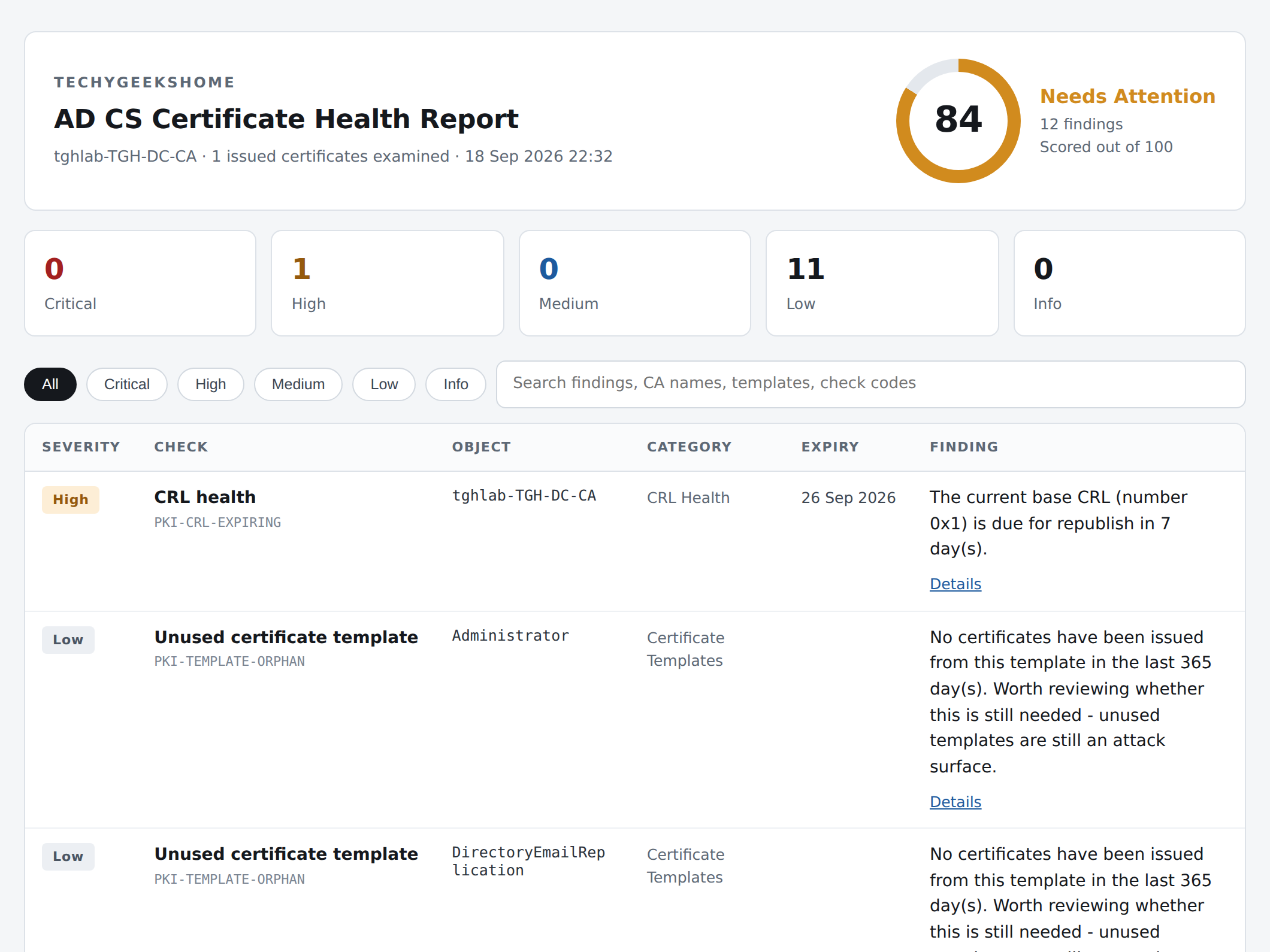
Everything comes back as one self contained HTML report: no internet connection while it runs, no agent to install, no cloud account to create. The findings table filters by severity and searches by CA name, template or check code, so a long list of findings is never just a wall of text.
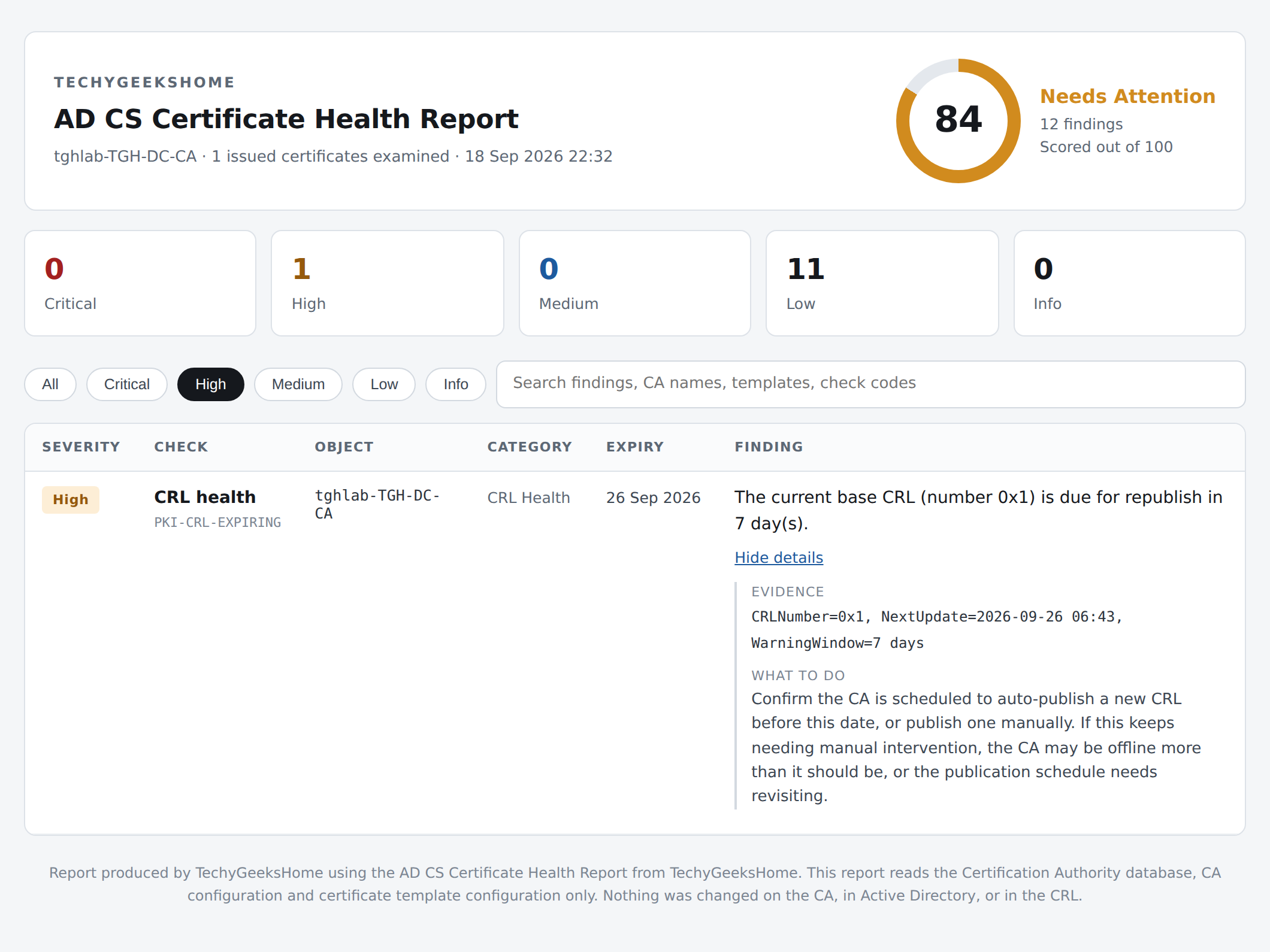
Every finding expands to show its evidence and exactly what to do about it. The CRL finding below is a genuine one from a real lab CA, not a synthetic example: the base CRL was due for republish inside the tool’s default 7-day warning window, with the CRL number and next-update timestamp shown straight from certutil.
See it in action
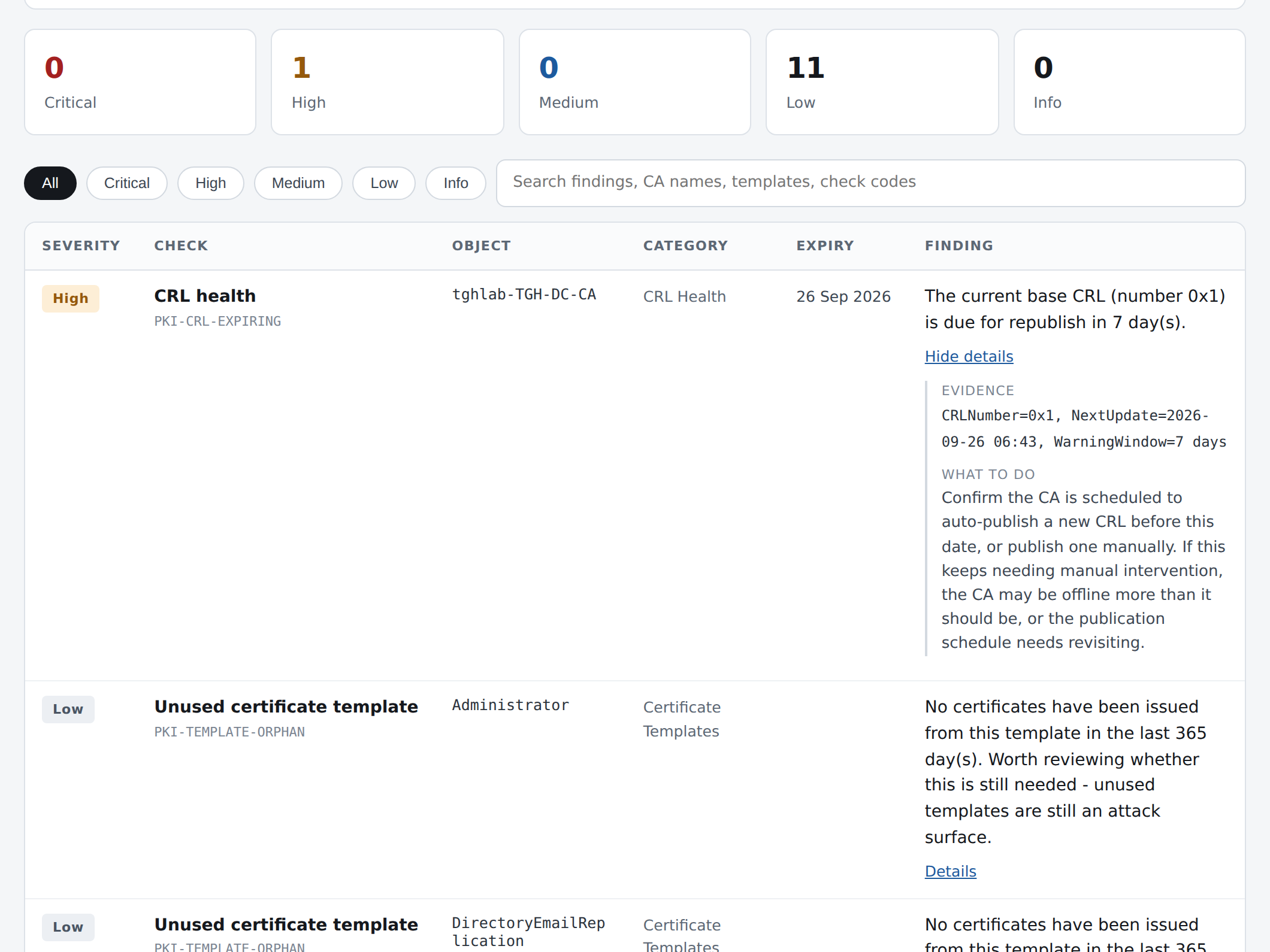
A short clip of the actual report: the score card, a finding expanded to its evidence and guidance, and the findings table filtered to High severity.
Like the rest of the range, the score decays gradually rather than falling off a cliff, so a CA with a handful of orphaned templates never reads the same as one with a lapsed CRL or an ESC1 misconfiguration, and every fix you make actually moves the number.
It is entirely read-only. It never issues, revokes, changes or deletes a certificate, a template, or anything else on the CA, in Active Directory, or in the CRL.
Why ESC1 gets top billing
ESC1 is the best-known AD CS privilege-escalation misconfiguration, and it’s a template misconfiguration rather than a bug: a template that lets the requester supply their own Subject Alternative Name, permits client authentication, and grants enrollment to a low-privilege principal like Domain Users or Authenticated Users. Put those three together and any user who can enrol can request a certificate for any identity they choose, including a Domain Admin, and authenticate to the domain as that user. This tool reads every published template’s configuration directly from Active Directory and flags the combination as Critical the moment it finds it, regardless of whether the template has ever actually been abused.
Joins the rest of the range
AD Health & Security Audit covers accounts, privileged group membership and password policy. GPO Health & Cleanup Report goes deep on Group Policy. MSP Backup Health Report checks whether your backups would actually restore. AD CS Certificate Health Report is the fourth: your internal PKI. Same architecture, same report style, same one-time-purchase model, easy to run all four for a client in one sitting.
| Tool | Checks | Price |
| AD Health & Security Audit | Stale accounts, privileged group membership, password policy, orphaned GPOs | £19 |
| GPO Health & Cleanup Report | Orphaned/empty/disabled GPOs, missing SYSVOL, broken WMI filters, MS16-072 permission gap, inheritance conflicts | £17 |
| MSP Backup Health Report | Windows Server Backup or Veeam coverage, failed/stale jobs, capacity, 3-2-1 offsite copies, retention | £29 |
| AD CS Certificate Health Report | CA cert & service health, issued cert expiry, CRL health, weak crypto, orphaned templates, ESC1 | £32 |
Discover more from TechyGeeksHome
Subscribe to get the latest posts sent to your email.
