 By Andrew Armstrong
Waiting for concert tickets to drop, a sold out item to come back, or exam results to go live usually means one thing: sitting there pressing refresh over and over. It gets old fast, and the moment you look away is the moment it changes.
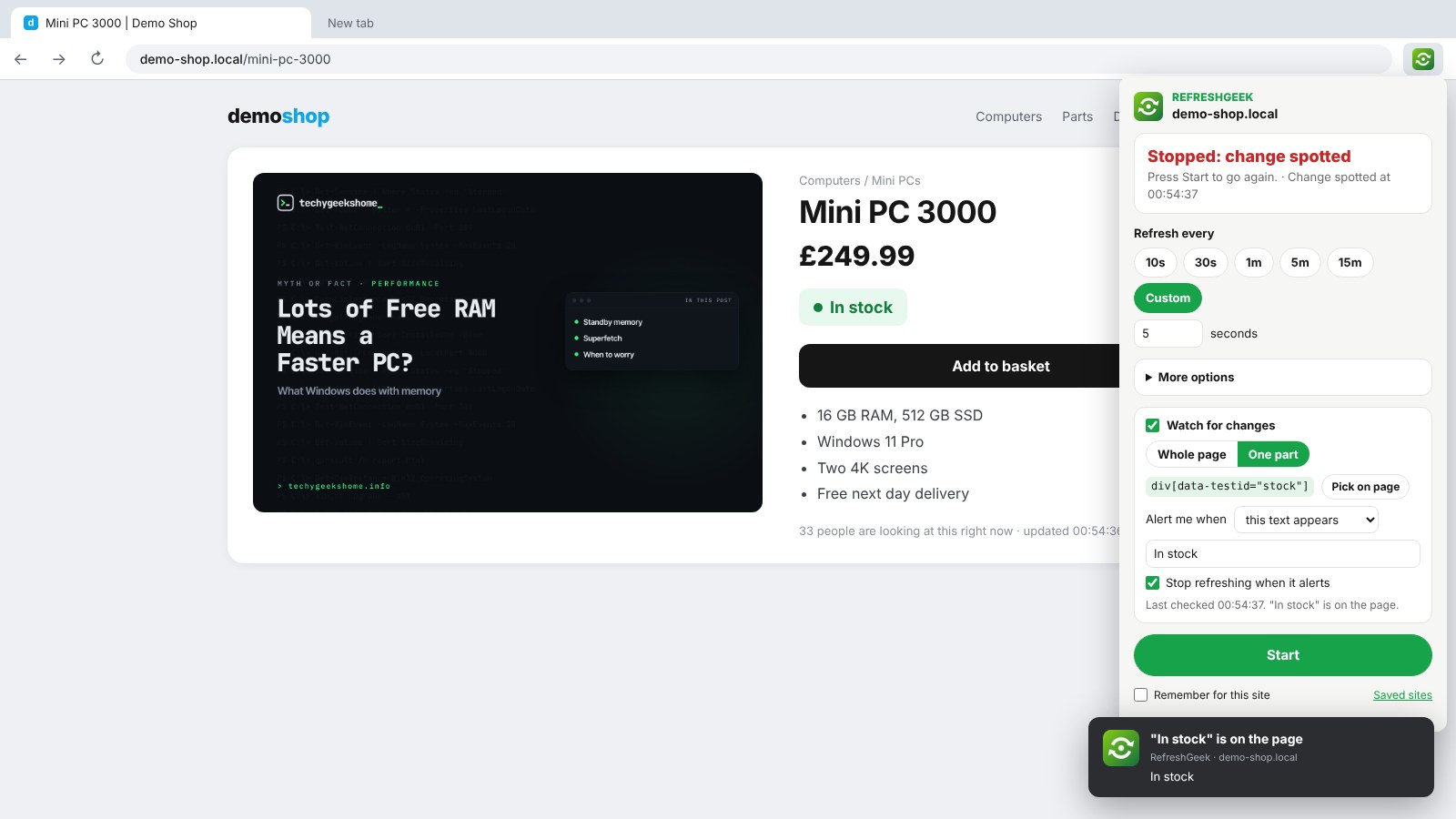
So we built RefreshGeek. Pick a time and it refreshes the tab for you, with a countdown on the toolbar icon. Turn on Watch for changes, click the bit of the page you care about, and you get a desktop alert the moment it changes. It’s free, open source and has no tracking at all.
Quick Facts
- Free. No Pro tier, no ads and no limit.
- Open source under the GPL-3.0, with the full source on GitHub.
- Works in Chrome, Edge, Brave, Opera, Vivaldi and Firefox.
- No account and nothing sent anywhere.
What it does
- Any refresh time: 10 seconds to 15 minutes, or your own number of seconds.
- Countdown on the icon: see when the next refresh is due.
- Watch for changes: the whole page, or one part you click on.
- Wait for the right words: alert when text like In stock appears or disappears.
- Desktop alert: plus a flashing tab title, and it can stop by itself.
- Stop rules and extras: random gap, hard refresh, stop after a count or at a time, keep your scroll place.
How it works
RefreshGeek reloads the tab on your timer. If you turn on watching, it reads the text of the page, or just the part you picked, after each refresh and compares it with last time, all inside your own browser. Nothing is sent anywhere, and it only asks for access to a site when you turn on watching for that site.
How to install it
Store listings for Edge and Firefox are on the way. Until then, adding it yourself takes about a minute:
- Download the ZIP and unzip it somewhere you’ll keep it.
- Go to
chrome://extensions(oredge://extensions) and switch on Developer mode. - Click Load unpacked and pick the
refreshgeekfolder.
On Firefox, grab the Firefox version instead and load it from about:debugging. The RefreshGeek page walks through every step with screenshots.
Download it
Found a bug or want a feature? Open an issue on GitHub. RefreshGeek joins FocusGeek, Bluesky Saver, ErrorGeek, Image Format Saver, Reddit Saver, Page Saver, Board Saver for Pinterest, Grid Saver for Instagram and Clip Saver for TikTok in our browser extensions.
Discover more from TechyGeeksHome
Subscribe to get the latest posts sent to your email.
