 By Andrew Armstrong
Bluesky is growing fast, and plenty of artists, photographers and news accounts now post there first. But if you want to keep the pictures and videos from an account, you are stuck saving them one post at a time, and videos don’t save at all because Bluesky streams them in small pieces.
So we built Bluesky Saver. Open a Bluesky profile, post, custom feed or list, click the icon, and every picture and video comes down at full size in one ZIP file. It’s free, open source and has no tracking at all.
Quick Facts
- Free. No Pro tier, no ads and no limit.
- Open source under the GPL-3.0, with the full source on GitHub.
- Works in Chrome, Edge, Brave, Opera, Vivaldi and Firefox.
- No account and no sign-in. It reads public posts through Bluesky’s own open API.
What it does
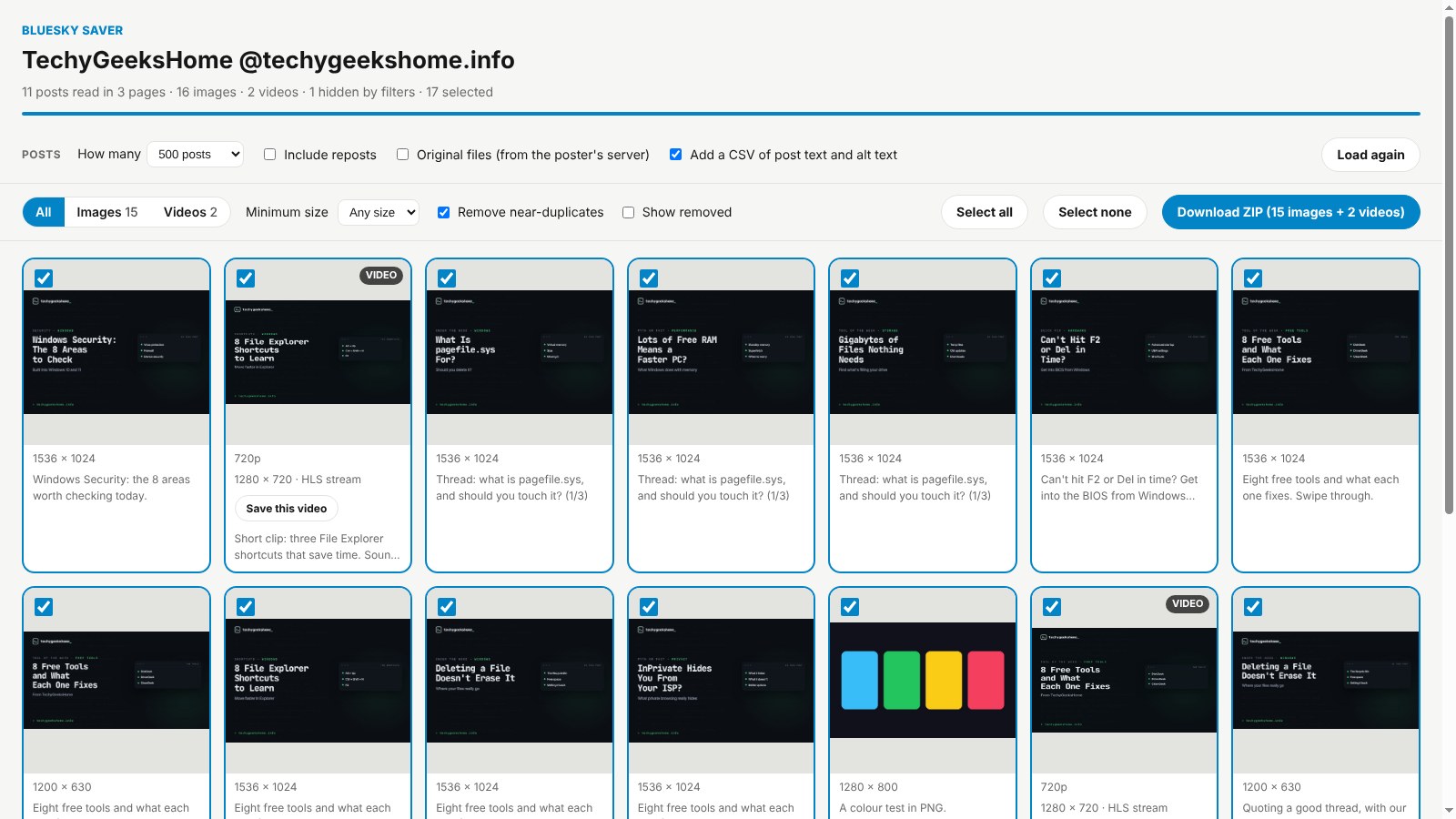
- Profiles, posts, feeds and lists: works on any of them on bsky.app.
- Full-size pictures: in the format they were posted in, not small thumbnails.
- Videos with sound: the streamed pieces are joined into one normal MP4.
- Duplicates removed: the same picture posted twice is only kept once.
- A preview grid: untick anything you don’t want before you download.
- Optional CSV: the post text and alt text of everything you saved.
How it works
Bluesky has an open, public API, so Bluesky Saver doesn’t need to scrape anything or ask you to sign in. It reads the posts you are looking at, then downloads the pictures and video pieces straight from Bluesky’s own servers. Nothing goes through a website in the middle, and nothing is sent anywhere else.
How to install it
Store listings for Edge and Firefox are on the way. Until then, adding it yourself takes about a minute:
- Download the ZIP and unzip it somewhere you’ll keep it.
- Go to
chrome://extensions(oredge://extensions) and switch on Developer mode. - Click Load unpacked and pick the
bluesky-saverfolder.
On Firefox, grab the Firefox version instead and load it from about:debugging. The Bluesky Saver page walks through every step with screenshots.
Download it
Found a bug or want a feature? Open an issue on GitHub. Bluesky Saver joins ErrorGeek, Image Format Saver, Reddit Saver, Page Saver, Board Saver for Pinterest, Grid Saver for Instagram and Clip Saver for TikTok in our browser extensions.
Bluesky Saver is an independent tool made by TechyGeeksHome and is not affiliated with Bluesky Social PBC.
Discover more from TechyGeeksHome
Subscribe to get the latest posts sent to your email.
