 By Andrew Armstrong
Instagram makes it easy to post and oddly hard to get anything back out. Want a copy of your own photos? You get a zipped data export days later. Want a handful of posts from a profile for a project? It’s screenshots, or opening each post one at a time.
So we built Grid Saver. It’s a free browser extension that saves every photo, carousel slide and reel from an Instagram profile in one go, at the best quality Instagram has, and hands it all to you as a single ZIP file.
Quick Facts
- Free. No Pro tier, no ads and no limit on how many posts you save.
- Open source under the GPL-3.0, with the full source on GitHub.
- Works in Chrome, Edge, Brave, Opera, Vivaldi and Firefox.
- No account and no tracking. It runs entirely inside your browser.
What it does
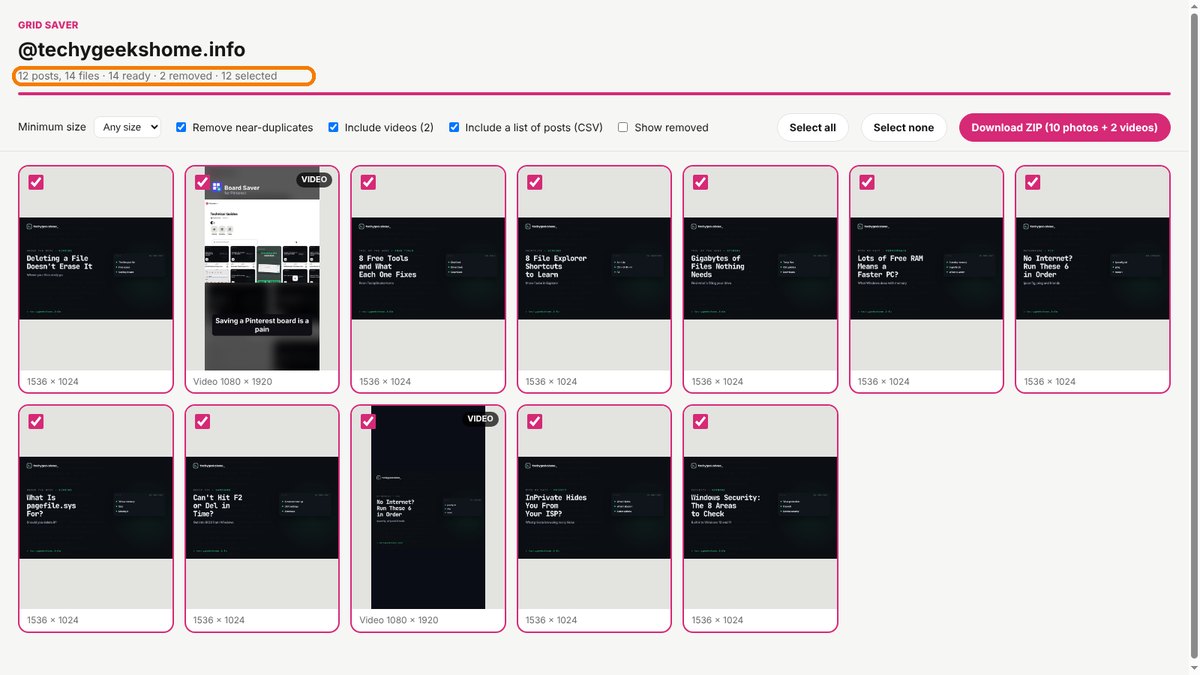
Open a profile, click the Grid Saver icon, and it scrolls down for you, counting the posts as Instagram loads them. A results tab then pulls down the largest copy of every photo, every slide of every carousel, and reels as MP4 files.
- Whole profiles or one post. Open a single post or reel instead and Grid Saver saves just that.
- Duplicates go. The same picture posted twice, or a smaller copy of one you already have, is taken out automatically.
- You stay in charge. A preview grid shows everything first. Untick what you don’t want, set a minimum size, or switch videos off.
- One tidy ZIP. Newest first, with the account name and date in every file name, plus an optional spreadsheet of links and captions.
How it works, and why it’s gentle on your account
Plenty of Instagram downloaders hammer Instagram’s servers with their own requests, which is a quick way to get rate-limited. Grid Saver doesn’t make any extra requests to Instagram at all. It simply remembers the post details Instagram already sends to your browser while you scroll, then downloads the photos from Instagram’s own image servers.
That’s also why you need to be signed in to Instagram, just as you would to scroll the profile yourself. Grid Saver never sees your password.
How to install it
On Microsoft Edge, install Grid Saver straight from the Edge Add-ons store and it updates itself. Firefox Add-ons is still reviewing it. On Chrome, Brave, Opera and Vivaldi, adding it yourself takes about a minute:
- Download the ZIP and unzip it somewhere you’ll keep it.
- Go to
chrome://extensions(oredge://extensions) and switch on Developer mode. - Click Load unpacked and pick the
grid-saverfolder.
On Firefox, grab the Firefox version instead and load it from about:debugging. The Grid Saver page walks through every step with screenshots.
A word on whose photos they are
Saving a profile doesn’t change who owns what’s on it. Grid Saver is ideal for backing up your own account, or keeping work you have permission to use. If you want to repost someone else’s photos, you still need their permission.
Download it
Found a bug or want a feature? Open an issue on GitHub. Grid Saver joins Board Saver for Pinterest and Clip Saver for TikTok in our browser extensions.
Grid Saver is an independent tool made by TechyGeeksHome. It is not affiliated with, endorsed by or connected to Instagram or Meta.
Discover more from TechyGeeksHome
Subscribe to get the latest posts sent to your email.
