 By Andrew Armstrong
Pinterest is brilliant for collecting ideas and terrible at giving them back. There’s no “download board” button. Save an image the usual way and you get whatever size Pinterest happened to show you, one pin at a time. Do that for a board of 200 pins and you’ve lost an evening.
So we built a fix. Board Saver is a free browser extension that downloads every image on a Pinterest board in one go, at full size, with the duplicates taken out, and hands it all to you as a single ZIP file.
Quick Facts
- Free. No Pro tier, no ads and no limit on how big the board is.
- Open source under the GPL-3.0, with the full source on GitHub.
- Works in Chrome, Edge, Brave, Opera, Vivaldi and Firefox.
- No account and no tracking. It runs entirely inside your browser and only talks to Pinterest.
What it does
Open any board, click the Board Saver icon, and it collects every pin on the board, including the ones tucked away in sections. A results tab then pulls down each image at the best size Pinterest has. For most pins that’s the original upload, not the shrunk-down copy you see when you scroll.
- Duplicates go. The same picture pinned twice, or a smaller copy of an image you already have, is removed automatically. The biggest copy is the one kept.
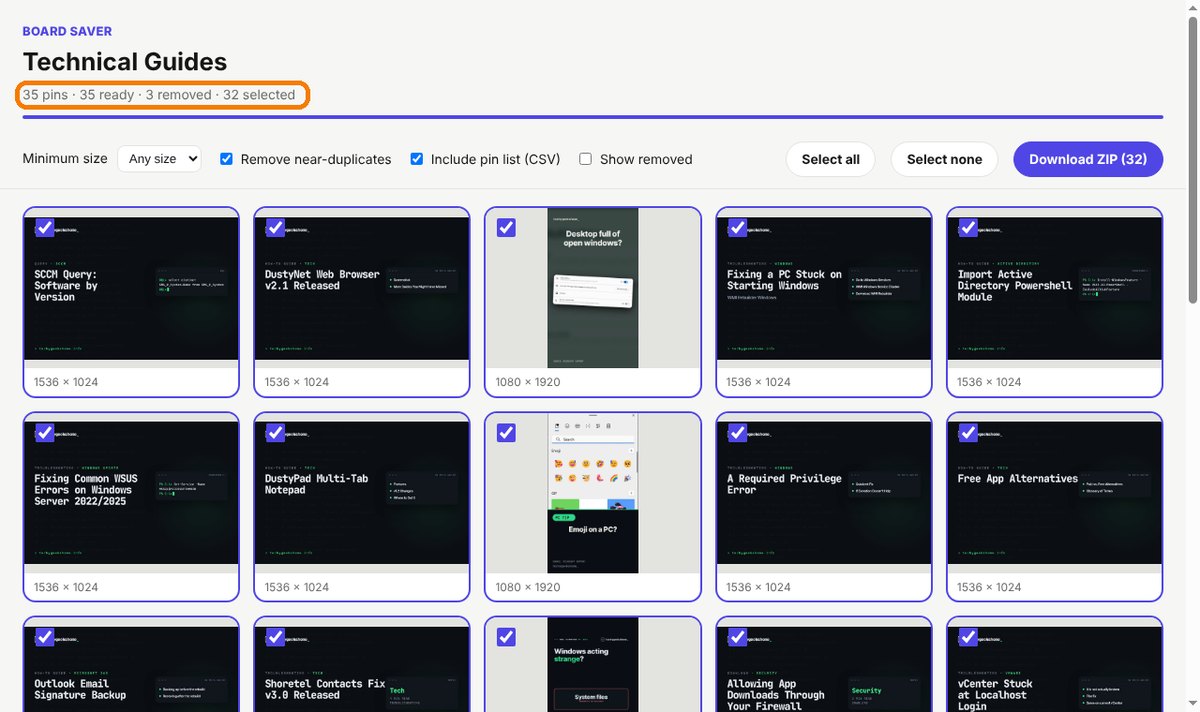
- You stay in charge. A preview grid shows everything before it downloads. Untick what you don’t want, or set a minimum size to skip the small stuff.
- One tidy ZIP. Images are numbered in board order, sections become folders, and there’s an optional spreadsheet listing every pin’s title and link.
- Video pins too. Switch on Include videos and they come down as MP4 files.
The tricky bit: spotting real duplicates
Finding exact copies is easy. Finding the same picture saved at two different sizes is harder, and the obvious way of doing it gets things badly wrong. When we tested an early version on our own boards, where every image uses the same dark design, it decided 25 completely different images were duplicates of each other.
The version we’re releasing compares a scaled-down copy of every picture pixel by pixel before it removes anything. Pictures that just share a style are left alone, and a genuine smaller copy is still caught. If it ever gets one wrong, tick Show removed and put it back with one click.
How to install it
Board Saver is waiting for review on Edge Add-ons and Firefox Add-ons. Until then, adding it yourself takes about a minute:
- Download the ZIP and unzip it somewhere you’ll keep it.
- Go to
chrome://extensions(oredge://extensions) and switch on Developer mode. - Click Load unpacked and pick the
board-saverfolder.
The Board Saver page walks through every step with screenshots.
A word on whose pictures they are
Saving a board doesn’t change who owns what’s on it. Board Saver is ideal for mood boards, reference folders and backing up your own pins. If you want to repost someone else’s work, you still need their permission.
Download it
Found a bug or want a feature? Open an issue on GitHub. There is a Firefox version too, on the Board Saver page.
Board Saver is an independent tool made by TechyGeeksHome. It is not affiliated with, endorsed by or connected to Pinterest.
Discover more from TechyGeeksHome
Subscribe to get the latest posts sent to your email.
