 By Andrew Armstrong
Content that ages well shouldn’t have to compete with content that doesn’t. If your homepage, category pages and RSS feed are increasingly full of years-old news, deals and version-specific tutorials, the newest thing you published gets buried under the pile. We built BackBurner Post Archiver to fix that without the usual trade-off: it retires old content out of your “latest” listings, but never deletes anything, never breaks a URL, and never touches your search rankings. As of today, it’s available for anyone to download.
No manual cleanup, no broken links, no lost SEO value: just a daily job that quietly keeps your homepage and archives feeling current.
What BackBurner does
BackBurner is a housekeeping tool, not a deletion tool: every archived post is fully intact and fully reachable, it just stops surfacing as “new”:
- Configurable age threshold: choose a single site-wide age (in months) after which content is archived.
- Per-post-type scope: include Posts, Pages, Media, Products, or any other public custom post type.
- Category and tag targeting: restrict archiving to specific sections of your site, or run it everywhere.
- Permanent exemptions: mark any individual post “Never auto-archive this post” regardless of its age.
- Nothing is deleted: archived content moves to a dedicated “Archived” status, never Trash.
- Full removal from listings: archived posts are automatically excluded from the homepage, category/tag archives, internal search, and the RSS feed.
- URLs keep working: archived posts keep their original permalink and load normally, no redirects, no 404s.
- One-click un-archive: change the status back to Published from the normal post editor at any time.
- Built-in Dry Run mode: preview exactly which posts would be archived before anything actually changes.
- Runs itself: a daily WP-Cron job, or trigger it manually with a “Run now” button.
Who it’s for
Built for sites that accumulate a lot of time-sensitive content, news, deals, version-specific how-to guides, event write-ups, where old items cluttering the homepage and archives hurts the reading experience, but where the content itself is still worth keeping for its existing traffic and search rankings. If you’ve ever manually hunted down and unpublished old posts to tidy up your homepage, this automates exactly that job, safely.
Requirements
- WordPress: 5.8 or later
- PHP: 7.4 or later
- Current version: 1.0.5
See it in action
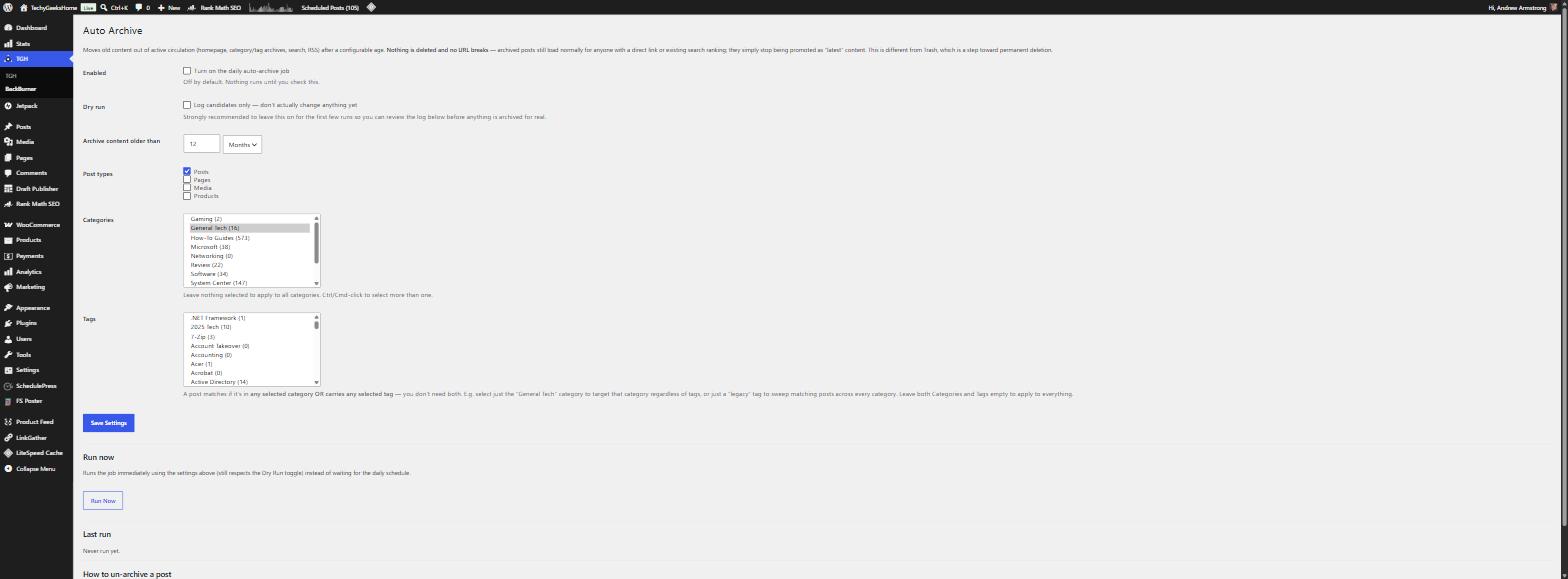
The settings screen is where you set your age threshold, choose which post types and categories/tags are in scope, and run BackBurner on demand.
Get BackBurner Post Archiver
BackBurner Post Archiver is free to download and use: 100% free, GPLv2 licensed. It does nothing until you turn it on, and ships with Dry Run mode so you can see exactly what it would do before it changes anything live.
Download BackBurner Post Archiver Free
Free, GPLv2 licensed: also submitted and awaiting review for the official WordPress.org Plugin Directory.
Download BackBurner Post Archiver FreeFrequently Asked Questions
Does this delete anything?
No. BackBurner never deletes content. It changes a post’s status to “Archived” so it stops appearing in listings of new/latest content. The post itself, its media, and its URL are untouched.
Will archived posts 404 or redirect?
No. An archived post’s permalink continues to load exactly as it did before, full content, no redirect, no 404, for any visitor who reaches it directly, whether that’s a bookmark, an external link, or an existing search engine ranking.
Can I stop a specific post from ever being archived?
Yes. Every post has a “Never auto-archive this post” option. Enable it and that post is permanently excluded from BackBurner’s daily run, regardless of its age.
Does this affect my SEO?
Archived posts keep their canonical URL and continue to be included in your XML sitemap, so search engines can keep indexing them. BackBurner only changes where the post appears within your own site: it does not add noindex, does not redirect, and does not remove the post from your sitemap.
What happens if I turn off the “Enabled” switch?
Nothing runs. The daily cron check does nothing at all while Enabled is off, and no previously-archived posts are affected: they stay exactly as they are until you turn BackBurner back on.
Discover more from TechyGeeksHome
Subscribe to get the latest posts sent to your email.
