 By Andrew Armstrong
CredSSP Encryption Oracle Remediation Breaking Remote Desktop
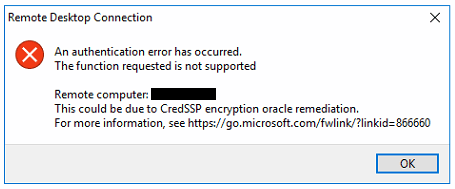
If Remote Desktop connections to a server suddenly start failing with a CredSSP-related error — commonly worded along the lines of “An authentication error has occurred. The function requested is not supported. This could be due to CredSSP encryption oracle remediation” — the cause is almost always a security update mismatch between your client and the target server, not a genuine credential problem.
This traces back to CVE-2018-0886, a vulnerability in CredSSP that Microsoft patched in March 2018. That update and later ones changed the default CredSSP behaviour, and once enough time passes, machines that are fully patched will refuse to negotiate RDP sessions with machines that are still missing the fix, since the unpatched side is considered vulnerable to the encryption oracle attack.
The fix is to make sure both the client and the server have the relevant CredSSP update installed — check via Windows Update, or pull the specific package for your OS build from the Microsoft Update Catalog. Once both ends are patched, the connection will negotiate normally again on the updated, more secure CredSSP behaviour.
As a temporary workaround only — not a fix — you can loosen the client’s CredSSP enforcement via Group Policy (Computer Configuration > Administrative Templates > System > Credentials Delegation > Encryption Oracle Remediation, set to Vulnerable), but this deliberately re-opens the vulnerability the update was written to close, so it should only ever be used briefly while you get the missing update applied, never as a long-term setting.
Resources
Gear We Recommend
A few general tech accessories worth having alongside this.
Browse our General Tech Accessories picks on AmazonAs an Amazon Associate, TechyGeeksHome earns from qualifying purchases.
Discover more from TechyGeeksHome
Subscribe to get the latest posts sent to your email.
