Browse step-by-step how-to guides covering Windows, Windows Server, networking, and virtualization. These tutorials are designed for IT professionals, system administrators, and home lab users looking for practical solutions and clear instructions.
If you want to export an Exchange mailbox to PST with some variables included, then this guide should help you out. In Exchange Management Shell, you can run the following command to export a mailbox to PST with variables like delete all mail from mailbox after export or maybe excluding Contacts or Calendar. The command … Read more
Have you ever wanted to use your iPad as a second monitor to your Mac or PC? Well, now “there is an app for that”!. We recently came across an app in the Apple App Store called “Duet Display” and didn’t really give it much thought as we have seen a lot of these in … Read more
If you are using Cisco switches, you may find that you need to configure IP helper addresses to give devices on different VLAN’s the correct direction to your DHCP server. To do this, you can use the following commands: # = the number of your VLAN To view the current vlan configuration: This will bring … Read more
If you are using Windows Deployment Services (WDS) and you need to add a boot image into the system, then you should view the below tutorial video demonstration on how to successfully carry this out.
Comments
If you have any questions or comments on this guide, then please feel free to leave us a message below using our comments system and we will try and get back to you as soon as possible.
If you have a requirement to have Silverlight installed as a silent install, like for deployment through System Center Configuration Manager, then you can use the following guide to allow you to do this. First of all, you will need to download the full installer which you can get from the download link below: Download … Read more
You may run in to a situation where you need to completely factory reset a Shoretel phone handset. This can be due to a handset being unresponsive or not talking to its headquarter server or local MGC, amongst other reasons like selling your handset! To carry out a full factory reset you should take the … Read more
If you want to restart SCCM OSD Task Sequence from within Windows PE without having to reboot the machine and start the PXE boot sequence again, you can quickly press F8 to bring up a command prompt and enter the following command: x:smsbini386TsmBootstrap.exe /env:WinPE /configpath:x:smsdata This will then restart the task sequence process for you … Read more
If you have a new model of computer and you have PXE booted it and you do not get a network connection or IP address, then this is because the network card driver for that model is not available either within Windows PE or the boot image you have used to PXE boot the machine. … Read more
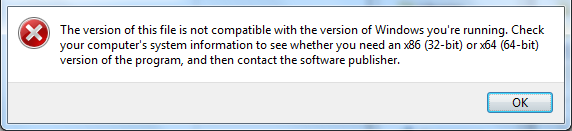
If you have an old 16-bit application that you need to run on Windows 7 or 8.1 or maybe even an old classic game you want to play, you will find that the chances are the modern operating systems will not run them and you will run into an error like this for Windows 7:
Or this one for Windows 8:
So, what can you do?
Well there is hope! There is an excellent DOS emulator that we have tested and now using called DOSBox. It seems to work with all of the DOS programs that we have tested it with and we even downloaded some old DOS games to test it and all worked perfectly.
With a little bit of simple configuration, the DOSBox emulator loads your DOS program in no time and allows you access back into these old programs.
Download
You can download the latest version of the DOSBox program from SourceForge using the link below:
Once you have downloaded the DOSBox program there is a little configuration you have to carry out in the options to get your program “mounted” and then to run, but it is extremely simple to do. Below is a video guide on how to configure the program to run:
Video Demo
Comments
If you are still struggling or have any questions or comments, then please feel free to leave us to message below using our comments section and we will try and get back to you as soon as we can.
We recently came across issues where our Configuration Manager Operating System Deployments (OSD) where running extremely slowly and we could not figure out why. After some investigation, we found out that one of our remote Distribution Points (DP) was not working correctly and that rebuilds on one of the sites where actually pulling the image … Read more
If you need to download the Windows 8.1 recovery media for your OEM version of your operating system, then you can do so by clicking the link below and entering the details from your licence sticker (COA). Windows 8.1 Recovery Software You can download the media to a USB stick or ISO file to burn … Read more