Practical IT Guides for Windows, SCCM & PowerShell Admins
TechyGeeksHome has been helping IT professionals and sysadmins since 2010. Find 1,500+ real-world guides covering Windows 10 & 11, Windows Server, SCCM/ConfigMgr, PowerShell scripting, Active Directory, networking, and virtualisation — all written from hands-on production experience by a UK IT pro with 26 years in the field.
If you are looking at setting up your System Center Configuration Manager (SCCM) with PKI, then there is an excellent step by step guide that you can follow from SCCMGuy. The link to this guide is below: https://sccmguy.com/2013/11/26/pki-certificates-for-configuration-manager-2012-r2-part-1-of-4-web-server-certificate/ We have used this in the past our various labs and it details well what you need to … Read more
We recently came across an issue where when trying to connect a bluetooth mouse, it kept coming up asking to enter a passkey. Well, with it being a mouse you cannot enter a code so how do you fix it? You need to look in the registry and remove the address for it. Identifying the … Read more
If you want to add multiple specific email addresses to your Exchange Anti-Spam Recipient Filtering then you can use Exchange Management Shell to run a command to add comma separated multiple email addresses. The command you should run is this: You can keep adding email addresses to the list for what you require. Something to … Read more
If you are looking for the restore media for your Windows machine, then you can download the official media (if you have a licence of course!) from the official Microsoft website. All you have to do is click the link below: Microsoft Windows Download Page Then fill out your details with your licence key information … Read more
If you are using Exchange in your organisation and have multiple administrators, then you may need to keep an eye on mailbox limits. In most organisations the mailbox limits are set by default on the database, however you can change the limits per mailbox. So, if you want to see which mailboxes do not have … Read more
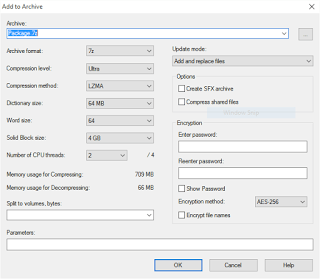
If you have used Visual Studio to create an installer, then you will find that their are two output files required for the installation – setup.exe and setup,msi. You can zip these together into a package, but what if you want a single EXE file installer? Well you can use 7-Zip to create a packaged … Read more
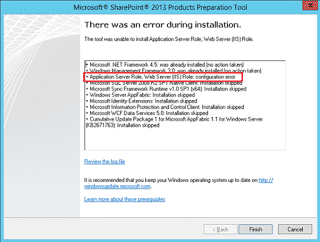
If you are trying to install SharePoint Foundation 2013, you will need to run the pre-requisite installation process. However, you may come across an error stating that the tool cannot configure the Application Server Role and Web Server (IIS) Role.
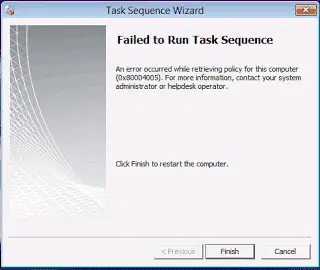
If you are using System Center Configuration Manager for Operating System Deployment (OSD) then you may come across an error like this even after a successful PXE boot:
Remote Server Administration Tools for Windows 10 includes Server Manager, Microsoft Management Console (MMC) snap-ins, consoles, Windows PowerShell cmdlets and providers, and command-line tools for managing roles and features that run on Windows Server Technical Preview.
If you would like to disable Microsoft OneDrive in your corporate environment then you can do so using Group Policy. Simply open up your Group Policy editor and create a new policy (or edit an existing policy) and browse to the following location: Computer Configuration > Administrative Templates > Windows Components In this location you … Read more
If you are having problems in getting Dropbox to either install or synchronise on your corporate network, then you will need to add some IP ranges and URL’s to your web security proxy whitelists.