Practical IT Guides for Windows, SCCM & PowerShell Admins

TechyGeeksHome has been helping IT professionals and sysadmins since 2010. Find 1,500+ real-world guides covering Windows 10 & 11, Windows Server, SCCM/ConfigMgr, PowerShell scripting, Active Directory, networking, and virtualisation — all written from hands-on production experience by a UK IT pro with 26 years in the field.

SCCM Collection based on Active Directory Organisation Unit (OU) Membership

sccm logo 600x400

You may want to create a Configuration Manager Collection based upon an Active Directory Organisation Unit. To do this you can use the following WQL code and then simply amend the last part to be the Organisation Unit that you want to base the Collection on: SELECT SMS_R_USER.ResourceID, SMS_R_USER.ResourceType, SMS_R_USER.Name, SMS_R_USER.UniqueUserName, SMS_R_USER.WindowsNTDomain FROM SMS_R_User WHERE … Read more

DOSBox – 16-Bit Application Emulator

DosBox

If you have an old 16-bit application that you need to run on Windows 7 or 8.1 or maybe even an old classic game you want to play, you will find that the chances are the modern operating systems will not run them and you will run into an error like this for Windows 7:
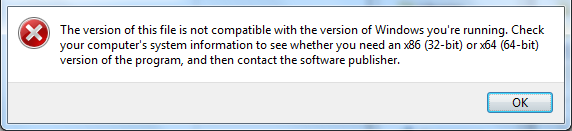
win7

Or this one for Windows 8:

win8

So, what can you do?

Well there is hope! There is an excellent DOS emulator that we have tested and now using called DOSBox. It seems to work with all of the DOS programs that we have tested it with and we even downloaded some old DOS games to test it and all worked perfectly.

With a little bit of simple configuration, the DOSBox emulator loads your DOS program in no time and allows you access back into these old programs.

Download

You can download the latest version of the DOSBox program from SourceForge using the link below:

DosBox Download

Instructions

Once you have downloaded the DOSBox program there is a little configuration you have to carry out in the options to get your program “mounted” and then to run, but it is extremely simple to do. Below is a video guide on how to configure the program to run:

Video Demo

Comments

If you are still struggling or have any questions or comments, then please feel free to leave us to message below using our comments section and we will try and get back to you as soon as we can.
Show Distribution Point in use during Task Sequence

sccm logo 600x400

We recently came across issues where our Configuration Manager Operating System Deployments (OSD) where running extremely slowly and we could not figure out why. After some investigation, we found out that one of our remote Distribution Points (DP) was not working correctly and that rebuilds on one of the sites where actually pulling the image … Read more

Microsoft Office 2016 Product Key

Office 365 logo

Microsoft have now released the preview version of their upcoming Office 2016 release and you can now download a trial version from the list of choices below: Download Get Office 2016 Preview (32 bit) Get Office 2016 Preview (64 bit) Use the product key provided below to activate your trial: NKGG6-WBPCC-HXWMY-6DQGJ-CPQVG Once the trial period … Read more

Orchestrator Not Showing Newly Created Folders or Runbooks

Missing SCORCH Runbooks

This is a re-post of a guide that we posted about two years ago, but this happened to us again thisweek so thought it would be good to share again… We ran into an issue where our newly created folders and runbooks in Orchestrator were not showing up in our SCCM (MDT) Execute Runbooks task … Read more

Remote Server Administration Tools (RSAT) for Windows 10 & Windows 8.1

microsoft black logo

You can now download the Remote Server Administration Tools (RSAT) for both Windows 10 and Windows 8.1. This allows you to manage your servers for options like DHCP, Active Directory and DNS amongst many others. To download the RSAT installation files, simply click the version you require below: DOWNLOAD RSAT for Windows 8.1 RSAT for … Read more