Practical IT Guides for Windows, SCCM & PowerShell Admins
TechyGeeksHome has been helping IT professionals and sysadmins since 2010. Find 1,500+ real-world guides covering Windows 10 & 11, Windows Server, SCCM/ConfigMgr, PowerShell scripting, Active Directory, networking, and virtualisation — all written from hands-on production experience by a UK IT pro with 26 years in the field.
This post will show you how to enable the ability to uninstall programs when in safe mode. This can help if you have installed a driver or some other piece of software that may have blue screened your computer. Guide Launch your computer into safe mode and then run the following from a command prompt: … Read more
If you are using System Center Operations Manager (SCOM) then you may have Management Packs in your system that you may longer want – especially if, like me, you go and add as many as you can in blissful ignorance expecting to get lots of tasty data. Then realising that this is a terrible idea … Read more
Introduction If you are trying to use Windows Hello to use your face to login to a domain connected device (like a Surface Pro 4 for example) then you may find that the option to set it up is greyed out and not available to you. This seems to be some sort of Microsoft bug and … Read more
We recently dealt with an issue for a customer where a few of their server event logs where full of Group Policy error. The error in question was: Event Type: Error Event Source: Group Policy Local Users and Groups Event Category: (2) Event ID: 8194 Date: 30/06/2017 Time: 10:27:12 AM User: NT AUTHORITYSYSTEM Computer: WINDC1 … Read more
If you have a server which has been used for EMC RecoverPoint then you may find that you require a password to get into the BIOS. The standard default for this is as below: Note that it is case sensitive.
If you run into an issue with opening documents or spreadsheets from SharePoint, then this guide will show you how to fix the problem. You will probably get an error message pop up when you try to open a SharePoint file which may be something like “Sorry, we couldn’t open ‘spreadsheet.xlsx“. This is actually a … Read more
If you are fed up of having to use an USB cable to connect your Amazon Kindle to your computer, then you can take advantage of your own home wireless to create a connection between your computer and Kindle. Connect your Kindle Fire to your home wireless connection. Also ensure that your computer is connected … Read more
If you have started a task sequence in Configuration Manager and you hit a problem, the last thing you want to do is to have to go through the reboot process back into Windows PE. So, if you want to just restart the task sequence without rebooting, carry out the following steps: Press F8 to … Read more
If you are using System Center Operations Manager (SCOM) then you may want to enable agent proxy on all your agents. If you want to do this then you can use the power of Powershell to carry this out. Just open up a Powershell command box and use the following command: get-SCOMagent | where {$_.ProxyingEnabled … Read more
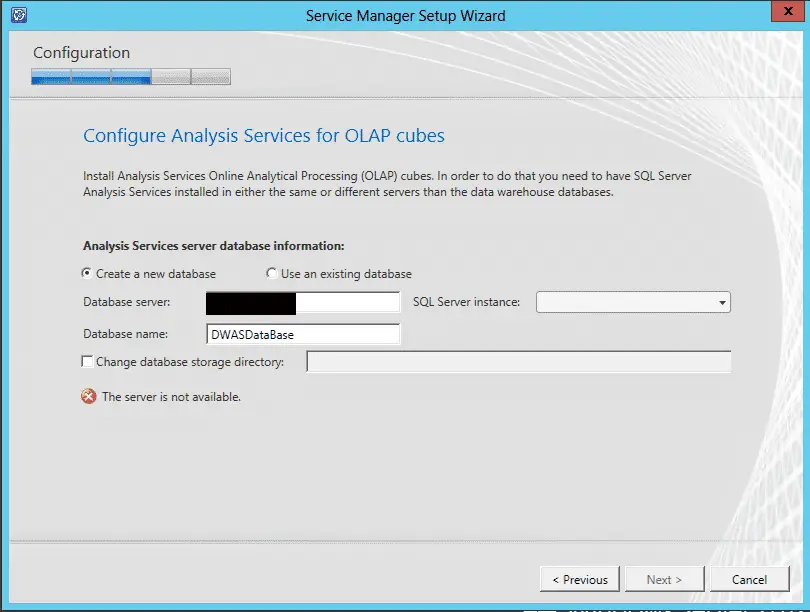
If you are trying to install System Center Service Manager Data Warehouse then you may run into an issue on the Configure Analysis Services for OLAP cubes wizard page where it states that The server is not available: We ran into this issue a while ago and we checked everything that we could find on … Read more
If you’re using Windows 10 Professional, Enterprise, or Education, the easiest way to disable and hide OneDrive is by using the Local Group Policy Editor (or Group Domain Policy if on a corporate domain). In Windows 10, press Start, type gpedit.msc, and press Enter. In the Local Group Policy editor’s left pane, drill down to Computer … Read more
If you have not yet upgraded to Windows 10 Creators Update then you may notice this annoying message in your Windows Update page: So, what if you don’t want your computer (or Microsoft) telling you what to do and you want to remove this message? Well, the solution is a very simple registry edit. Open … Read more