Practical IT Guides for Windows, SCCM & PowerShell Admins
TechyGeeksHome has been helping IT professionals and sysadmins since 2010. Find 1,500+ real-world guides covering Windows 10 & 11, Windows Server, SCCM/ConfigMgr, PowerShell scripting, Active Directory, networking, and virtualisation — all written from hands-on production experience by a UK IT pro with 26 years in the field.
Tumblr is a blogging and social networking site founded by David Karp way back in 2007, and it’s currently owned by Oat Inc. The service provides its users with the option to post multimedia and other content to their own personal blog. Users can follow other users’ blogs, comment and interact with them. Bloggers can … Read more
When using System Center Service Manager (SCSM) you can sometimes end up with Incidents, Change Management items or Service Requests that need to be deleted individually. You an carry this out by using a combination of SMLets and PowerShell. INSTRUCTIONS The first thing you will need to do is to download and install SMLets on your … Read more
After our recent post about providing our visitors with a number of evaluation and KMS Microsoft product keys, please see below the latest set in this series. These are the full range of Microsoft Evaluation keys for all editions of Windows 10. Windows 10 Edition Product Key Windows 10 Professional W269N-WFGWX-YVC9B-4J6C9-T83GX Windows 10 Professional N … Read more
If you are getting Group Policies that are not applying to a users machine, you may well come across this error: The processing of Group Policy failed. Windows could not apply the registry-based policy settings for the Group Policy object LocalGPO. Group Policy settings will not be resolved until this event is resolved. This can … Read more
This guide assumes that you use Microsoft Deployment Toolkit (MDT build 8443) or Microsoft System Center Configuration Manager (SCCM) capturing Windows. You capture a task sequence, and the capture computer does not have Internet access. When the task sequence is running and the computer is checking for updates (pre-application installation), the installation freezes for 2 … Read more
If you are using Configuration Manager, you will be aware that you can create a number of custom reports using the SCCM SQL data and SSRS to produce the reports. The best way to start creating a custom report is to ensure that you get your SQL query correct first. We have written hundreds of … Read more
This is a quick reference guide to the Chassis Type values that are pulled from machine when using SCCM. 1 = ‘Other’ 2 = ‘Unknown’ 3 = ‘Desktop’ 4 = ‘Low Profile Desktop’ 5 = ‘Pizza Box’ 6 = ‘Mini Tower’ 7 = ‘Tower’ 8 = ‘Portable’ 9 = ‘Laptop’ 10 = ‘Notebook’ 11 = … Read more
If you have the need to factory reset your Sky+ HD box, then there is a few simple steps that you need to follow. Guide First press the Services button on your Sky remote which will take you into the Services section: Then press 0, 0, 1 then press the Select button to take you … Read more
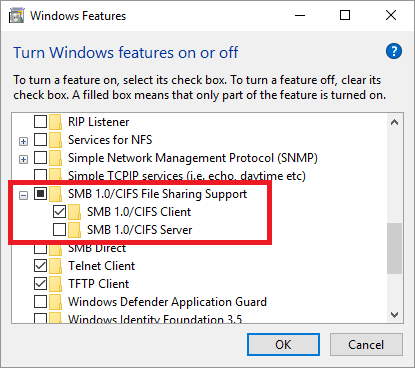
Have you recently upgraded your machine to Windows 10 Fall Creators Edition (1709) and can now no longer access your network drives or home NAS drives? Well, we have just run into this issue where after installing the 1709 update, we could not access our (slightly old) WD MyBook Live network attached storage device. When … Read more
With Microsoft‘s release of the Windows 10 Fall Creators Update (1709), you may want to have the ability to choose when to update your personal or corporate machines and maybe without access to the internet. So how can you do that? Microsoft seem these days to want to update all our machines using Windows Update. … Read more
Microsoft have now brought back the OneDrive Files on Demand feature with the latest release and here is how you get it. First of all, you need to make sure you have the latest version of OneDrive, you can upgrade to Windows 1709 or you can download the installer by clicking the link below: OneDrive … Read more
Microsoft release the next version of Windows 10 today called the Fall Creators Update. This update will become available to the general public as it is rolled out over the next few days and weeks. This means that just running your normal Microsoft Updates will be enough for it to upgrade and load onto your … Read more