
If you want to schedule the date and time of sending out a tweet, then you can do this using a computer, tablet and your mobile phone.
A lot of people have said it’s not an available option on a mobile device, however, it is possible and our quick guide will show you the steps to do it.
Computer Method
To schedule sending out a tweet on a computer, first of all, go to the Twitter website to the main page here:
Then sign in to the website using your login credentials. This will take you to your Twitter feed like this:

At the bottom left, you will see a big blue Tweet button. Go ahead and click that to bring up the compose tweet popup.

Now type in the tweet that you want to send out. Remember to add any images, gifs or polls as you want. Then, you will see the little icon with the timer on it here:
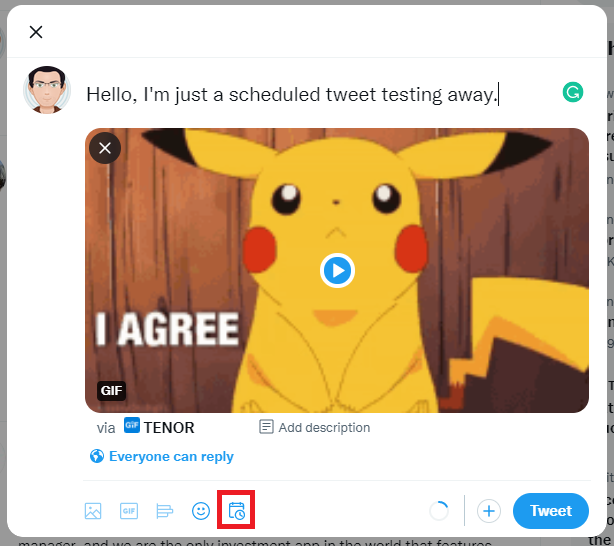
Click this and it will bring up the criteria that you can set for when you want the Tweet to be sent out automatically:
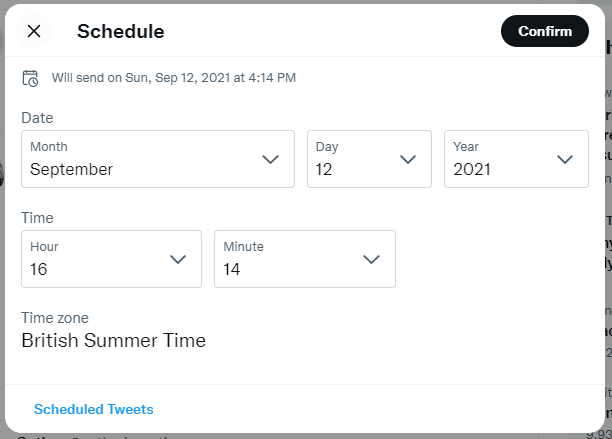
Once you are happy with the settings you have selected, click on the Confirm button at the top right.
This will now take you back to the composing tweet popup, but, you will now notice that the button has changed to Schedule:

Now go ahead and click Schedule and the tweet will be sent to your set scheduled criteria.
Conclusion
This is a very simple way of scheduling any tweets that you want to send out from your own Twitter account. It is probably not the best way to schedule tweets if you are a business or social media star, but it does the job and proves that you can do it using mobile devices!
If you have any trouble or any questions, please leave us a message in the comments below and we will try to help you out where we can.
About The Author

Discover more from TechyGeeksHome
Subscribe to get the latest posts sent to your email.